
Retina images for your template: when to deactivate them
Retina images for your template usually make email graphics look sharper on high-density screens. Mail Designer 365 creates larger image assets so supported devices can display logos, photos, and other graphics with more detail. In some situations, however, you may prefer to disable this option—for example, when you need to reduce exported file size, meet a strict image-hosting limit, or troubleshoot an email platform that processes high-resolution assets unexpectedly.
This guide explains how to deactivate Retina image generation for mobile and desktop versions of a Mail Designer 365 design. The setting affects the assets created from image areas; it does not remove the original images from your document.
Before changing the Retina settings
Save a copy of the design before changing export-related options, especially if the design is already part of a campaign workflow. Check whether your email service provider has an upload or message-size limit and compare that requirement with the benefit of sharper graphics. Disabling Retina assets can reduce the amount of image data, but recipients using high-density displays may see less detail.
If only one image causes problems, first consider optimizing that image rather than changing the setting for the whole design. The guide to optimizing an image area can help you reduce unnecessary image data while retaining the overall Retina workflow.
Disable Retina images for the mobile version
- Open the design you want to update in Mail Designer 365.
- Choose File > Design Options… from the macOS menu bar.
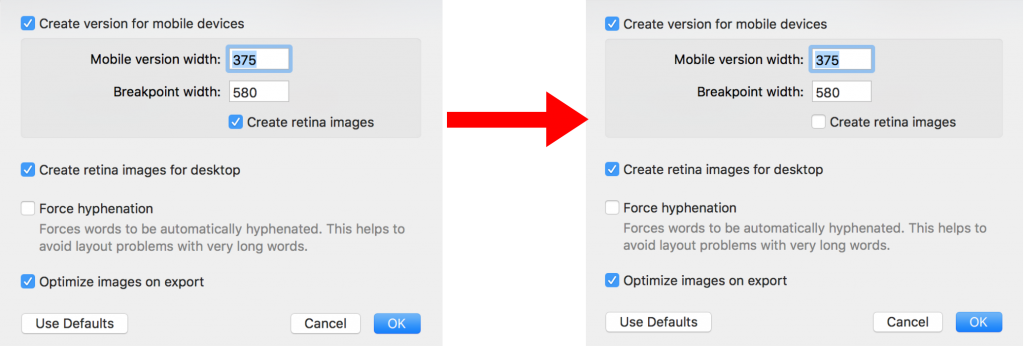
- Locate the Retina image settings in the Design Options window.
- Clear the option labeled Create retina images for the mobile version.
- Close the window and save the design.
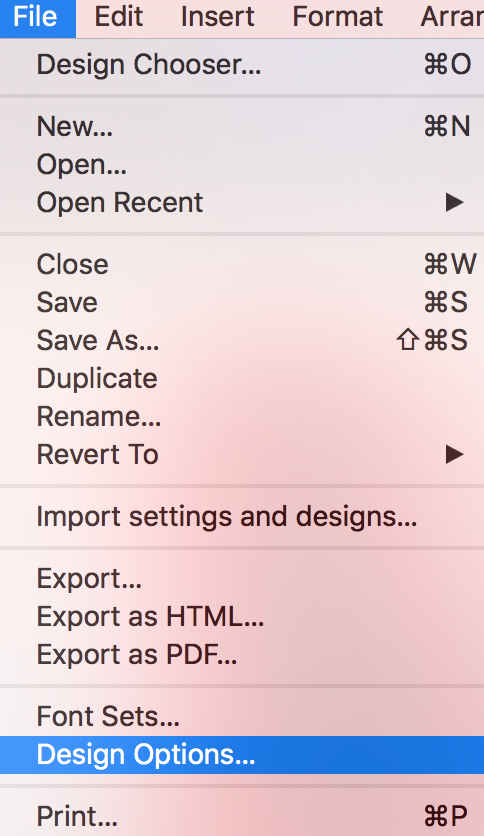
The exact wording can vary slightly between Mail Designer 365 versions, but the workflow begins in Design Options. If you do not see the setting immediately, review the image and export options in that window.
Disable Retina images for the desktop version
Mail Designer 365 lets you control the desktop asset setting separately. In the same Design Options window, clear Create retina images for desktop. This is useful when both layout versions must use standard-resolution assets, but it also means desktop recipients with high-density screens will not receive the additional Retina detail.
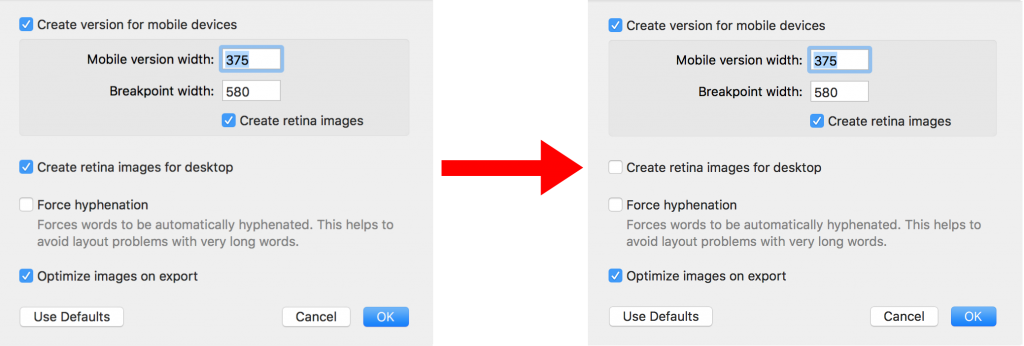
You can leave one version enabled and the other disabled. For example, you might retain Retina graphics for the desktop design while reducing mobile asset size, or do the reverse when the mobile design contains fewer images.
Check the result before sending
After changing the settings, preview both the mobile and desktop versions. Pay particular attention to small text inside graphics, detailed logos, thin lines, and screenshots, because those elements reveal resolution changes most clearly. Send a test email to at least one high-density device and one standard display if image sharpness is important to your campaign.
When exporting or uploading the design, compare the resulting file or message size with your previous version. If the reduction is small and the visual difference is noticeable, re-enable Retina assets. If the design is now accepted by your sending platform and still looks good, keep the adjusted setting for that document.
Re-enable Retina images later
The change is reversible. Return to File > Design Options… and select the relevant Retina options again. Save the design, regenerate the export or upload, and repeat your test send. Using a deliberate preview-and-test process helps you balance image quality, compatibility, and email size instead of applying one setting to every campaign.
How Can We Help?