
How to Print an Email Design
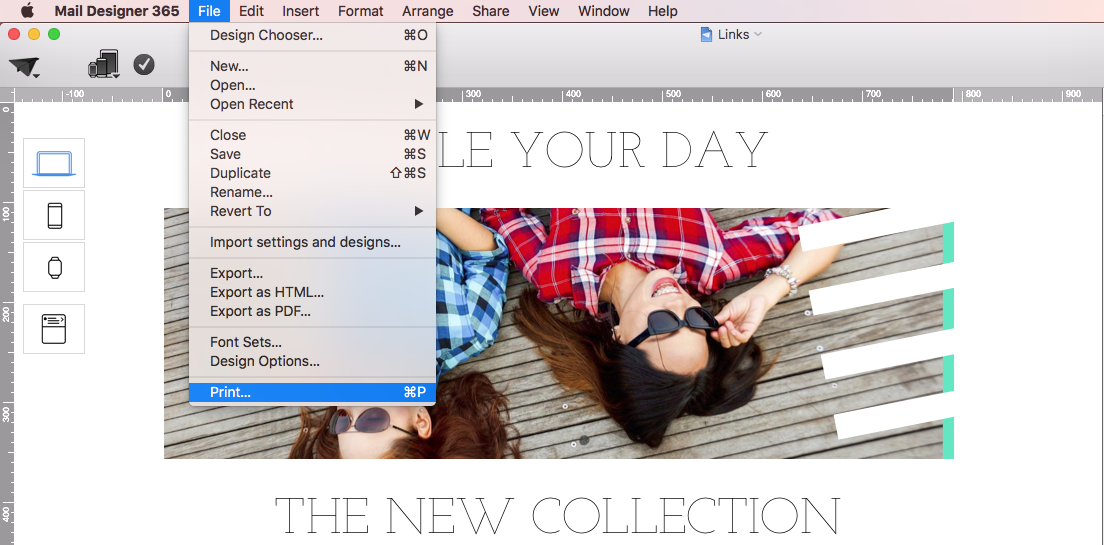
To print an email design from Mail Designer 365, open the finished document and choose File > Print… from the macOS menu bar. You can also press Command-P. The standard print dialog lets you choose a printer, paper size, orientation, scale, page range, and PDF output before anything is printed.
Printing is useful when a design needs an in-person review, a paper proof, an approval copy, or a handout. Keep in mind that paper and email are different formats: interactive links, animation, responsive behavior, and inbox-specific rendering cannot be reproduced on a printed page.
Prepare the Email Before Printing
Before you print an email, review the desktop version in Mail Designer 365 and confirm that the correct content is visible. Check headings, prices, dates, contact details, image quality, and the final spelling. If the document includes personalized placeholders, a printed proof may show the placeholder rather than data from a real recipient.
Use Preview to check the complete design first. Printing can be helpful for copy review, but it should not replace a test email. A delivered test is still required to verify links, tracking, responsive behavior, dark mode, and the way an inbox displays the message.
Choose Print Settings on macOS
Choose File > Print… or press Command-P to open the macOS print dialog.
Select the intended printer and paper size. Portrait orientation usually works well for narrow newsletter layouts, while landscape may suit wider proofs. Check the preview for clipped text or images. If the email design is longer than one sheet, review every page and adjust the scale only when necessary; excessive scaling can make text difficult to read.
Save the Email Design as a PDF
If you need a review copy rather than a paper printout, use the PDF menu in the macOS print dialog and choose Save as PDF. A PDF is convenient for internal approval, archiving, or sharing a fixed visual proof. Store it in an appropriate project folder and avoid including confidential recipient information.
A PDF is not a substitute for the HTML email. Do not upload the PDF as the campaign itself: recipients would lose responsive layout, accessible text, working buttons, and normal email analytics. Continue to send the original Mail Designer 365 design through the intended delivery workflow.
Check the Printed Result
After printing, check that the content is readable, images are sharp enough for the selected paper size, and no section is cut off at a page boundary. Printed colors can differ from colors on screen because displays use light while printers use ink or toner. For brand-critical proofs, compare the result with your approved print references instead of relying only on the screen preview.
Use the printed or PDF proof to review static content, then send a final test email to confirm the live campaign. This combination gives reviewers a convenient document while preserving the checks that matter for an actual inbox.
How Can We Help?