Category

Mail Designer 365 Newsletter Academy

Best 2026 Email Ideas - Key Dates and Events for Marketers

By Team equinux Mail Designer 365 Newsletter Academy

Looking for 2026 email ideas? Planning campaigns around key dates helps your business stay relevant, engage your audience, and increase conversions throughout the year. To make your 2026 email strategy easier, we’ve compiled 12 must-know marketing dates, including holidays, global celebrations, and unique pop culture events that can inspire creative campaigns.

2026 Email Ideas You Need in Your Email Marketing Calendar

January 11 – International Thank You Day

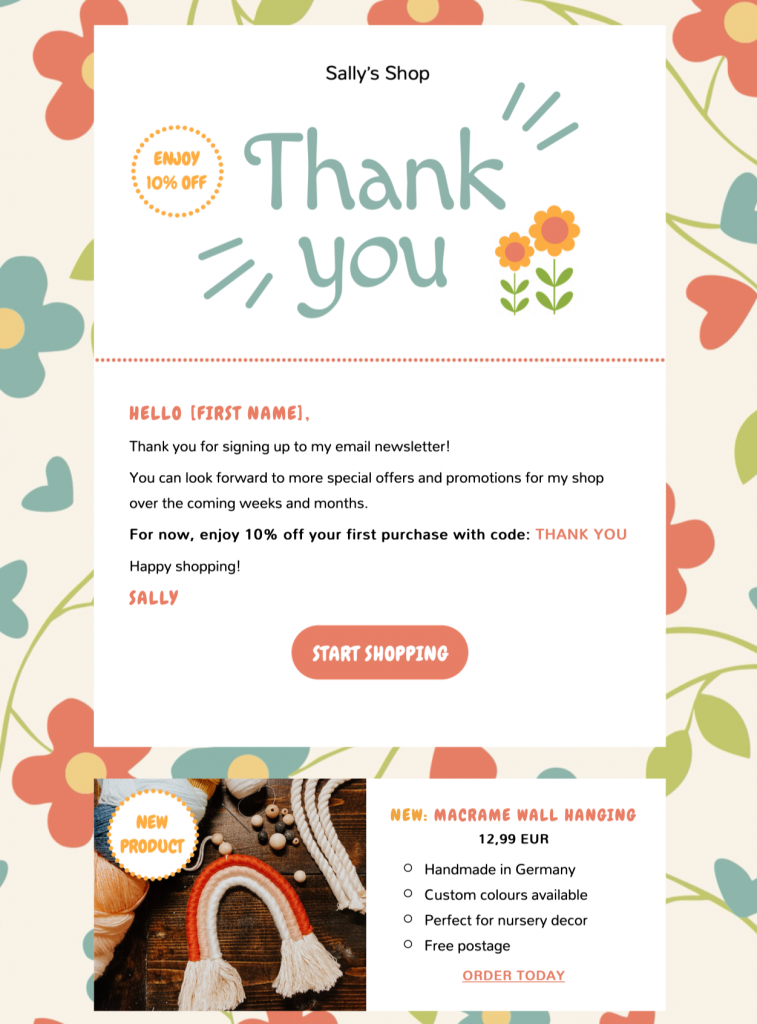
Start the year by showing your appreciation to customers. Whether it’s a thank-you email, a loyalty reward, or a special offer, this day is perfect for building goodwill and strengthening relationships early in the year.

thank you email template

Mail Designer 365 Thank You Offer Email Template

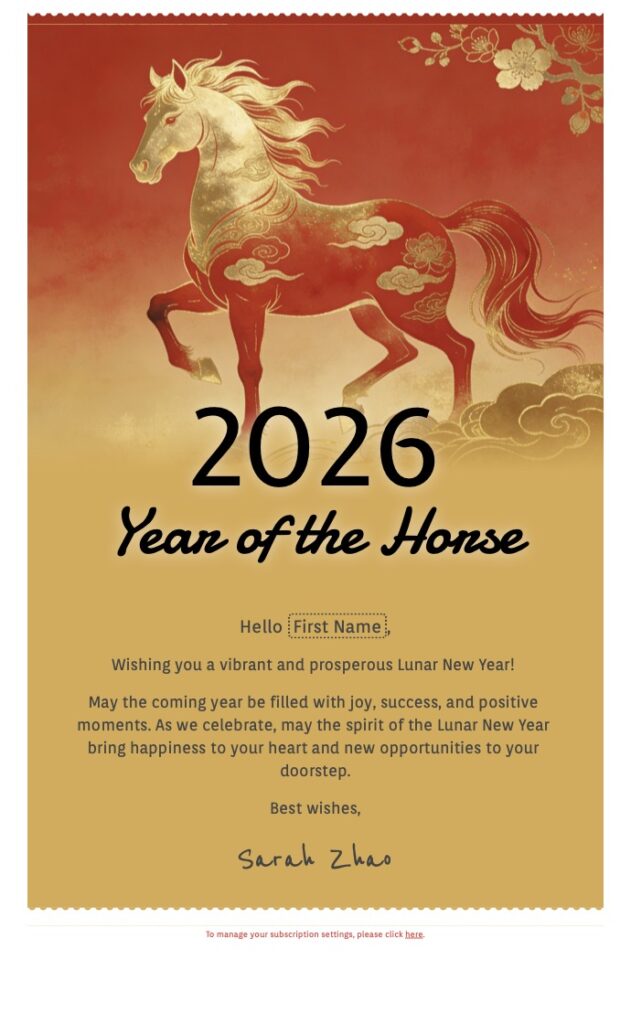
February 17 – Lunar New Year (Year of the Fire Horse)

The Lunar New Year is celebrated across Asia and globally, making it a fantastic opportunity to send culturally relevant greetings or promotions. Bright visuals and festive messaging can help your campaigns stand out and resonate with diverse audiences.

Lunar New Year 2026 email template

Mail Designer 365 email template for Lunar New Year

March 28 – Earth Hour

Earth Hour is a global movement for sustainability, encouraging everyone to switch off lights for an hour. Align your brand with eco-friendly initiatives, share tips for reducing energy use, or highlight your company’s sustainability efforts in your emails.

April 23 – Record Store Day

Although not an obvious choice for 2026 email ideas, music fans all around the world celebrate Record Store Day. This makes it a great opportunity for campaigns centered on culture, creativity, or limited-edition product releases. Promote exclusive offers, playlists, or behind-the-scenes content to engage your audience.

vinyl record player. world record day as a 2026 email idea

World Record Store Day is a fun and quirky campaign idea for music lovers

May 4 – Star Wars Day (“May the Fourth”)

Leverage this fun pop culture moment for playful and engaging campaigns. Email content could include themed promotions, interactive quizzes, or social media tie-ins. It’s a simple way to connect with fans and inject some humor into your marketing.

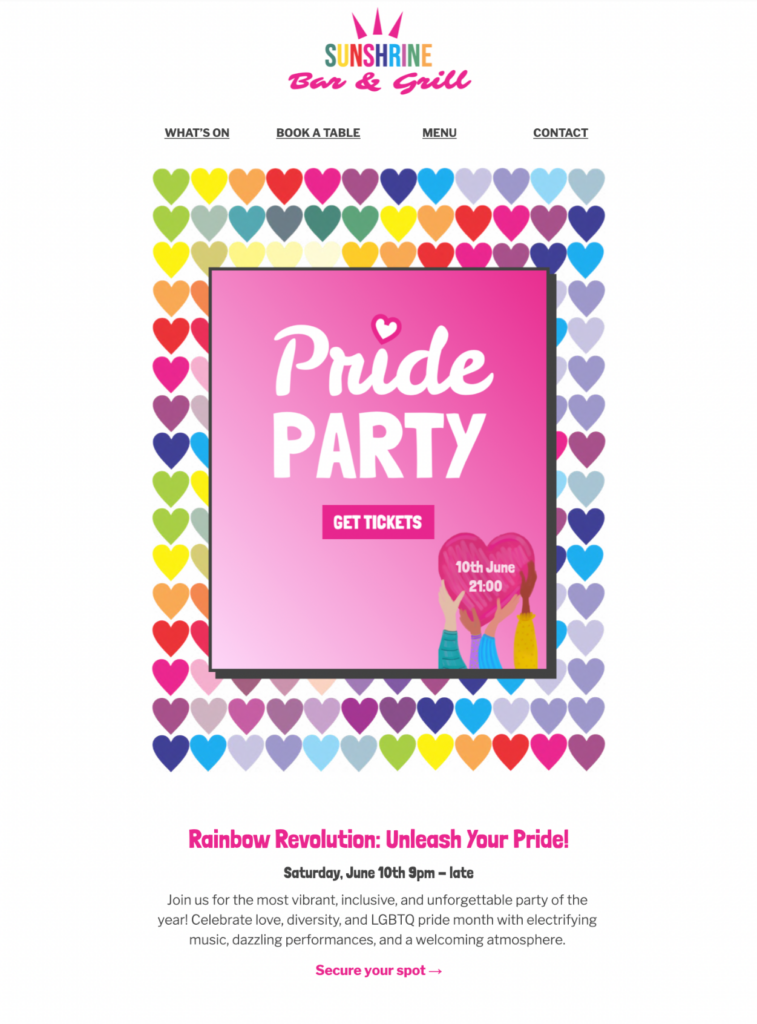
June 1 – LGBT Pride Month Begins

Pride Month celebrates diversity, inclusion, and equality. Showcase your support with campaigns highlighting LGBTQ+ initiatives, employee stories, or curated product collections. Authenticity is key, so make sure your messaging is inclusive and meaningful.

LGBTQ Pride Party email template

LGBT Pride Event Template in Mail Designer

July 17 – World Emoji Day  😉🫶🐴🥑🏄🏻‍♂️🆒

Emojis are a universal language in digital communication. Use World Emoji Day to create fun, lighthearted campaigns with creative visuals, playful copy, and interactive content to boost engagement and click-throughs.

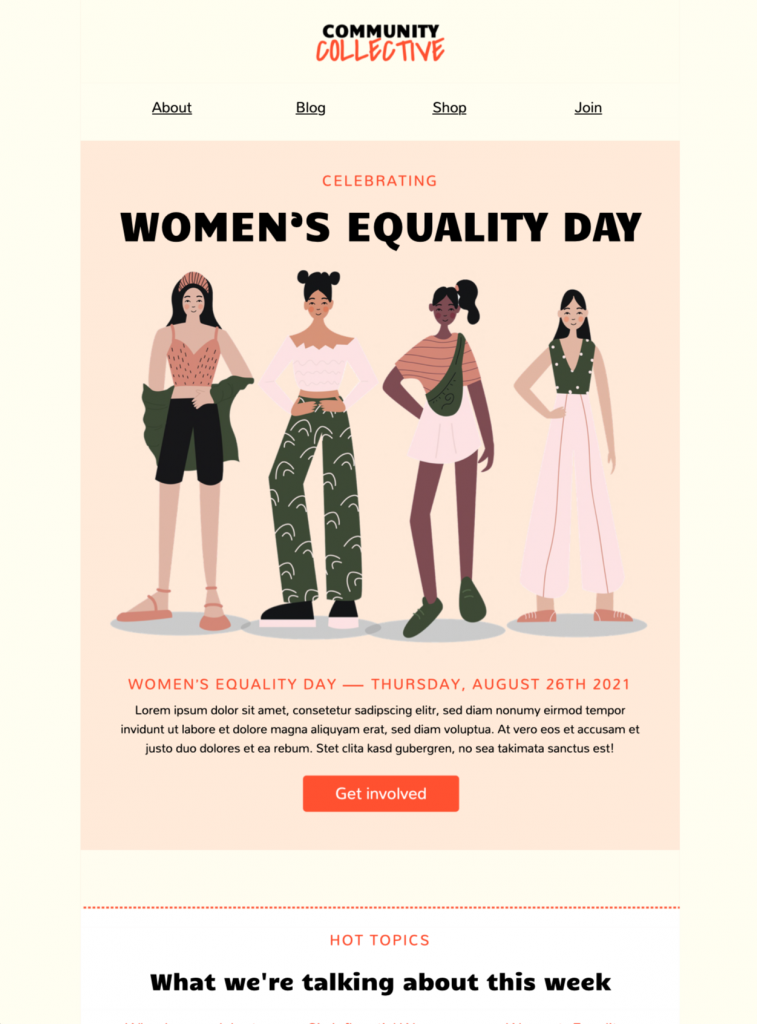
August 26 – Women’s Equality Day

Recognize the achievements and rights of women on Women’s Equality Day. This is a perfect addition to your 2026 email ideas list. Highlight women leaders in your company, promote initiatives for gender equality, or run campaigns that empower your audience.

2026 email ideas: email template for women's equality day

Mail Designer 365 Email Template for Women's Equality Day

September 19 – Oktoberfest Begins

Prost! 🍻 The world’s largest beer festival kicks off in Munich, Germany. Embrace Oktoberfest themes for promotions, events, or themed product launches. Highlight community, fun, and celebration to engage audiences during this festive period.

October 10 – World Mental Health Day

Promote wellbeing and support your community by raising awareness around mental health. Share tips, resources, or charitable campaigns in your emails. Showing genuine care can build trust and resonate with your audience.

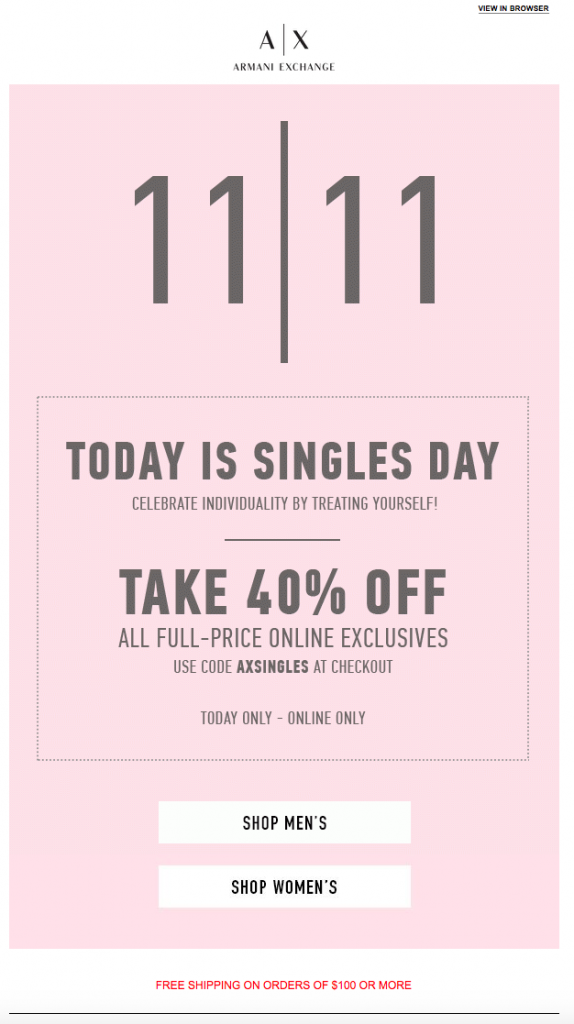
November 11 – Singles’ Day

Originating in China, Singles’ Day has grown into one of the biggest shopping days in the world. As 2026 email ideas go, this one is a must-have for any marketer. Offer exclusive deals, flash sales, or gift guides to capitalize on this massive e-commerce opportunity.

Singles Day sales email idea for 2026

Singles Day is just one day. Make this clear in your campaign to help generate a sense of urgency.

December 6 – St Nicholas Day

Mark the start of the festive season in Europe with early holiday campaigns. Previews, special offers, or themed storytelling can help you warm up your audience ahead of Christmas promotions.

Celebrate St. Nicholas Day in the run up to Christmas.

Planning Ahead for 2026

These are just 12 email ideas for 2026 and provide a framework for creative, timely email campaigns that keep your audience engaged all year. Plan your visuals, copy, and offers around these events to make 2026 your most successful marketing year yet.

Hungry for more design inspiration? Check out all our Design Ideas for seasonal, sales, events and more!

Try Mail Designer 365 for free

Design emails without code – 7 days free on your Mac.
Compatible with macOS 10.13 or later
Side-by-side comparison of the same HTML email sent with Thunderbird (left) and Mail Designer 365 (right), showing layout and rendering differences.

HTML Email Thunderbird: 3 Limitations & Better Options

By Team equinux Mail Designer 365 Newsletter Academy, Newsletter Academy

Thunderbird is a popular free email client used by individuals and small businesses around the world. One of the most common questions users ask is whether it’s possible to create and send an HTML email Thunderbird. The short answer is yes — Thunderbird does allow you to use HTML templates. However, once you start designing and sending more professional messages, you’ll quickly run into limitations that make the process frustrating and time-consuming.

Can You Create HTML Email in Thunderbird?

Yes — Thunderbird does support HTML emails. You can import a custom template or even write your own code directly inside the editor. For users who just want to test a simple HTML email Thunderbird workflow, this can work fine. At first glance, it looks like Thunderbird could handle newsletters or business updates by using HTML templates. If you want to try it out yourself, follow our step-by-step guide on how to export HTML emails from Mail Designer 365.

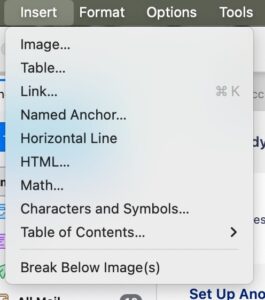
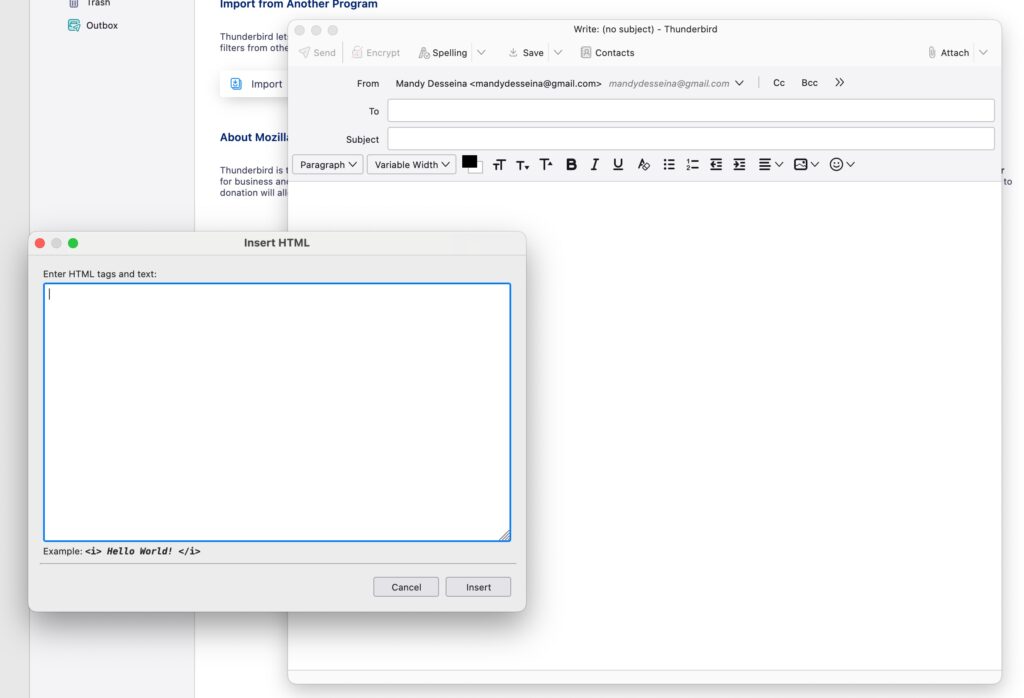
hunderbird Insert menu showing the HTML option for composing emails

In Thunderbird, you can choose the HTML option from the Insert menu to add custom code to your email.

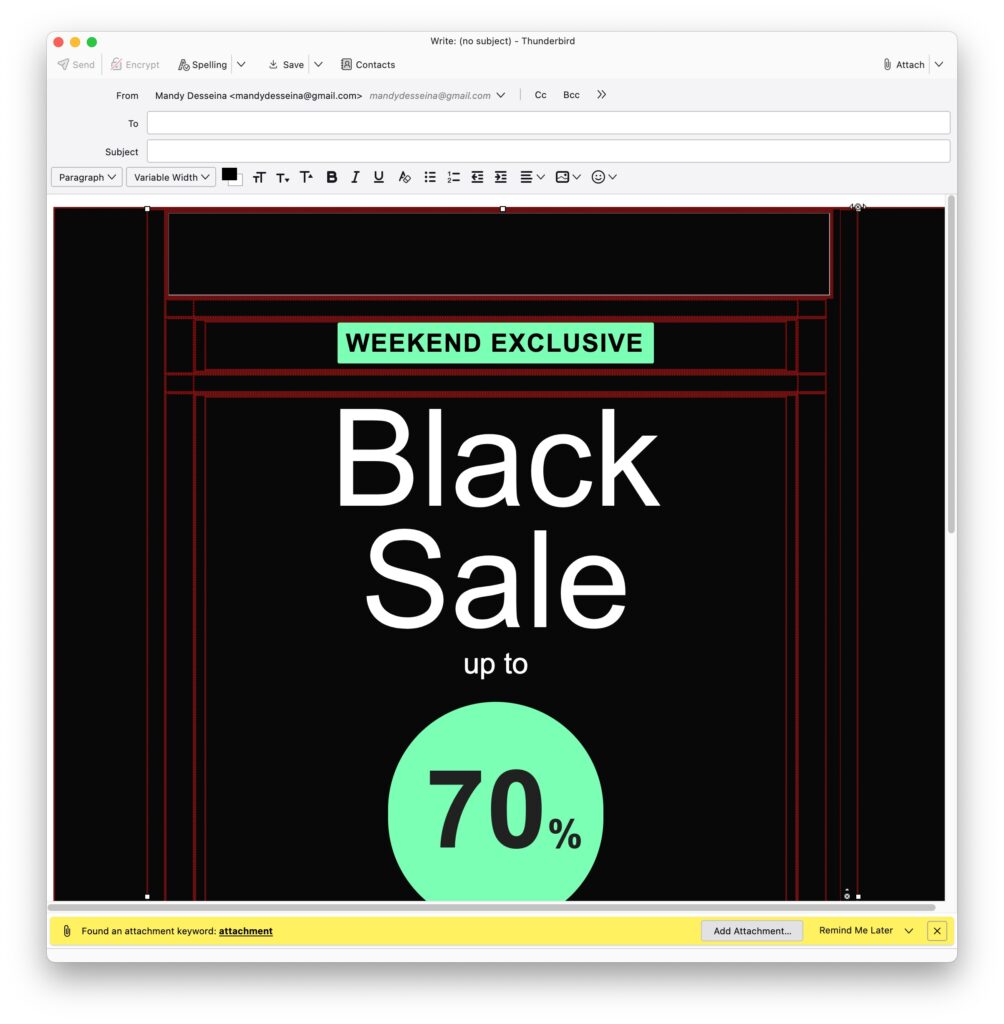
HTML Email Thunderbird Insert HTML window for adding custom HTML email code

Thunderbird allows you to paste custom HTML code into your message — but editing and formatting remain limited.

The Limitations of HTML Email Thunderbird

While you can technically create and send HTML email Thunderbird, the process comes with serious drawbacks:
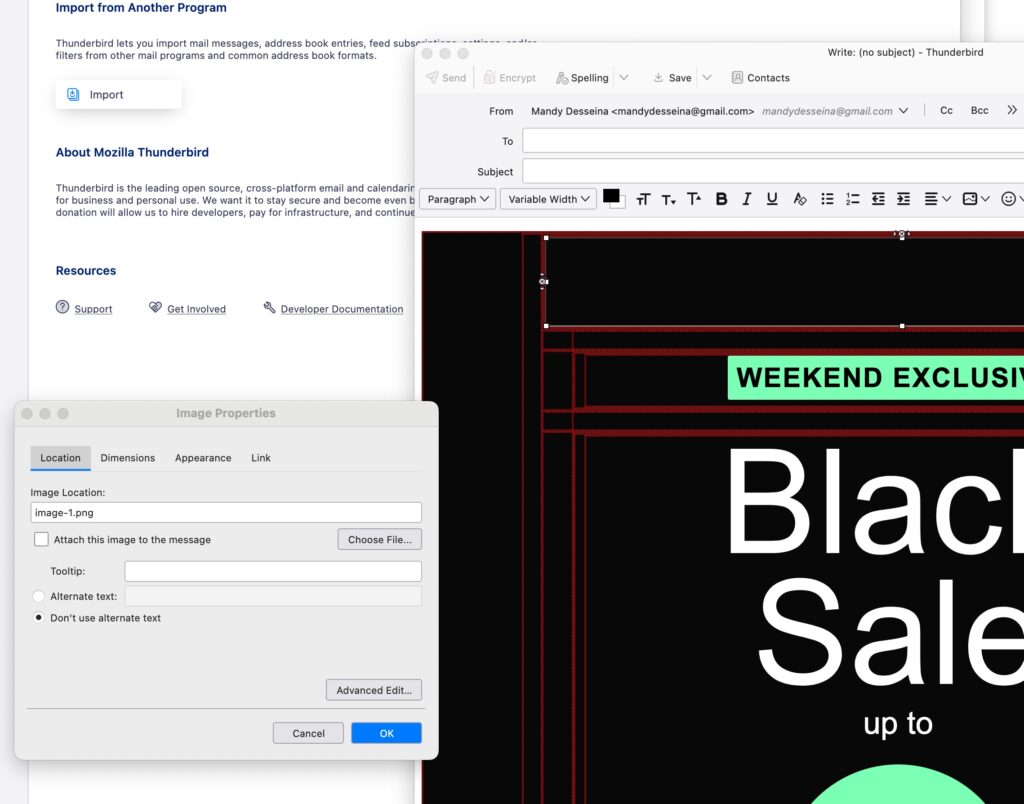
  • Editing issues: Imported designs display distracting red lines, which makes it difficult to edit the template.
  • Image problems: All images need to be reconnected manually, adding unnecessary extra work.
  • Layout limitations: Backgrounds don’t extend to the full width of the email. Instead, white gaps appear at the top, left, and bottom, making your message look unfinished.
  • Attachments or hosting: Every HTML email Thunderbird sends must either include attached images (making emails heavier) or rely on external hosting.
These issues mean that while Thunderbird is capable of sending HTML emails, it’s not well-suited for creating professional designs that need to look polished across different devices and email clients.

Why These Issues Matter for Your Business Emails

When sending out business communications, appearance and reliability matter. Using HTML email in Thunderbird may work for simple messages, but the limitations can cause real problems:

  • Unprofessional look: Broken layouts, misaligned backgrounds, and missing images make your brand appear less trustworthy.
  • Wasted time: Fixing every HTML email Thunderbird sends is inefficient.
  • Inconsistent results: Emails that don’t render properly across devices risk confusing or frustrating your audience.
  • Heavier emails: Thunderbird requires you to either attach all images to the message (making the email larger and more likely to hit spam filters) or host them externally, adding another layer of complexity.
  • No performance insights: Without tracking, you can’t see who opened your email or what links they clicked.
For personal use, these issues might be minor annoyances. But for businesses, they can directly affect engagement, credibility, and results.
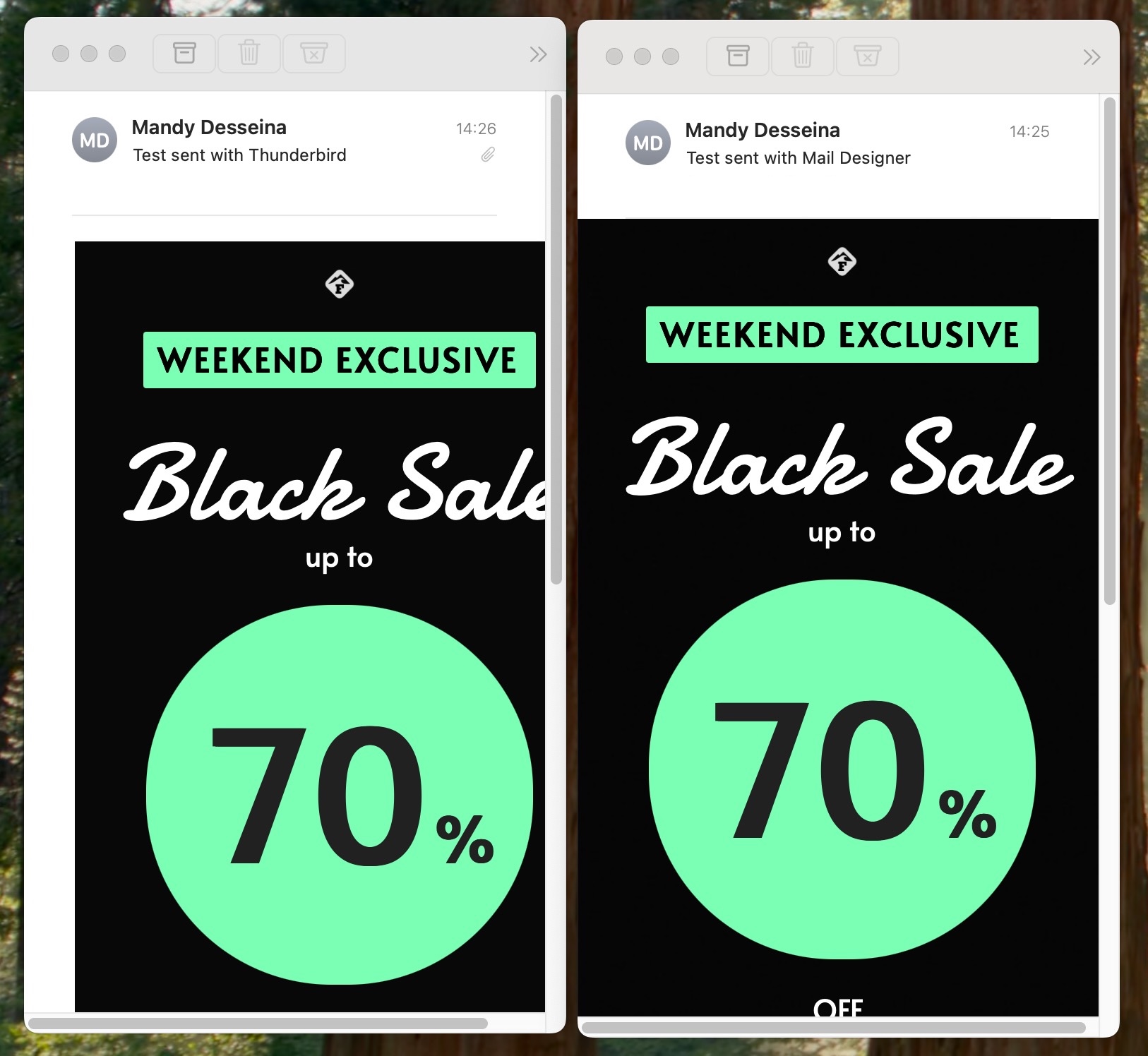
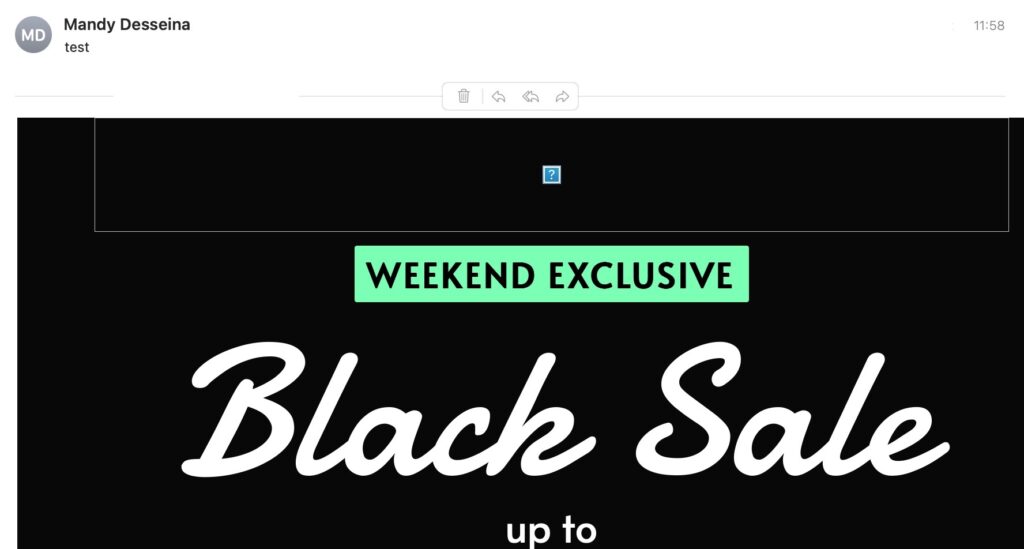
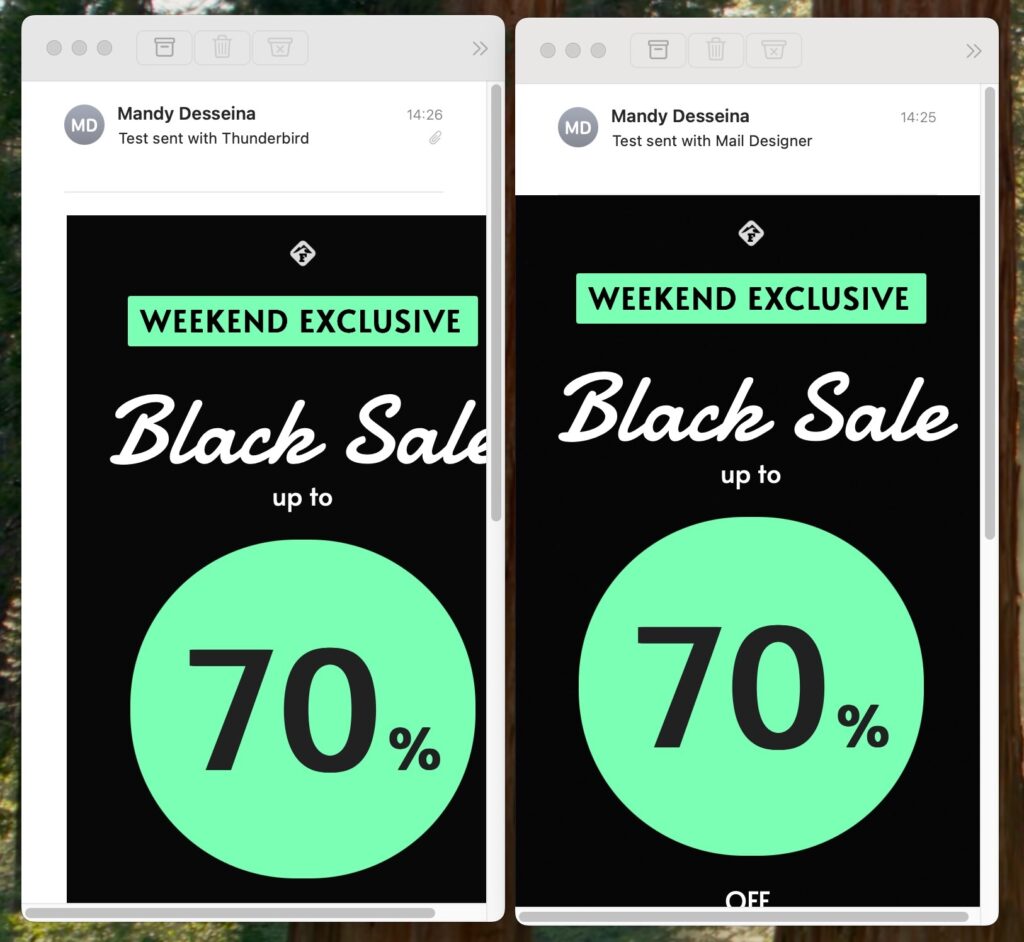
Side-by-side comparison of the same HTML email sent with Thunderbird (left) and Mail Designer 365 (right), showing layout and rendering differences.

The same HTML email sent with Thunderbird (left) shows formatting issues and requires image attachments, while Mail Designer 365 (right) delivers a clean, professional result.

A Better Alternative to Thunderbird HTML Email

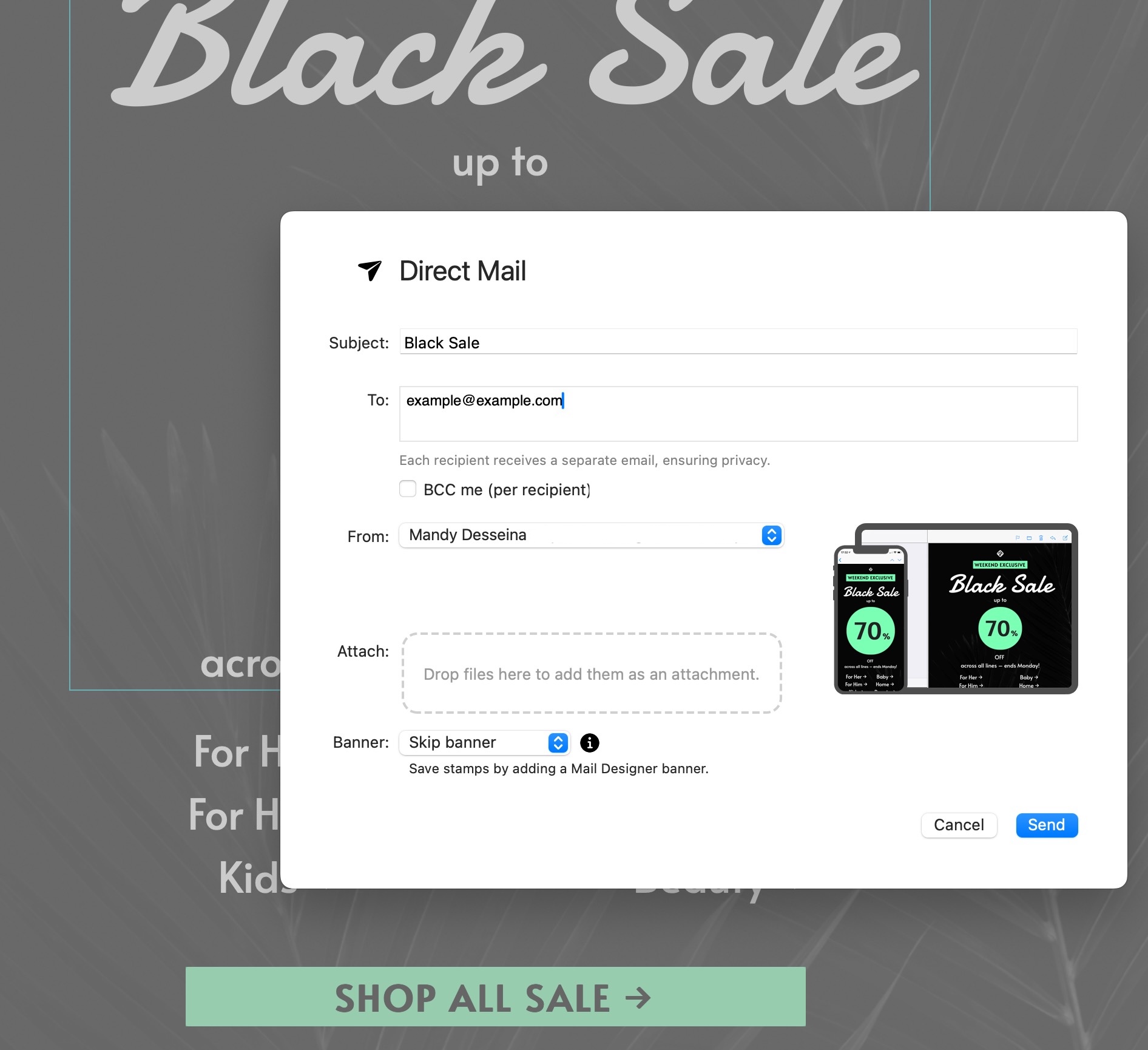
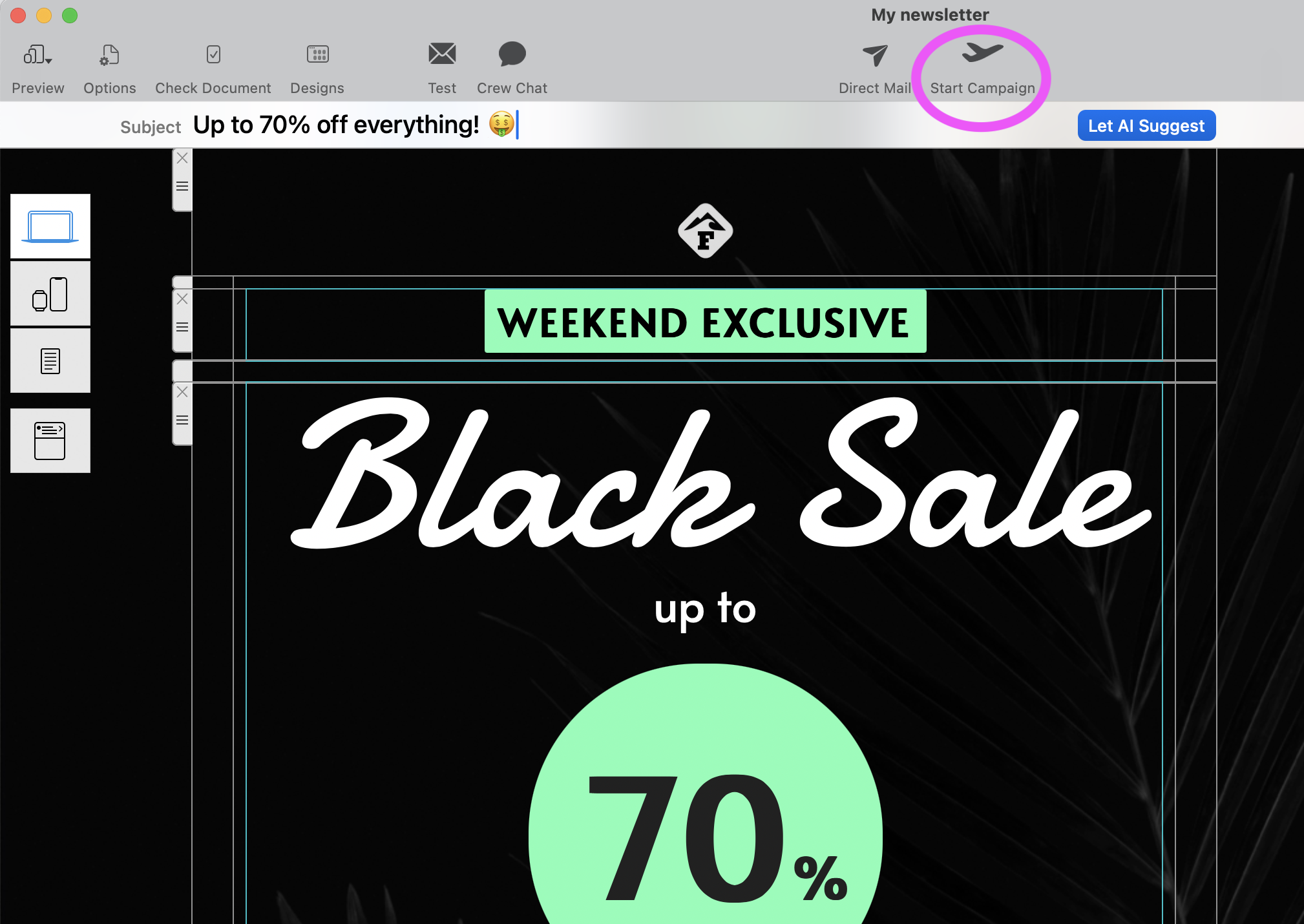
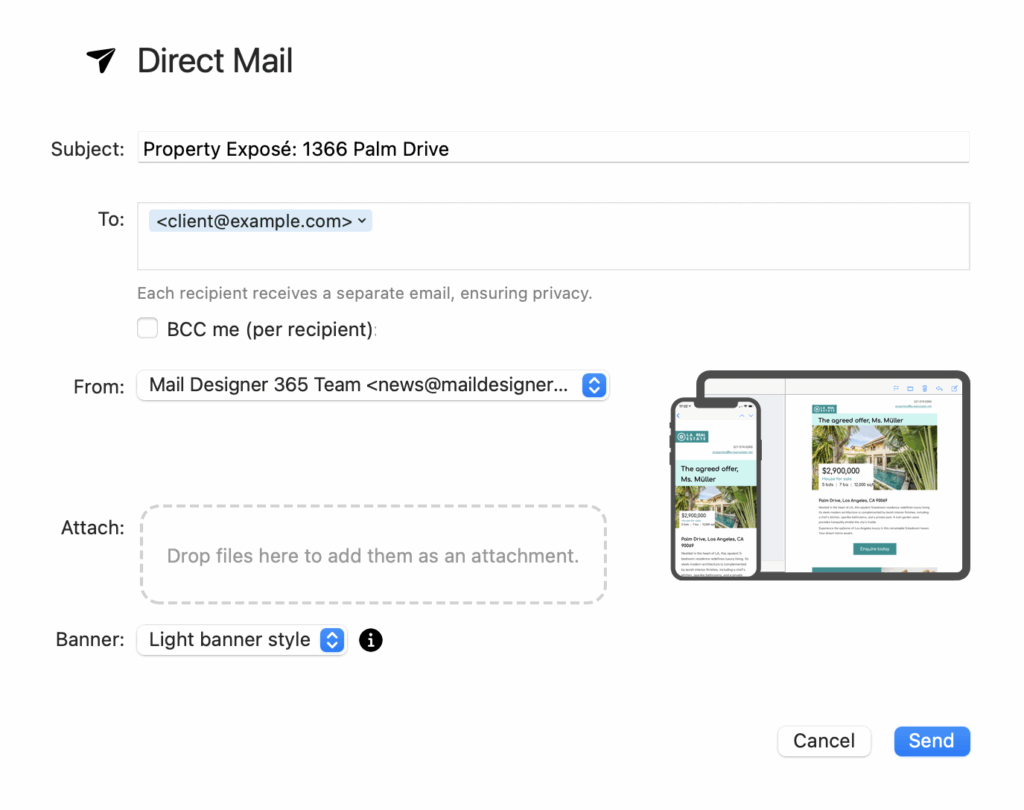
If you want professional results without the frustration, Mail Designer 365 offers a smarter solution. Instead of struggling with the limitations of HTML email Thunderbird, you can use Mail Designer’s built-in Direct Mail function to design and send polished emails directly from your Mac.
With Mail Designer Direct Mail, you can:
  • Design with ease: Drag-and-drop tools make it simple to create professional layouts without code.
  • Send without issues: Emails go out exactly as designed, without red lines, broken images, or layout gaps.
  • Use your contacts: Send messages directly to people in your Mac address book.
  • Keep a record: BCC yourself automatically to track what was sent.
  • Measure performance: Built-in tracking shows who opened your email and what they clicked.
This means less time fixing errors and more time focusing on creating impactful, engaging content for your audience. Learn more about how to get started with Mail Designer Direct Mail and send professional emails without the limitations of Thunderbird.
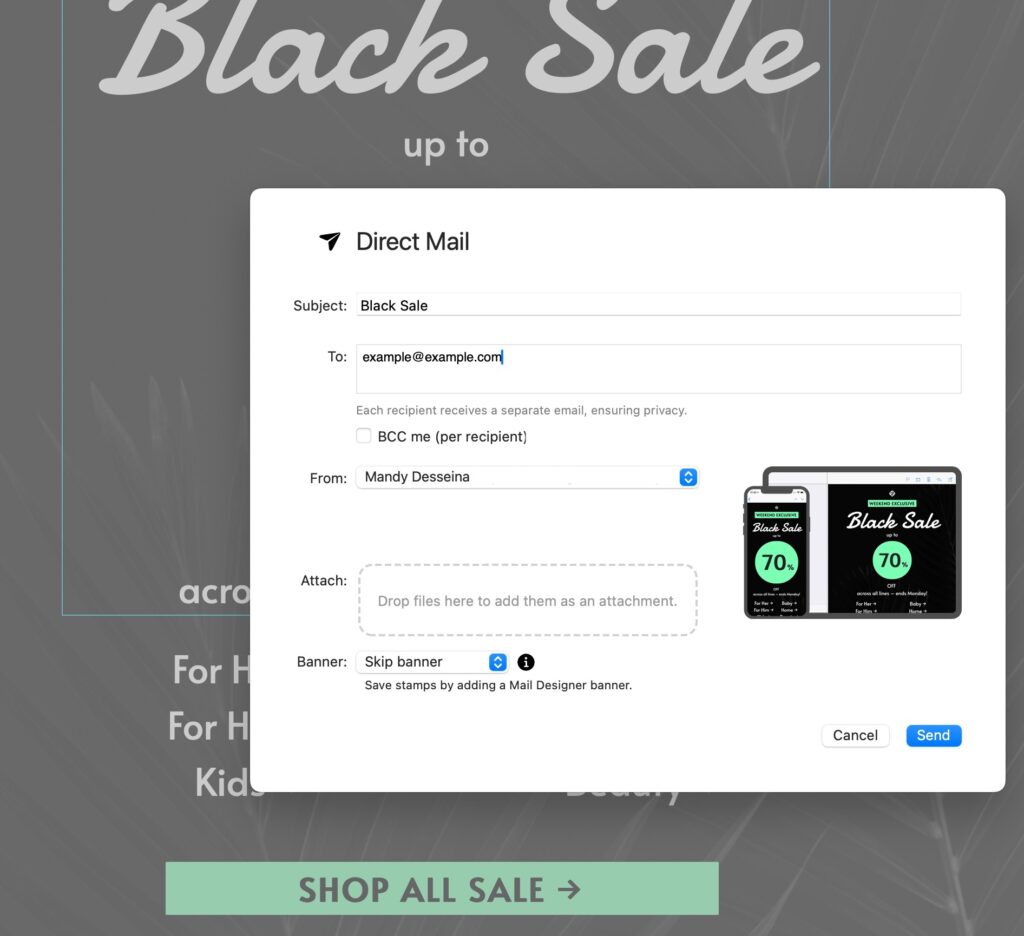
Mail Designer 365 Direct Mail interface for sending professional HTML emails directly from your Mac.

With Mail Designer 365 Direct Mail, you can send professional HTML emails directly from your Mac — without broken layouts, missing images, or large attachments.

Conclusion

Creating and sending HTML email Thunderbird is technically possible, but the experience is far from smooth. From broken layouts to constant image reconnecting, Thunderbird’s limitations make it difficult to achieve a professional result.

If your goal is to send emails that look polished, work reliably across devices, and provide insights into performance, Thunderbird will quickly feel restrictive.

That’s where Mail Designer 365 comes in. With powerful design tools and the integrated Direct Mail function, you can create beautiful HTML emails and send them directly — without the headaches.

Try Mail Designer 365 today and experience a better way to design and send professional emails.


Try Mail Designer 365 free for 7 days

Email marketing guide for e-commerce

Email Marketing for E-Commerce - Best Practice Guide

By Team equinux Mail Designer 365 Newsletter Academy

Email marketing for e-commerce is a cost effective way to reach new customers and grow your business. With the number of e-commerce stores rising and online shopping being more popular than ever, it's important for small businesses to do all they can to promote their store.

With email marketing, businesses of all sizes can directly connect with customers and drive more traffic to your store. In this guide, you'll find tips and ideas on how to get started with email marketing for your small business or optimize your existing email strategy.

Why is Email Marketing Essential for E-Commerce?

Although marketing strategies like paid ads, SEO and social media campaigns are all effective in their own way, they can't guarantee you a direct channel to customers. Email presents you with the unique chance to speak to your audience on a one-to-one level and create personalized content for them.

Especially in retail, customer loyalty is a strong success factor. Most businesses rely on customers returning to provide a steady stream of sales. Email is a great tool for maintaining relationships with repeat customers and keeping them engaged with your business over time.

Getting started

As long as you have an idea of your goals and knowledge of best practice, email marketing for e-commerce is really straightforward. All you need to get started is an email list, a set of email templates, and a sending service like Mail Designer!

Email Lead Generation for E-Commerce Sites

The first step in getting started with email marketing is collecting email subscribers for your list. This is also known as email lead generation.

One common way for e-commerce websites to gain email subscribers is through collecting email addresses at the point of sale. Inserting a field on your online checkout for shoppers to enter their email address allows you to stay in touch with them following the sale.

Important: Remember that data privacy regulations in most countries also require the customer's consent for receiving marketing emails. Make sure you research the opt in requirements in your country before setting this up.

More ways to grow your email list

While the above method provides you with contact information for existing customers, it doesn't take into account those who haven't purchased from your store. Here are a few organic ways to collect more email addresses for your list:

Build opt in forms

This is a popular method for many businesses. Build an opt in form for your website to allow customers to subscribe to your list for regular news and updates. These kind of sign ups are the most valuable, as they are customers with an active interest in your business.

Some good places to include an opt in form are: the footer area of your website, on your "contact" or "about" page, or as a header bar at the top of your site.
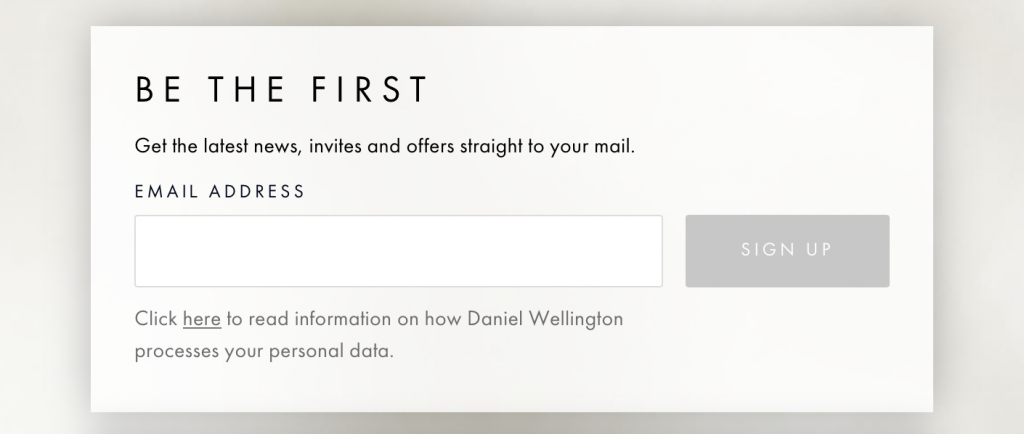
Daniel Wellington email opt in form

Daniel Wellington display this email opt in form at the bottom of their website.

Tip: Mail Designer Delivery offers an integrated form builder so you can easily insert sign up forms into your website. Learn more.

Set up popup promotions

Offering customers an incentive in exchange for providing their email address can also be effective. One way of doing this is through a discount or promotion. For example, many websites offer new customers money off their first purchase if they enter their email address.

Although this could be part of a regular sign up form, it can be even more effective as an eye-catching pop up window.
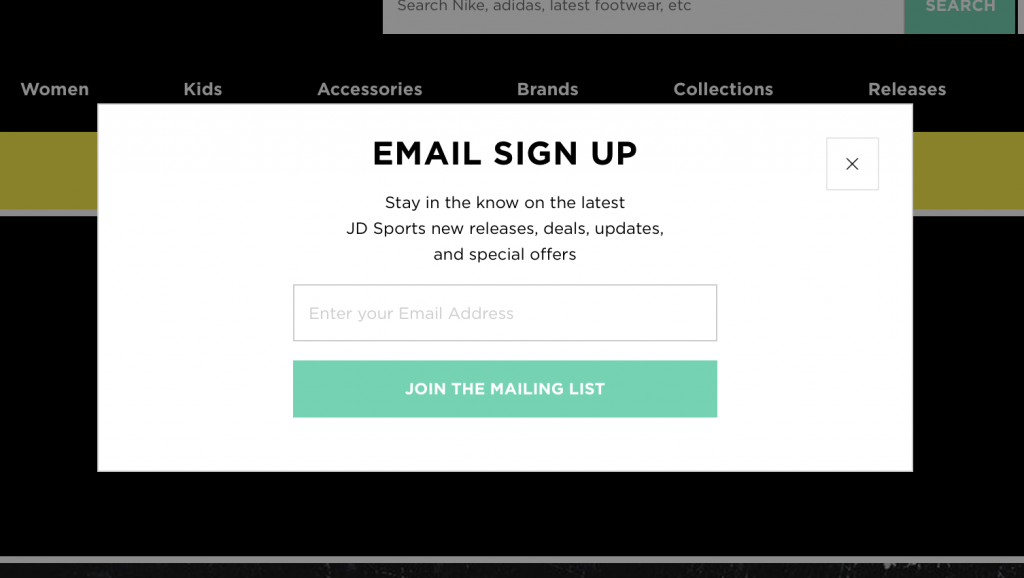
Pop up opt in window by JD sports

JD Sports use a popup window to encourage website browsers to sign up to their email list.

Tip: Set your popup to appear to new customers after a few minutes of browsing. This way, you'll know they have an interest in your store.

Run a giveaway

A giveaway or competition is another fun way to increase email signups and get more people engaging with your store. Set up a dedicated landing page where participants can enter their email address for a chance to win.

Tip: Use your social media platforms to promote your giveaway and encourage more people to take part.

Offer "back in stock" notifications

If you have products which are out of stock, use this as an opportunity to encourage more newsletter sign ups. Create a dedicated sign up form for sold out items which customers can use to get notified when the product is available again.

Tip: Use this sign up data to see which products customers are interested in and offer an alternative.

Types of Emails to Send for E-Commerce

When it comes to the types of emails you can send for your e-commerce site, you have a wide range of options. Split your emails into two main categories: automated, transactional emails for everyday use and one-time promotional campaigns. Find out more about each of these below.

Automated email strategy for e-commerce

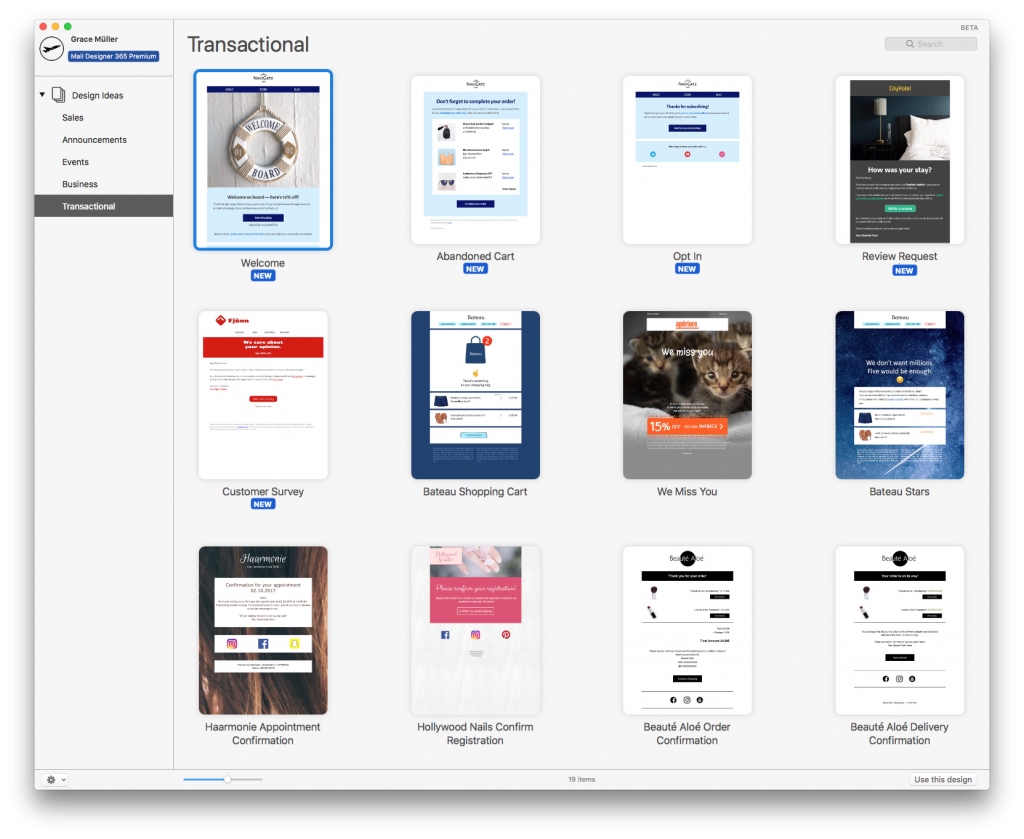
Transactional emails cover the emails a business need to send on a day-to-day basis. They are sent out when a customer performs a certain action or trigger (e.g. making a purchase.) For an online store, this will most often be order confirmation emails and delivery updates.

Every business is unique. Think about your store's general workflow and come up with a set of functional, on-brand templates to simplify this process. This article offers some great tips on how to do this. Once you have created your email templates, you can set them up to use with your automation tool of choice.
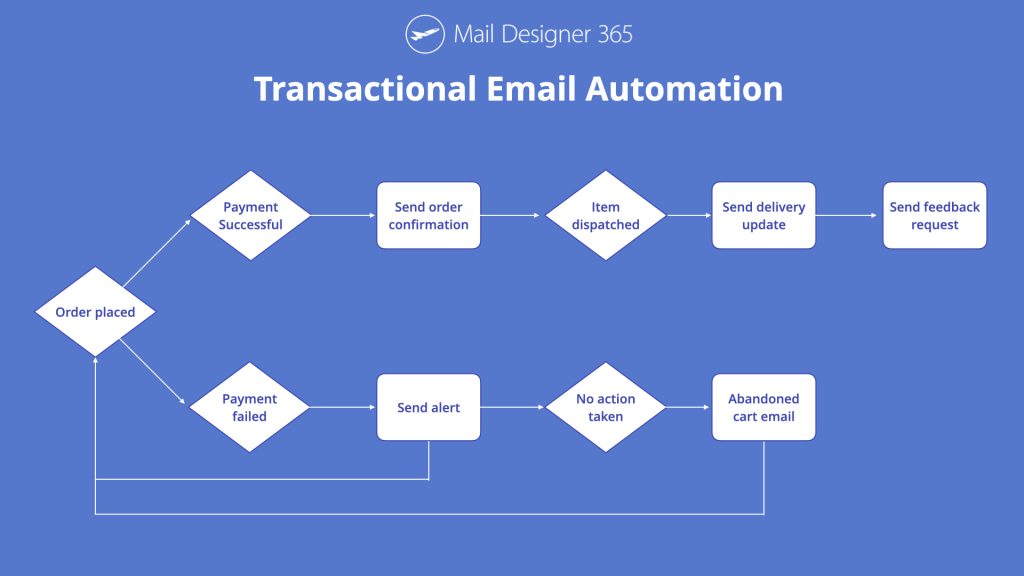
Transactional email automation flowchart

Here is an example automation flow for transactional emails to use for your online store.

Tip: Over time, you can optimize your strategy and add more and more templates to respond to different triggers. Here are some more great ideas for transactional emails.

Promotional email strategy for e-commerce

Promotional email campaigns are also a major part of your email marketing strategy. These campaigns help you generate revenue and get more traffic to your store. As one-off campaigns, it will take a little more work to make them stand out and excite customers, so good design is key.

Here are some examples of email promotions you can run for your online store:

Seasonal sale

A seasonal sale is a classic choice for any online retailer. Announce your sale to email subscribers and watch your website traffic skyrocket, as customers try and get hold of a great deal.
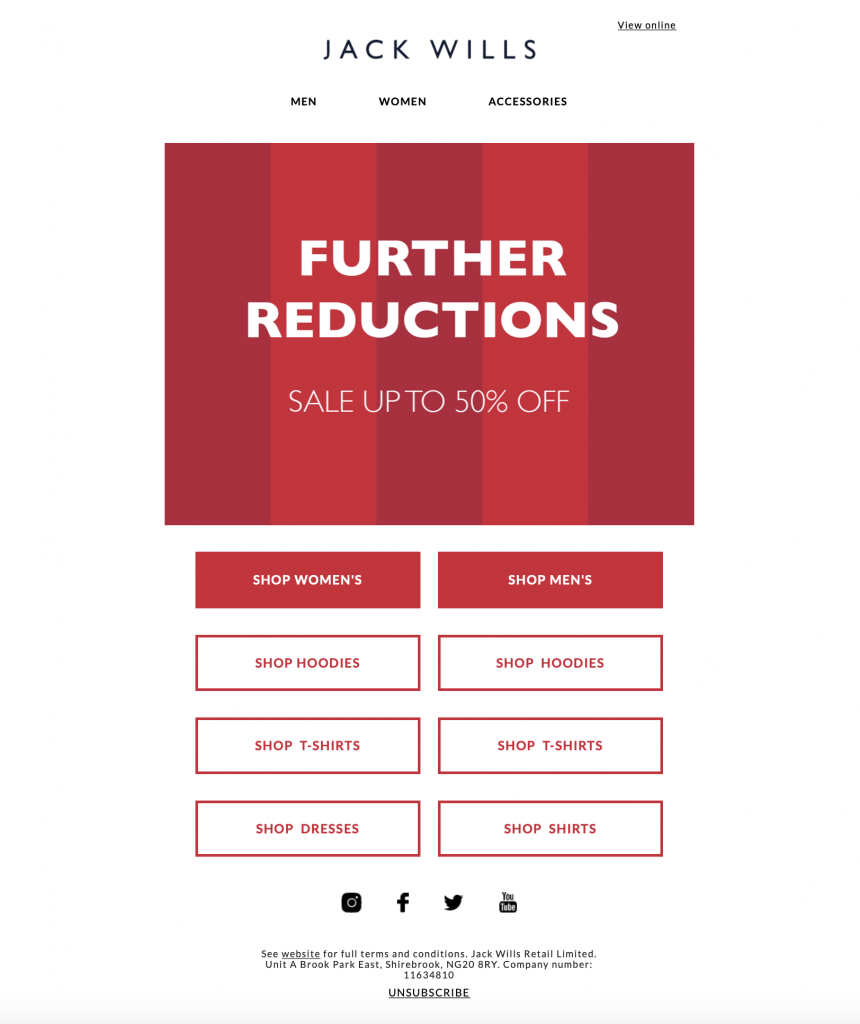
Jack Wills sale email

Sale email by Jack Wills to advertise their summer sale to customers.

Tip: Make sure to generate a sense of urgency in your email by using time sensitive language. This plays on customers' FOMO (fear of missing out) and helps ensure they check out your sale faster. When it's gone, it's gone!

"New in" email

Tempt subscribers with your latest products and send an email to announce new stock in your store. Whether it's a new product range, exciting collaboration or restock, your customers will want to know.

Product inspiration

Staying relevant is really important for your small business's survival. Even if you have nothing new to share, you can engage customers by showing them new and creative ways to use your products.

Themed promotion

Similarly to a sale, running a promotion is also an effective way to tempt customers onto your e-commerce site. A promotion can come in many shapes and sizes, covering everything including: free delivery, x% off, free gift with purchase, etc.
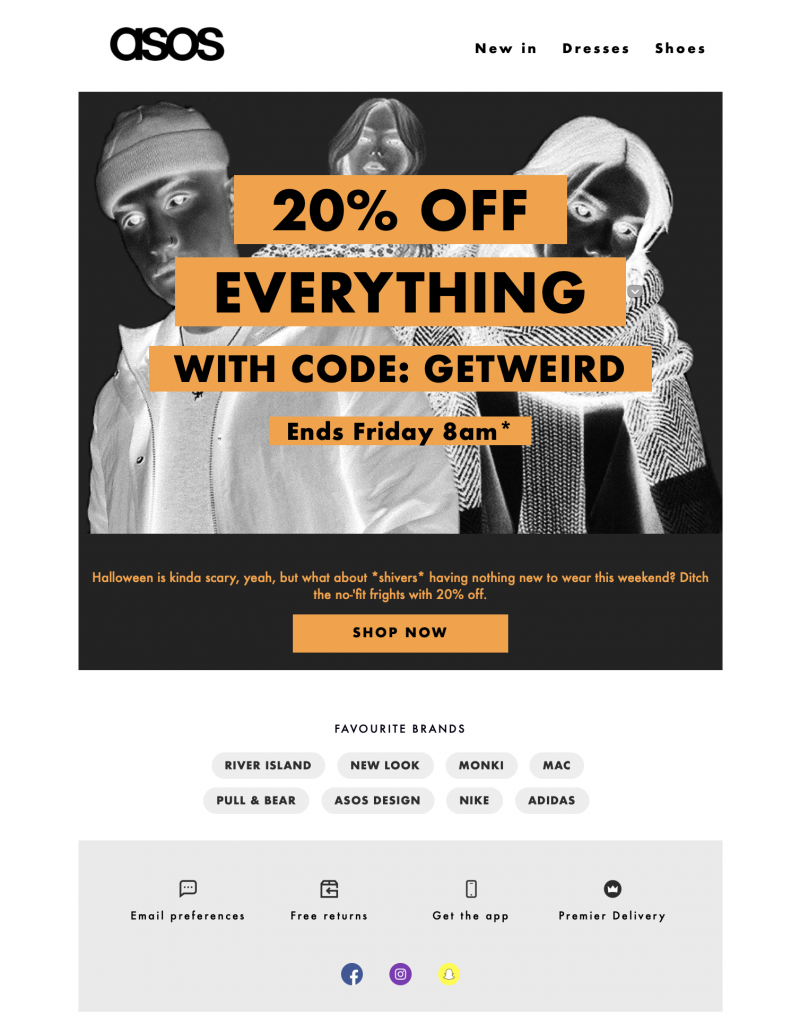
ASOS Halloween promotion

Halloween promotional email by ASOS.

Tying in a promotion with a certain theme or event is a good method in making it more relevant to your customers. As well as popular seasonal holidays like Halloween, Thanksgiving and Valentine's Day, there are also a number of alternative occasions throughout the year which provide a great opportunity to hold a promotion with less competition from other brands. Here are a few ideas:

  • International Women's Day (8th March)
  • Singles Day (11th November)
  • Earth Day (22nd April)
  • International Thank You Day (11th January)
  • International Day of Friendship (30th July)

Tip: Running promotions too regularly can often be detrimental to your business, as they will lose their exclusivity and also deter customers from purchasing at full price on a regular day.

Blog content

If you have a blog, this can be another good tool to use to get more visitors to your online store. Curating your latest blog posts and sending them to subscribers alongside fun product recommendations and other news can make for a great newsletter.

Your subscribers signed up because they are interested in your business. Informative, content-based emails are often a welcome break from a sales heavy strategy. It's good to balance out your content every now and again.

Blog topics could include industry news, smart ways to use your products, step-by-step tutorials, or personal stories about your products or business.

Best Practice for Marketing Emails

Now you have an idea of which emails to be sending your customers, you should briefly familiarise yourself with these five, specially selected best practice tips. This helps ensure your marketing emails are effective and will result in more conversions.

Eye-catching subject line

Your email subject line is your first chance to make an impression on your reader. Oftentimes, if the subject line is not interesting enough, the email will be left unread.

When writing your email subject, you should try your best to ensure it is entertaining and also effective in communicating the contents of the email. Advertising a summer sale? Make sure you use these keywords in the subject line! Emojis can also be a great way to make your subject even more striking.

Tip: Mail Designer 365 has a built in inbox preview tool. Use this to keep control of the length and get a feel of how your email subject will look in your recipients' inbox.
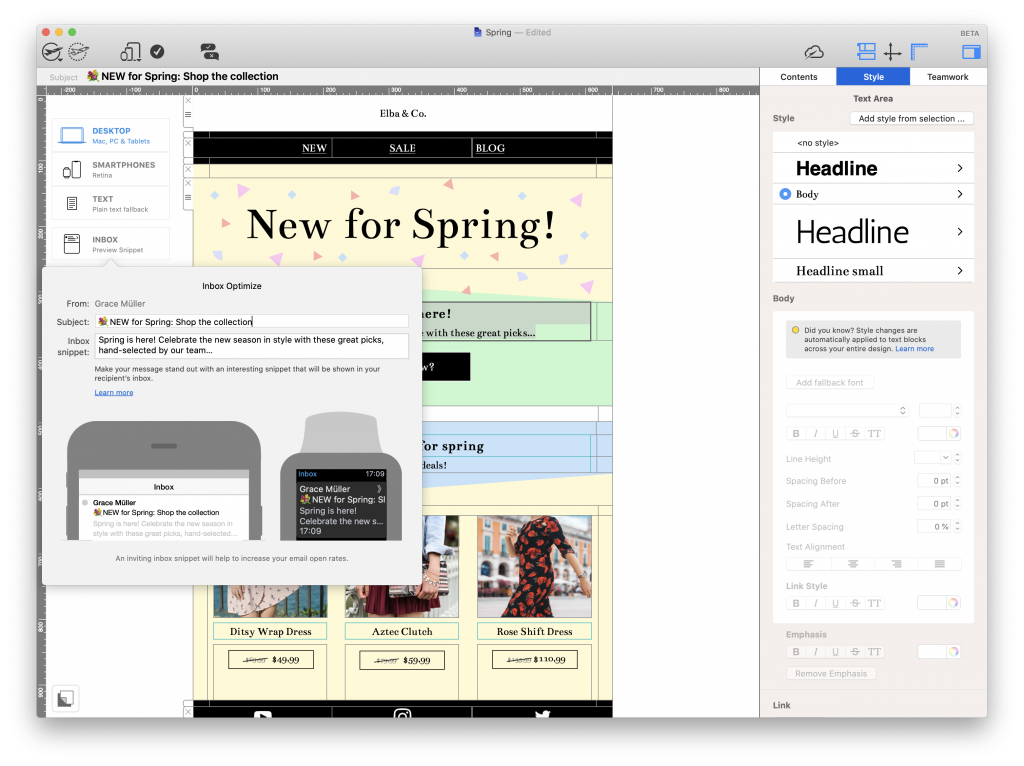
Inbox preview tool in Mail Designer 365Sales layout

Most of your promotional emails will be advertising certain products. To make these easier to shop, you should make sure your email layout is practical and easy for readers to navigate.

In addition to good quality product photos, remember to also include a product name and up to date price tag. This helps customers a lot in the shopping process. As well as this, a direct and accurate link to the product is also essential, as customers will quickly lose interest if they are unable to find what they are looking for.

Where possible, you should also ensure that your email layout reflects your store's layout in the best way possible. Consistency is key and helps streamline the transition between your emails and your website.

Tip: Mail Designer 365 offers 1000s of layout combinations which you can use to recreate the look and feel of your store in your email designs. Drag and drop to build.
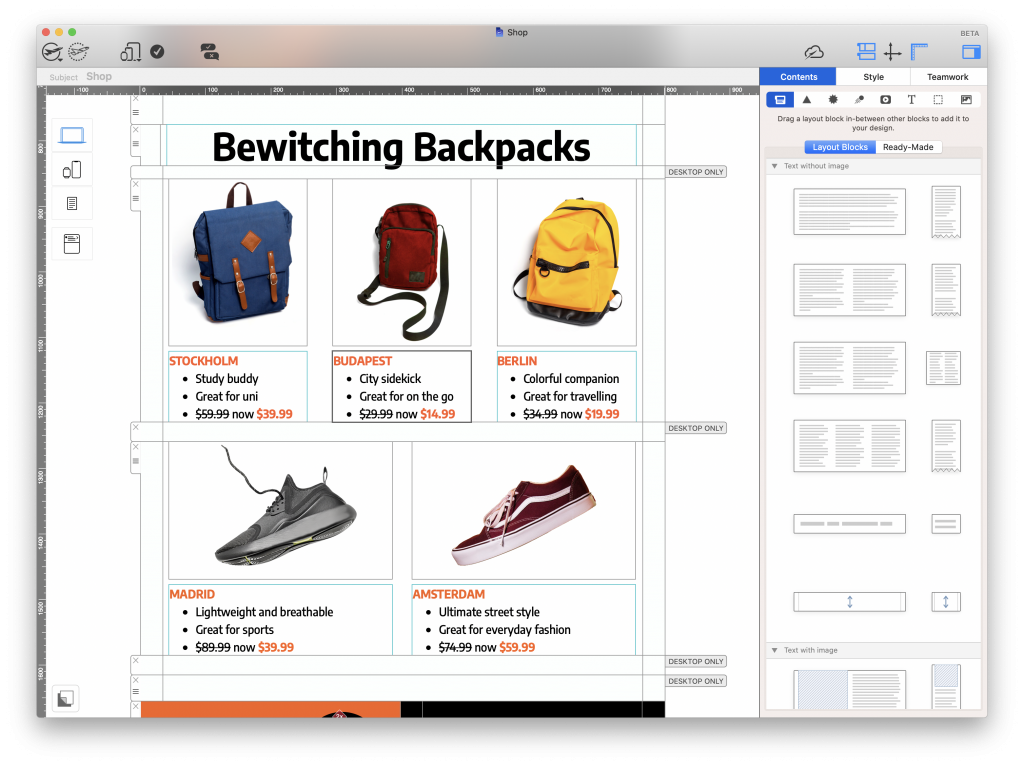
Sales layouts for emails in Mail Designer 365

Clear call to action

Having a clear call-to-action (CTA) is a must in every email. Your CTA points the customer to their next step and is a critical factor in securing more conversions.

If you have a great email design but no clear next step, your customer will quickly become disengaged and move on. Use a bold CTA button to link to a specific product, to your sale page, your blog, or another destination.

Mail Designer 365 supports the use of text buttons for ultimate compatibility in all email clients. Learn more.
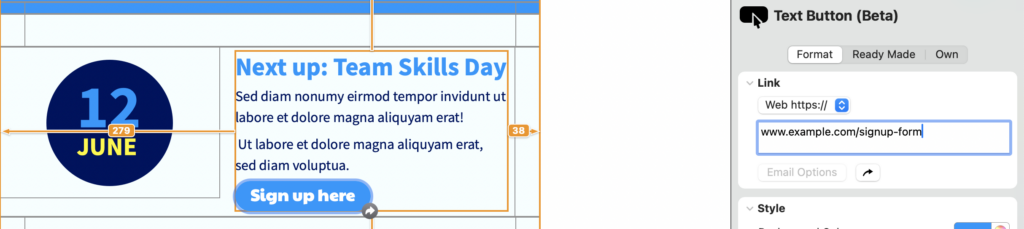
Inserting a text button in Mail Designer 365 is easy


Mobile optimization

Just like your online store needs to be mobile friendly, so do your emails! Having great email content for smartphones and other mobile devices is an important part of the user experience for many of your customers.

Tip: Mail Designer 365 automatically creates a mobile responsive version of your email design that you can edit separately in the smartphone view.
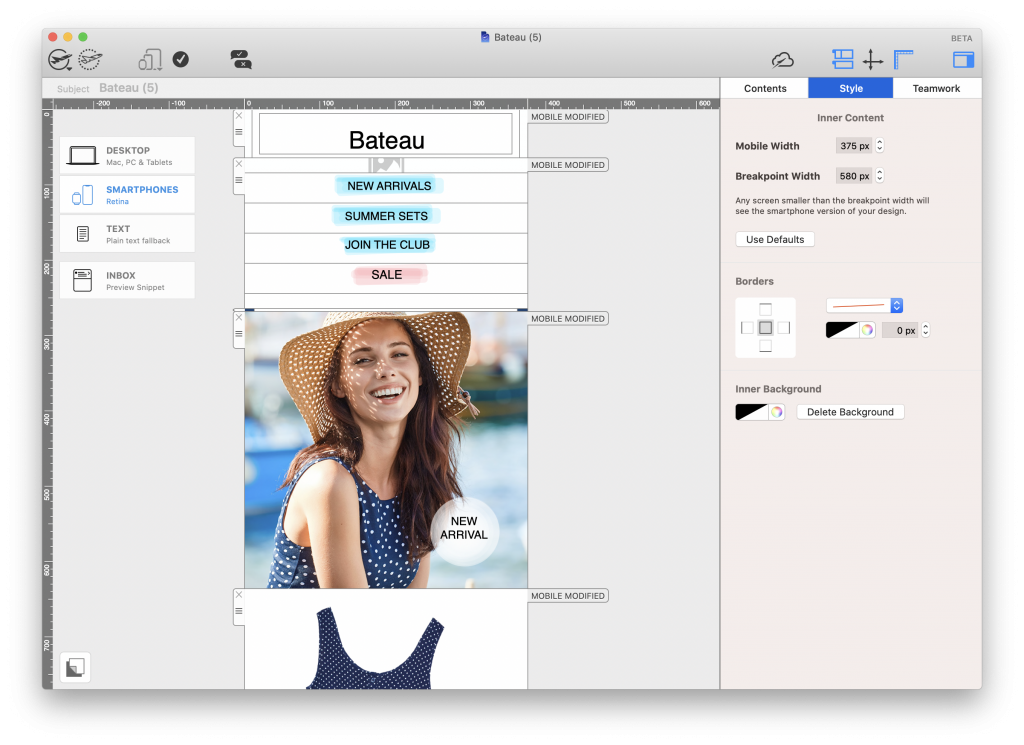
Mail Designer 365 smartphone editor

Unsubscribe link

By law, you are required to include an unsubscribe link in every promotional email. This allows subscribers a way to opt out of your list if they are no longer interested.

The email footer is the most common location for an unsubscribe link. When you do set this up, it's best practice to make it well-visible, as not to deceive customers and make things difficult.

Remember, subscribers removing themselves from your list is not all bad. Your goal is to send emails to customers with a genuine interest in your business. With fewer disengaged subscribers on your list, you can hope for better open and click rates in the future.

Get Started with Email Marketing for E-Commerce Today

Hopefully, this guide has shown you the benefits of email marketing for e-commerce. Getting started with an email marketing strategy for your e-commerce business is super straightforward:

  1. Build up your email list with innovative lead generation techniques
  2. Use Mail Designer 365 for Mac to build stylish templates for your online store
  3. Send directly to customers via Mail Designer Delivery

For more useful resources on getting started with email marketing for e-commerce – including setting up email target groups, scheduling campaigns, and managing email contacts, check out the Mail Designer 365 Manual.

Try Mail Designer 365 for free

Design emails without code – 7 days free on your Mac.
Compatible with macOS 10.13 or later

Enjoyed this post?

Get more inspirational tips, tricks, and best practice examples in the Mail Designer 365 Newsletter Academy -
your one stop hub for all things email marketing strategy and newsletter design.

Email marketing for schools and universities

Email Marketing for Schools & Universities: Best Practices and Strategies

By Team equinux Mail Designer 365 Newsletter Academy

Email marketing for schools is a flexible and effective communication channel — especially for schools and universities. Whether you’re sharing internal updates, contacting recent graduates, or reaching out to potential new students, email marketing helps you connect with your audience in a targeted and meaningful way.

If you’re looking to get started, on our page for email marketing for higher education you will find everything you need to create impactful, professional emails that reflect your institution’s brand.

In this post, we’ll walk you through the key steps to building a successful email strategy for your school or university — from planning and content ideas to design tips and best practices.

Why Email Marketing is Essential for Schools & Universities

Cost-Effective Communication That Saves Your School Money

Email marketing for schools is a cost-effective and powerful way to enhance communication with students, parents, teachers, and staff. Beyond saving your institution thousands of dollars each year in printing and postage costs, it offers a modern, easy-to-implement solution to streamline your outreach efforts.

Reach Students, Parents, and Staff Directly on Their Devices

In today’s digital age, students and educators frequently check their smartphones, tablets, and laptops throughout the day. Email provides a direct, reliable channel to reach your school community instantly — whether you’re sharing urgent updates, upcoming events, or important announcements.

Personalize Messages to Different School Community Groups

Moreover, email marketing allows schools to deliver personalized messages tailored to different groups, such as parents, students, and faculty, improving engagement and building stronger relationships. This direct communication boosts transparency, fosters trust, and encourages active participation in school activities.

Automate Routine Communications for Efficiency

With email marketing for schools, you can also automate routine communications like enrollment reminders, newsletters, and event invitations, freeing up valuable administrative time. And thanks to detailed performance tracking, you can continuously refine your campaigns to ensure your messages resonate and make an impact.

Measure and Improve Your Outreach Effectiveness

Track email open rates, click-throughs, and engagement to refine your campaigns and ensure your messages resonate with your school community.

Top Email Campaigns for Educational Institutions

Email marketing for schools goes far beyond flashy sales messages — it’s a powerful tool to improve internal communication and connect with students, parents, staff, and alumni in a targeted, cost-effective way. Here are the most impactful email campaigns your school, college, or university should consider using:

1. Email Newsletters for Schools: Keep Your Community Informed

Most institutions are already familiar with newsletters. Switching from printed to email newsletters lets you share school updates, event highlights, and important announcements — while saving on printing costs and reducing your environmental footprint.

  • Use it for: Monthly school updates, board decisions, new programs
  • Who it’s for: Staff, students, parents, governors

Email newsletter for schools or universities

2. Orientation Emails: Welcome New Students with Confidence

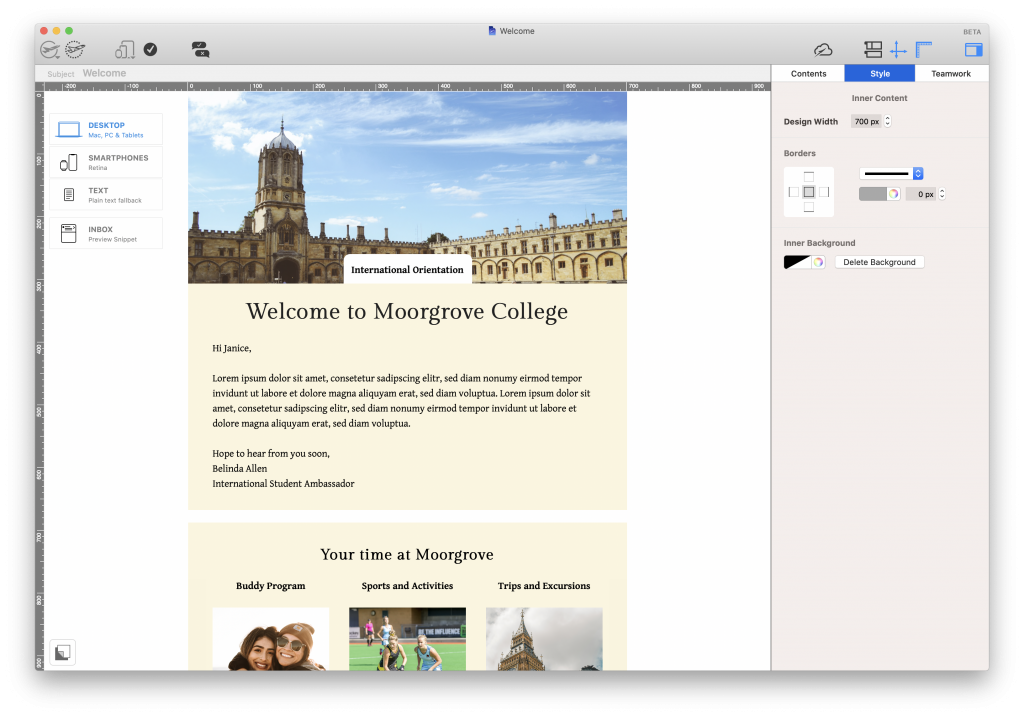
Start-of-year communications can be overwhelming. A well-designed orientation email helps students feel informed and supported from day one, with easy access to schedules, campus maps, key contacts, and must-know info.

  • Use it for: Back-to-school info, exchange student support
  • Who it’s for: Incoming students, international students

Student orientation email for colleges and universities

3. Feedback Emails: Hear Directly from Students and Staff

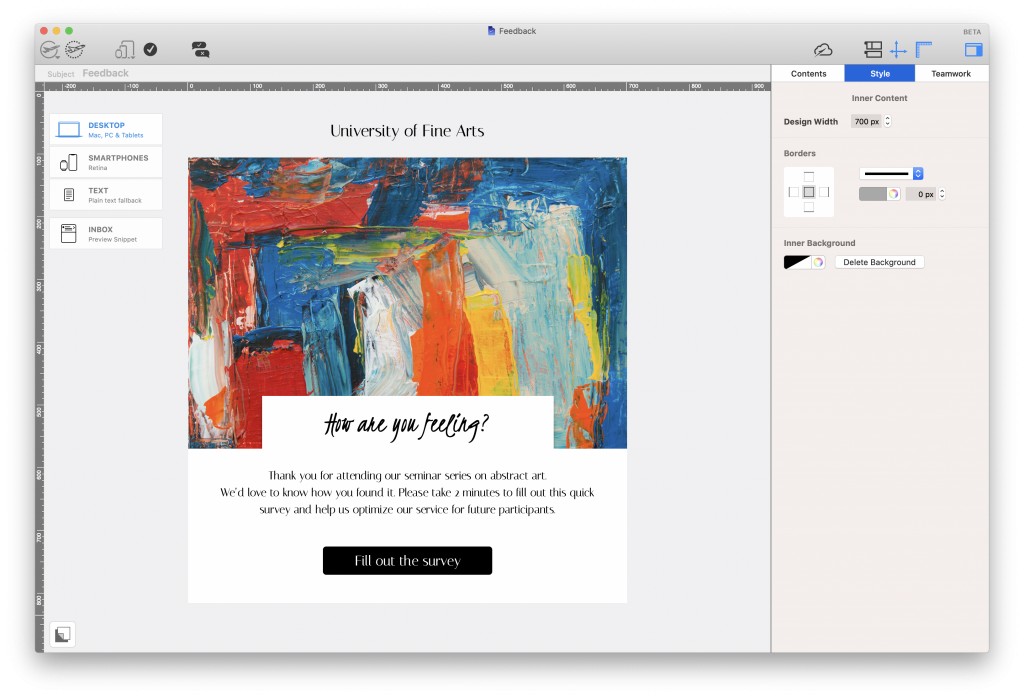
Email is a great way to gather honest feedback from your school community. Instead of printed slips, send a quick, mobile-friendly survey (e.g. via Google Forms) and use responses to improve courses, events, or campus life.

  • Use it for: Course feedback, faculty evaluations, student check-ins
  • Who it’s for: Current students, teaching staff

Feedback email for teachers and lecturers.

4. Use Email Marketing to Attract Prospective Students

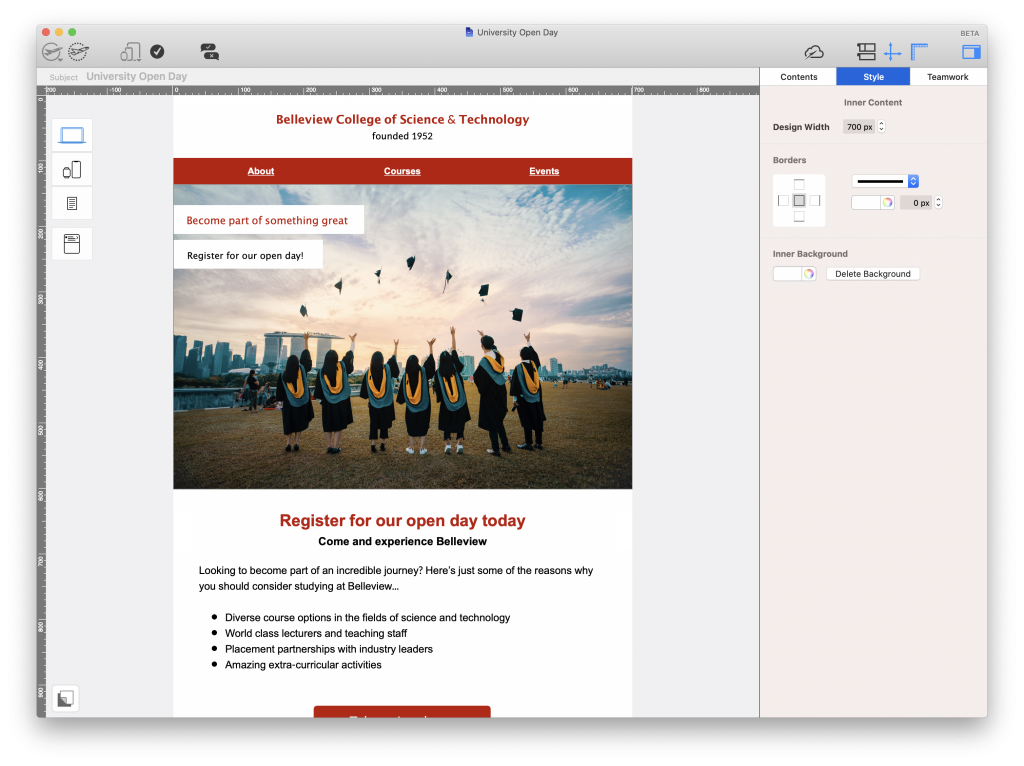
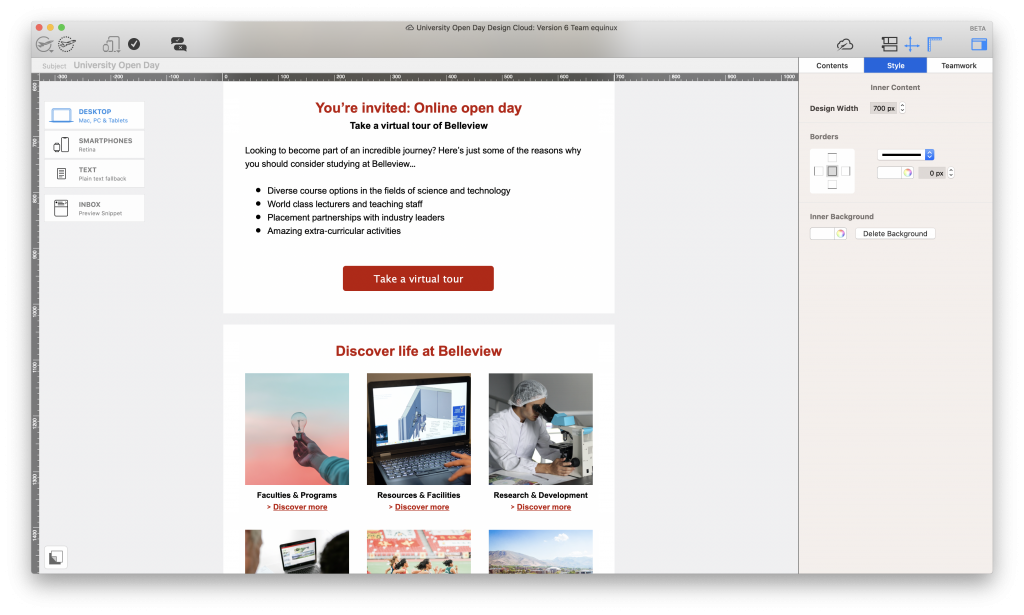
Use email campaigns to showcase your institution’s strengths. Highlight upcoming open days, academic programs, research breakthroughs, or student success stories to stand out from the competition.

  • Use it for: Admissions marketing, open day invites
  • Who it’s for: Prospective students, parents, school counselors

Open day email invitation for universities and colleges

5. Email Marketing for Alumni Outreach in Schools

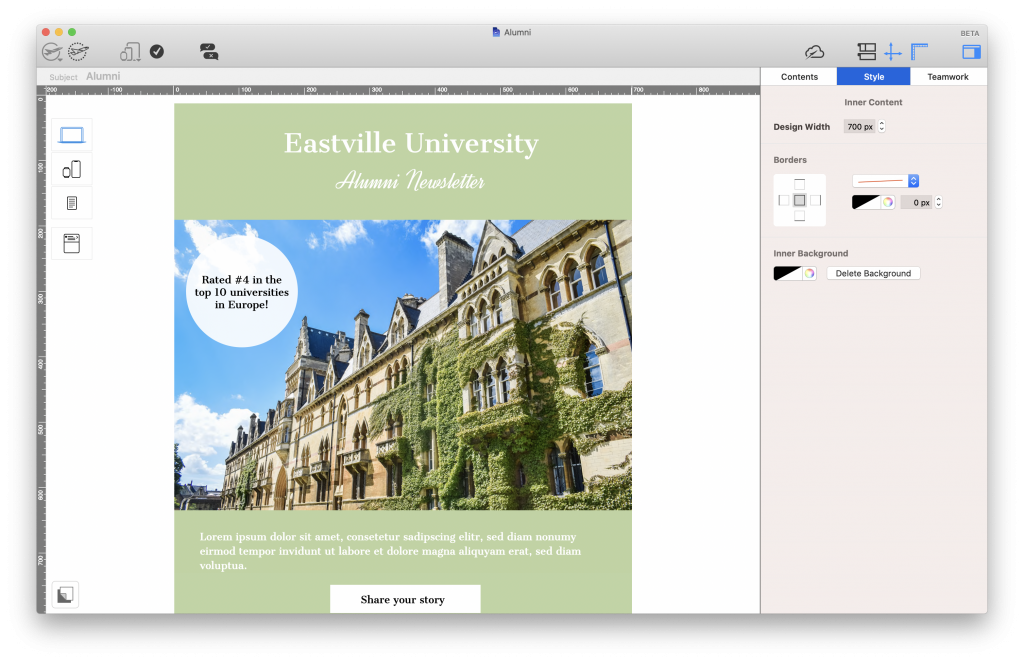
Stay connected with your alumni community by sharing success stories, event invites, or giving opportunities. Since graduates often move, email is a more reliable channel than postal mail.

  • Use it for: Fundraising, testimonials, alumni spotlights
  • Who it’s for: Former students, donors, alumni groups

Alumni outreach email for universities and schools

Best Practices for Email Marketing in Schools and Universities

Once you’ve chosen your email campaigns, follow these design and content guidelines to ensure your emails look professional and perform well.

With a drag & drop email editor like Mail Designer 365, you can build professional email templates for your school or university in minutes. Start with a blank canvas or choose a Design Idea from our selection of email templates for education.

Branding: Stay Consistent with Your School’s Identity

Every email you send on behalf of your institution should conform to your brand guidelines. Not only does this make it easier for recipients to recognise that the email has come from you, it also helps you to protect your reputation.

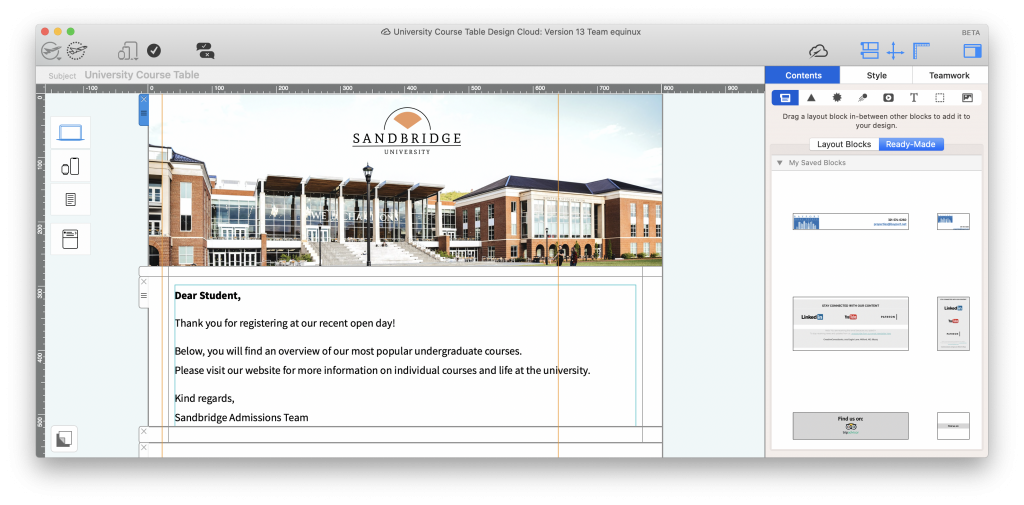
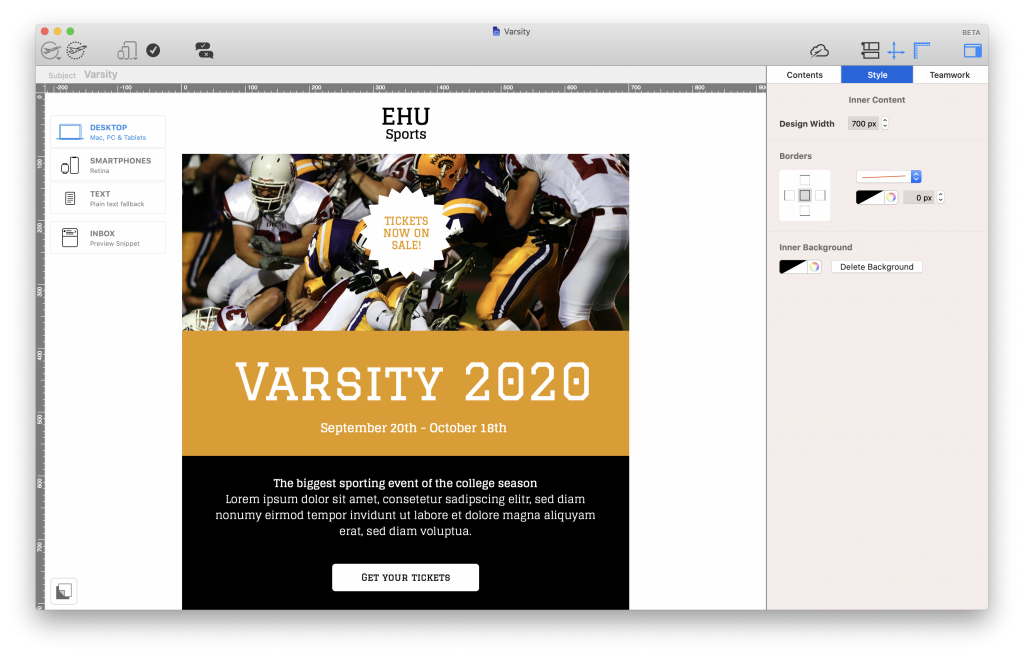
Start by inserting the logo or crest for your school in a prominent place in your design. Usually, this would be the email header. You should also keep other aspects such as the font family and color scheme consistent at all times.

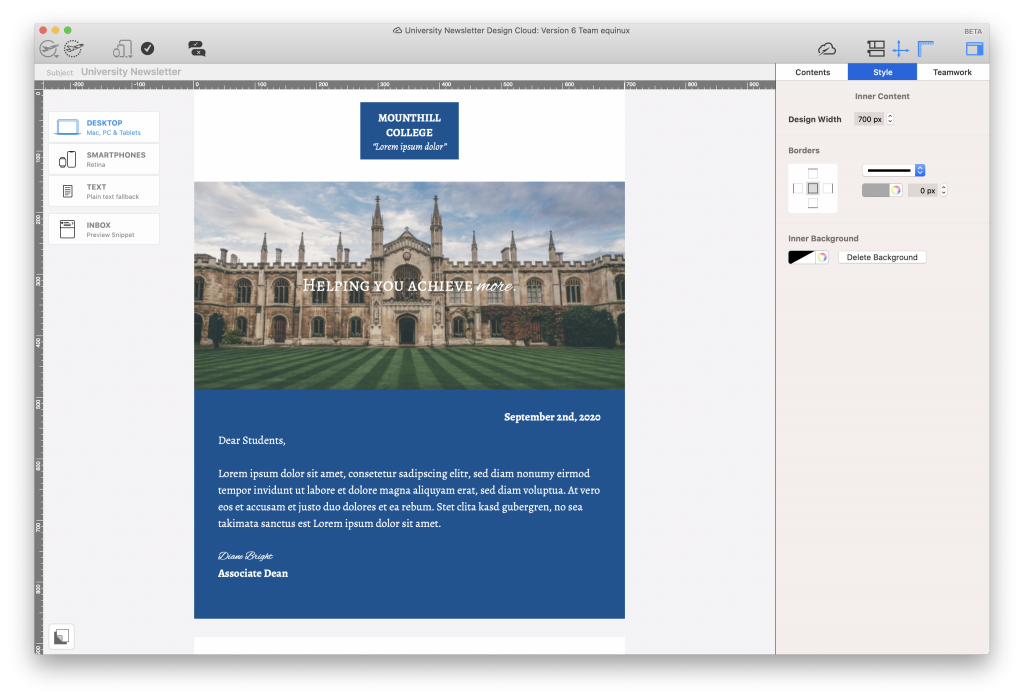
Tip: In Mail Designer 365, you can save your logo header under "My saved blocks" to reuse in all future email designs.

University logo in an email design

Layout: Organize Content for Easy Reading

Especially when you are presenting large amounts of information to your readers, it's important to opt for a clear layout. There's nothing worse than trying to navigate your way through a cramped email to locate what you're looking for.

Be sure to use a healthy balance of text and images and use spacers and headlines to separate different sections of your email.

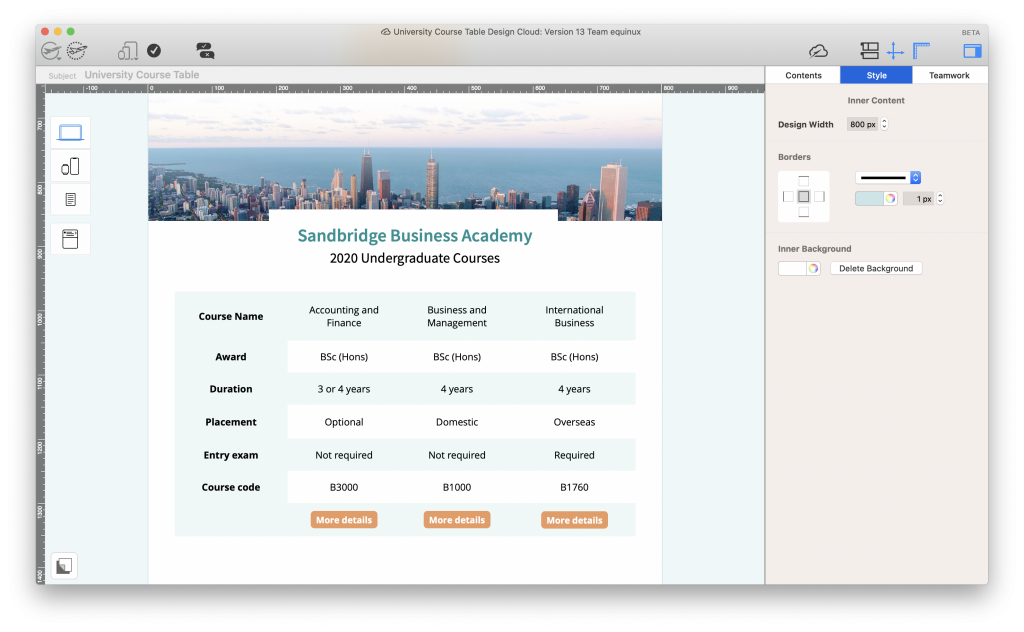
Tip: Mail Designer 365 offers you a wide range of layout options, including mobile-responsive table layouts, which you can use to clearly present important information.

Email with table layout for universities and colleges

Tone & Style: Adapt to Your Audience

When putting together your emails, it's also best practice to consider your target group. This will help you determine the tone you use in your email copy, as well as other important style elements, such as graphics and eye-catchers.

If you are creating email content for a younger audience (i.e. high-schoolers or college students) it's generally fine to use a more relaxed tone and even shake things up visually, e.g. with GIFs, memes, emojis, etc.

On the other hand, if the email is intended for a different audience (i.e. parents, governors, etc.), or you are sharing important information, it's best to keep the tone more formal and to refrain from any style elements which may distract from your key message.

Fun email newsletter for students

Clear Calls to Action (CTAs)

Including a call to action (CTA) in your email helps point the recipient towards their next steps. This does not have to be sales-related! Here are a few examples of CTA links you can include in your institution's emails:

  • Sign up for a class/activity/field trip/extra tuition
  • Get tickets for an event/football game/prom
  • Download an eBook/guide/worksheet/timetable
  • Watch a video lecture/webinar
  • Share your class feedback
  • Follow us on Twitter/Instagram/Facebook/etc...

Whatever you opt for, you should ensure your CTA stands out well against the rest of your email and that the text is clear and concise.

Call to action button in a university email

Get Started with Email Marketing for Schools

We hope you’ve found this email guide for schools and universities useful and will consider applying some of these tips to your own email strategy. Getting started with email marketing for your institution is easy and affordable:

  1. Open the Mail Designer 365 app (Don’t have a Mail Designer 365 plan yet? Get your free trial here!)
  2. Use one of our dedicated email templates for education, or create your own design from scratch.
  3. Send  finished designs directly using Mail Designer, send from your school’s email account, or export as HTML to use with your own service.

Until next time,

Your Mail Designer 365 Team

Try Mail Designer 365 for free

Design emails without code – 7 days free on your Mac.
Compatible with macOS 10.13 or later

Email Rendering Issues: 7 Proven Ways to Fix Them

By Team equinux Mail Designer 365 Newsletter Academy

<p>Email rendering issues can change layouts, hide images, break spacing, and make a polished campaign look inconsistent across inboxes.</p>
<p data-start="160" data-end="349">Picture the scene: You’ve spent ages designing the perfect email, only to hit send and realize it looks completely different in your recipients' inbox. Is there anything more frustrating?!</p>
<p data-start="351" data-end="603">Email rendering issues are more common than you think – especially with so many different email clients and devices out there. From missing images and broken layouts to dark mode fails, these display problems can majorly affect your email's success rate and even land you in the dreaded spam folder!</p>
<p data-start="351" data-end="603">Using a dedicated <a href="https://www.maildesigner365.com/email-template-creator-mac/">email template creator</a> that’s built for responsive design is a smart first step toward preventing these kinds of issues.</p>
<p data-start="605" data-end="794">In this guide, we’ll walk you through some of the <strong>most common email rendering mistakes</strong> and share expert tips on how to avoid them so your emails always look great, no matter where they’re opened!</p>

<h2>Missing images in emails</h2>
As the old saying goes, "a picture speaks a thousand words". These days, HTML emails and images go hand in hand, and for good reason: adding images to your email design makes it much more interesting to read and gives you the chance to showcase products directly within your newsletter. Unfortunately, missing images are one of the most common email rendering issues and can completely break your design if not handled correctly.

However, many email clients now block images by default, either to save data (a common feature on mobile devices) or to protect users from potential spam. For example, Gmail and Outlook often display a "Show blocked content" message, leaving a blank space where your carefully crafted visuals should be. <a href="https://support.microsoft.com/en-us/office/block-or-unblock-automatic-picture-downloads-in-classic-outlook-email-messages-15e08854-6808-49b1-9a0a-50b81f2d617a" target="_blank" rel="noopener">Learn more about how Outlook handles automatic picture downloads here.</a> This is a classic example of email rendering issues that every marketer needs to anticipate.

<img class="size-large wp-image-42763" src="https://data.equinux.com/com.equinux.wordpress/uploads/sites/4/2025/02/outlook-image-blocking-1024x391.png" alt="Example of email rendering issues caused by image blocking in Outlook" width="1024" height="391" /> Image blocking in Outlook

<strong>If your email largely consists of or is heavily reliant on images, here are some important things to consider to avoid serious email rendering issues:</strong>
<h3>Avoid image only emails</h3>
Emails that are 100% image-based or too image heavy are much more likely to be caught out by spam filters, as these look for a high ratio of images to text as an indicator of suspicious or unsolicited messages. Furthermore, even if they do get through, if the images are not rendered, your recipients will end up seeing a blank email with no content — a critical rendering issue that can destroy engagement.

Generally, it's recommended to design emails with a 60:40 text to image ratio.

This email from FreePrints is a clear example of why image-heavy emails should be avoided at all costs. All of the main content is image-based and therefore completely invisible in the email client, showing how quickly email rendering issues can harm campaign performance:

<img class="alignnone size-large wp-image-42776" src="https://data.equinux.com/com.equinux.wordpress/uploads/sites/4/2025/02/freeprints-email-no-images-1024x809.png" alt="FreePrints example showing email rendering issues when images are blocked" width="1024" height="809" />

Here's how the email <em>should</em> look once rendering issues are resolved. Big difference!
<h3><img class="alignnone size-large wp-image-42778" src="https://data.equinux.com/com.equinux.wordpress/uploads/sites/4/2025/02/freeprints-email-og-1024x809.png" alt="FreePrints email correctly rendered without email rendering issues" width="1024" height="809" /></h3>
<h3>Always include alt text</h3>
Of course you can't completely avoid images in your emails and nor should you! Including alt text is a great backup plan in case your images aren't rendered correctly. This helps prevent email rendering issues from leaving users with a blank message. Alt text is a short, descriptive text that appears in place of an image when it can't be displayed, giving you the opportunity to describe the gist of your image to recipients. Not only that, it's also <a href="https://www.maildesigner365.com/inclusive-email-campaigns/">best practice for accessible emails</a> and ensures users with screen readers are also able to consume your content effectively.

Check out this example from Ryanair. The main message and selling point of the email "Flights from €16,99" is completely image-based:

<img class="alignnone size-large wp-image-42759" src="https://data.equinux.com/com.equinux.wordpress/uploads/sites/4/2025/02/rynair-image-946x1024.png" alt="Ryanair promotional email highlighting rendering issues with image-based text" width="946" height="1024" />

However, when images are deactivated in the email client, this is completely missed out — another major case of email rendering issues:

<img class="alignnone size-large wp-image-42757" src="https://data.equinux.com/com.equinux.wordpress/uploads/sites/4/2025/02/ryanair-no-image-843x1024.png" alt="Ryanair email with images blocked showing common email rendering issues" width="843" height="1024" />

If an alt text had been used here, a much higher percentage of their audience would have seen the low prices and been more likely to click.

On the other hand, this email from Bunches shows how to correctly use alt text in your email designs to overcome email rendering issues:

<img class="alignnone size-large wp-image-42761" src="https://data.equinux.com/com.equinux.wordpress/uploads/sites/4/2025/02/bunches-alt-text-886x1024.png" alt="Bunches email example showing correct use of alt text to prevent email rendering issues" width="886" height="1024" />

<a href="https://www.maildesigner365.com/knowledge-base/using-alt-text/">Learn how to add alt text to image areas in Mail Designer 365 →</a>
<h3>Use text buttons for CTAs</h3>
If your email's main call to action (CTA) is image-based, you’re taking a risk. Images may not render in all email clients, meaning a large chunk of your recipients might not see your CTA at all. When that happens, your click-through rate and overall campaign success will likely suffer due to rendering issues.

The solution? Use text buttons in place of image-based buttons– especially for important call to actions like "buy now", "download", "shop the sale", etc. This ensures that your recipients will always be able to see your CTA, regardless of whether images have been loaded or not.
<h4><strong>Text buttons vs alt text</strong></h4>
Although some senders only opt to add an alt text to their image-based button, text buttons give you the best of both worlds: guaranteed rendering and great visuals. Mail Designer 365 allows you to easily insert text buttons into your emails and perfectly style them to match your design. <a href="https://www.maildesigner365.com/knowledge-base/creating-text-buttons/">Here's how it works →</a>

<img class="wp-image-42765 size-large" src="https://data.equinux.com/com.equinux.wordpress/uploads/sites/4/2025/02/md-text-button-1024x230.png" alt="Mail Designer 365 editor showing how to insert styled text buttons to fix email rendering issues" width="1024" height="230" /> Inserting a text button in Mail Designer 365 is easy

<h2 data-start="160" data-end="349">Rendering Issues in Dark Mode</h2>
<p data-start="589" data-end="1148">Since dark mode gained popularity around 2018, many email marketers have encountered rendering issues due to the way different email clients handle content in dark mode. Take Gmail, for example: in dark mode, it adjusts brightness to improve readability, which can result in white backgrounds turning dark gray, and dark text turning lighter. This is particularly problematic for designs with black text on a white background (or vice versa), as it can make your carefully crafted email copy difficult or impossible to read!</p>
<p data-start="1150" data-end="1346"><strong data-start="1150" data-end="1167">The solution?</strong> Stick to color schemes and design practices that will be legible in both dark and light mode, ensuring your message gets across clearly regardless of the user’s display settings.</p>

<h2 data-start="160" data-end="349">Mobile layout problems</h2>
Using a <a href="https://www.maildesigner365.com/responsive-html-email-designer/">responsive HTML email designer</a> makes it easier to adjust desktop and mobile layouts and preview the result before sending.
<p data-start="41" data-end="306">These days, more emails are opened on mobile devices than on desktops, so getting your mobile layout right is crucial. If your email isn’t optimized for smaller screens, you risk broken layouts, unreadable text, and a wasted email campaign that doesn't hit the mark with your readers.</p>

<p data-start="308" data-end="657">One of the biggest culprits? Fixed-width designs. If your email is too wide and doesn’t adapt to different screen sizes, mobile users will be stuck zooming and scrolling sideways just to read your content. Another common issue is tiny, hard-to-tap buttons—if a recipient has to pinch and zoom just to click your CTA, chances are they won’t bother.</p>
<p data-start="659" data-end="1022" data-is-last-node="" data-is-only-node="">Mail Designer 365 has a separate mobile editor to ensure fully responsive email design. Here are some helpful ways Mail Designer 365 ensures your email also looks great on mobile:</p>

<ul>
<li data-start="659" data-end="1022"><strong>Adjustable mobile width:</strong> Ensure your content looks perfect whether it’s viewed on a small phone screen or a larger tablet</li>
<li data-start="659" data-end="1022"><strong>Mobile breakpoint:</strong> Your recipients will see the mobile version of your design if they are viewing on a screen narrower than the chosen width. This avoids content being cut off
<img class="size-full wp-image-42773 aligncenter" src="https://data.equinux.com/com.equinux.wordpress/uploads/sites/4/2025/02/mobile-width.png" alt="Mobile breakpoint preview preventing email rendering issues on small screens" width="688" height="488" /></li>
<li data-start="659" data-end="1022"><strong>Mobile-only layout blocks:</strong> Optimize elements of your design using <a href="https://www.maildesigner365.com/knowledge-base/add-dedicated-layout-blocks-mobile-version/">mobile only blocks.</a> Make images bigger or opt for vertical instead of horizontal layouts. These adjustments will be made for mobile devices while your desktop layout stays the same</li>
<li data-start="659" data-end="1022"><strong>Mobile text styles:</strong> <a href="https://www.maildesigner365.com/knowledge-base/creating-mobile-only-text-styles/?seq_no=2">Adjust the font size, line height and letter spacing for mobile</a> to make your text easy to read on all devices
<img class="size-large wp-image-42769 aligncenter" src="https://data.equinux.com/com.equinux.wordpress/uploads/sites/4/2025/02/md-mob-text-style-1024x499.png" alt="Example of mobile text style adjustments to avoid email rendering issues" width="1024" height="499" /></li>
<li data-start="659" data-end="1022"><strong>Integrated mobile previews:</strong> Preview and test your email design on the most popular devices to see exactly what your recipients will, then optimize where needed
<img class="size-large wp-image-42771 aligncenter" src="https://data.equinux.com/com.equinux.wordpress/uploads/sites/4/2025/02/md365-mob-preview-501x1024.png" alt="Mail Designer 365 integrated mobile preview tool showing email rendering issues fixed" width="501" height="1024" /></li>
</ul>

<h2 data-start="160" data-end="349">Missing Email Content and Email Clipping</h2>
<p data-start="160" data-end="349">Certain email clients – including Gmail – impose strict size limits for emails. Once an email reaches a certain size, it will be clipped, meaning emails over that size will not be completely rendered. For example, in Gmail the size limit is 102kb and in Yahoo it's 100kb. This is one of the lesser-known email rendering issues but one that can seriously impact campaign performance.</p>
<p data-start="160" data-end="349">Email clipping is especially problematic if you have important information or call to action links at the end of your email, as this content may be missed by your recipients. Furthermore, if your disclaimer containing the unsubscribe link is clipped, this could even result in legal issues and damaged deliverability — another major side effect of email rendering issues.</p>
<p data-start="160" data-end="349">Here are some quick tips on how to reduce email size and avoid clipping-related rendering issues. <a href="https://www.maildesigner365.com/5-smart-hacks-to-reduce-your-html-email-size/">For more detailed information, check out this guide.</a></p>

<ul>
<li data-start="160" data-end="349">Keep email copy short and concise and link out to long form content</li>
<li data-start="160" data-end="349">Compress images and don't include images that are too large. Mail Designer 365 contains a handy <a href="https://www.maildesigner365.com/knowledge-base/using-the-image-optimisation-tool/">image optimisation tool</a> that helps you compress images directly within the app
<img class="size-full wp-image-42789 aligncenter" src="https://data.equinux.com/com.equinux.wordpress/uploads/sites/4/2025/02/image-optimization-tool.png" alt="Mail Designer 365 image optimisation tool preventing email rendering issues caused by large images" width="735" height="704" /></li>
<li data-start="160" data-end="349">Use lightweight text buttons instead of images for CTAs to avoid unnecessary email rendering issues</li>
<li data-start="160" data-end="349">Finally, before sending, double check your email's size. Mail Designer 365's preflight checker alerts you when your design is over the 100kb size limit — helping you spot email rendering issues before they affect recipients
<img class="alignnone size-large wp-image-42791" src="https://data.equinux.com/com.equinux.wordpress/uploads/sites/4/2025/02/email-preflight-check-1024x664.png" alt="Mail Designer 365 preflight checker detecting email rendering issues caused by email clipping" width="1024" height="664" /></li>
</ul>

We hope you found these best practice email design tips useful. Try them out in your next newsletter to ensure your email campaign doesn't fall victim to common email rendering issues!
<h2 style="text-align: center;"><strong><span style="font-size: 35px !important; line-height: 50px !important; color: #ffffff;">Get started with Mail Designer 365 today</span></strong></h2>

<div style="text-align: center;"><span style="font-size: 25px !important; line-height: 30px !important; color: #ffffff;">Start your 7 day free trial and use your Mac to create stylish email newsletters for your business that look great in all email clients.</span></div>

<div style="clear: both; color: #ffffff; text-align: center;">Compatible from macOS 10.13 onwards</div>

Privacy Settings / Datenschutz-Einstellungen