
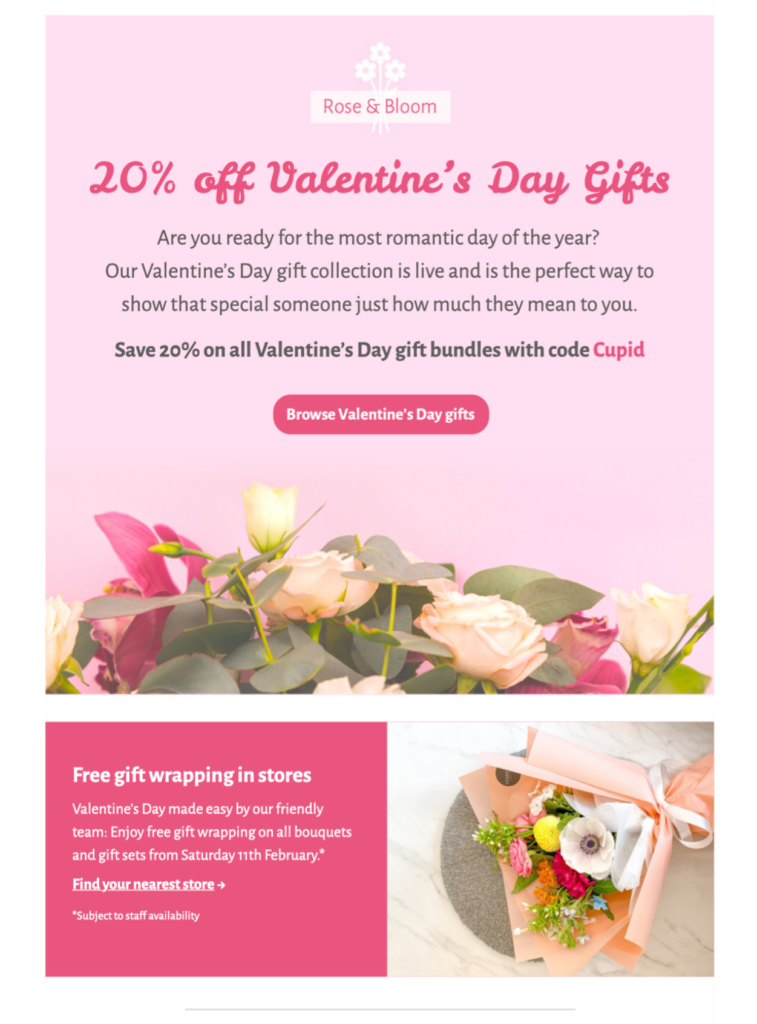
Valentines Day HTML email template for a gift-led campaign: customize this eye-catching pink design in Mail Designer 365, add your products and message, then send a responsive seasonal email to your audience.
Key Features:
- Edit on a supported Mac with the current Mail Designer 365 release
- Seasonal sales template
- Customize the layout with the drag-and-drop editor
- Mobile responsive design
- Send to your audience via Mail Designer 365
- Review campaign feedback together with Crew Chat
Use This Valentines Day HTML Email Template for Gift Ideas
This Valentines Day HTML email template uses a bright pink seasonal design to present products or gift ideas in a warm, upbeat way. Replace the sample items with a focused selection and give every product a clear reason to click. A short introduction works best when the preview already carries a strong visual theme.
Customize the Pink Gift Layout
Match the colors and typography to your brand while preserving enough contrast for easy reading. Keep product names and prices as live text whenever possible. Crop images consistently, write descriptive alternative text, and avoid placing essential offer details only inside artwork. If you use a discount code, repeat it in live copy and verify the exact spelling.
Choose One Valentine Campaign Intent
This page is for a gift-led HTML template. For a simple greeting without a sales focus, use the Valentine’s Day email greeting template. For a discount-led campaign, use the Valentine’s Day promotion email template. Keeping those purposes distinct helps readers choose the right design and prevents the pages from competing for the same search intent.
Build a Clear Product Path
Use one main button for the featured collection and concise secondary links for individual products. Button labels should describe the destination rather than say “click here.” Send subscribers to a landing page with the same products, prices, deadline, and promotion terms shown in the email.
Prepare the Valentines Day HTML Email Template for Sending
Before export, preview the desktop and mobile versions independently. Check that product cards remain in the intended order, headlines do not wrap awkwardly, and the main button stays easy to tap. Add useful preview text that expands on the subject line instead of repeating it. Confirm the sender name, reply address, personalization, footer, and unsubscribe option in the service you will use to send the finished campaign.
Meaningful campaign images need concise alternative text so the gift selection remains understandable when images are unavailable. Decorative flourishes can use an empty alt attribute. The W3C image decision tree offers a practical way to choose between those treatments. Test the Valentines Day HTML email template in real inboxes, then verify inventory and delivery dates immediately before scheduling so subscribers see an accurate offer.
Valentine Template Checklist
- Replace sample gift images and copy.
- Keep the main action visually dominant.
- Check contrast, crops, and tap targets on mobile.
- Verify prices, codes, links, and promotion terms.
- Send a real inbox test before scheduling.