
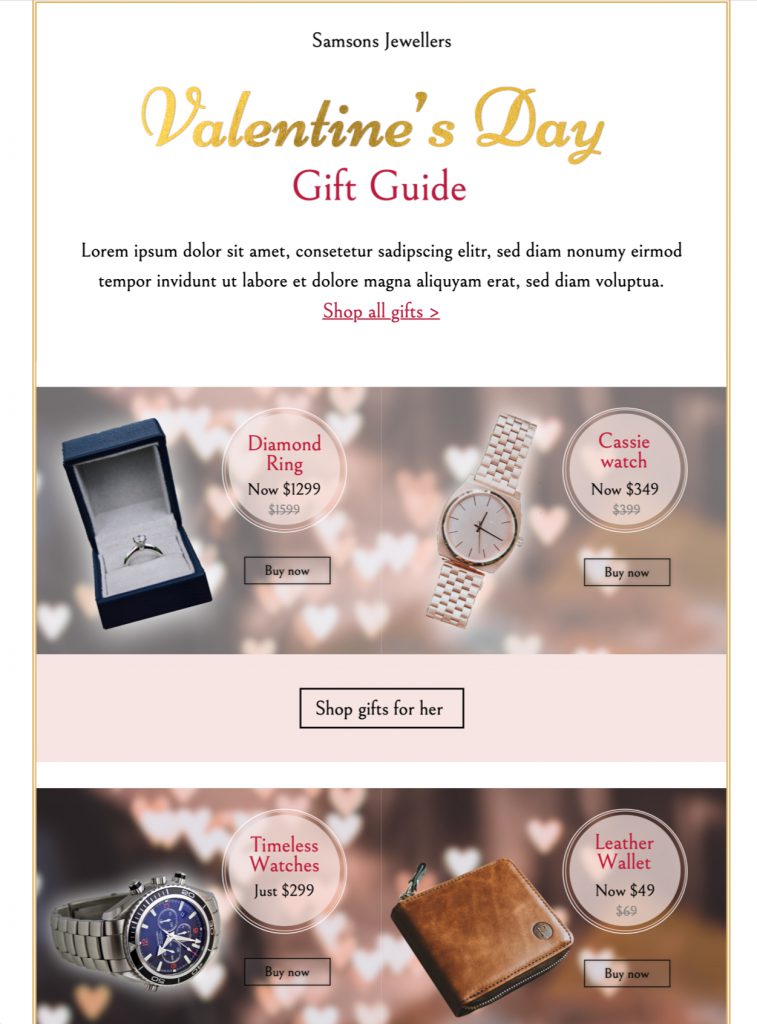
This Valentine's Day gift guide email template helps retailers turn a varied Valentine's Day range into one clear, inviting campaign. This Mail Designer 365 design leads with a seasonal greeting, groups gift ideas into easy-to-scan sections, and gives every featured item room for a short description and a direct link. Adapt it for jewellery, flowers, food, beauty, fashion, experiences, or a mixed product collection.
Choose the right audience and campaign moment
Use this design when subscribers need inspiration rather than a single discount. It suits an early planning email, a curated last-minute selection, or a follow-up for shoppers who have not yet chosen a gift. Segment the collection by recipient, price range, interest, or delivery deadline, and make the promise in the opening copy specific: thoughtful picks, quick-to-order ideas, or a focused collection for one audience.
Plan the essential gift guide details
Before editing, collect the product name, accurate price, destination URL, availability, delivery cut-off, and a concise benefit for every item. Keep equivalent information in the same order so readers can compare quickly. If a product has options, explain the most important choice without crowding the card. A useful gift guide email template should also state whether prices include tax or whether delivery restrictions apply whenever that information matters to the offer.
A well-planned gift guide email template leads with the strongest recommendation and places time-sensitive choices where they are easy to find. Avoid vague calls to action. Labels such as “View the gift”, “Choose a size”, or “Book the experience” set a clearer expectation than a repeated “Learn more”.
Use the visible design strengths
The supplied preview combines a large seasonal headline with a sequence of image-led recommendations. The repeated layout creates a steady reading rhythm, while short copy blocks keep attention on the products. Replace every sample image with a consistent crop and keep the surrounding spacing generous. That makes the collection feel curated even when the products come from different categories.
Use the hero area to explain the selection rule in one sentence. Then let each product block answer three questions: what is it, who is it for, and why is it a good Valentine's Day choice? This gift guide email template structure keeps the page specific to gift-guide intent instead of competing with broader Valentine promotion or greeting templates.
Customize the Valentine's Day gift guide
In Mail Designer 365, replace the sample images, edit the text, update button labels, and adjust brand colors and type styles to match the campaign. Keep the strongest item high in the email and move related products together. If your selection is long, create clear groups such as “Under $50”, “For food lovers”, or “Experiences to share” rather than presenting one undifferentiated list.
After customizing the gift guide email template, preview the desktop and mobile layouts. Shorten copy that wraps awkwardly on a narrow screen, confirm that buttons remain easy to tap, and make sure the product order still tells a useful story when the columns stack.
Write persuasive product copy without overpromising
Give each recommendation one concrete reason to care: a useful feature, an occasion fit, a delivery advantage, or a thoughtful detail. Match that reason to what the destination page actually confirms. Avoid unsupported scarcity, exaggerated superlatives, and generic romantic language that could describe any product. The strongest gift guide email template makes comparison easier and lets the products earn the click.
Use a subject line and preheader that name the collection benefit. For example, announce a curated range or a practical deadline rather than hiding the purpose behind a clever phrase. Keep sender name, subject, preheader, headline, and landing pages consistent.
Check every link and campaign detail before sending
Open each product link and confirm that it reaches the intended item, preserves required tracking, and works without an editor login. Recheck prices, stock wording, promotion dates, delivery cut-offs, coupon terms, and currency. Send a test to more than one inbox, then inspect the image-blocked version as well as the fully loaded email. Descriptive button text and meaningful linked-image alt text should still communicate where a click will go.
This pre-send pass is especially important when a gift guide email template contains many destinations. One copied URL can send several recommendations to the same product, so compare the final email against your source list item by item.
Make the design accessible and resilient
Use concise alt text that identifies the product or purpose of an informative image; leave purely decorative images without distracting descriptions. Maintain readable type sizes, logical heading order, and generous button spacing. Check text and button contrast against the W3C guidance for minimum contrast. Do not place essential price, deadline, or offer terms only inside an image.
When images are blocked, the headline, product names, descriptions, alt text, and buttons should still form a usable gift guide. A resilient Valentine's Day gift guide gives every subscriber enough context to understand the collection and act with confidence.