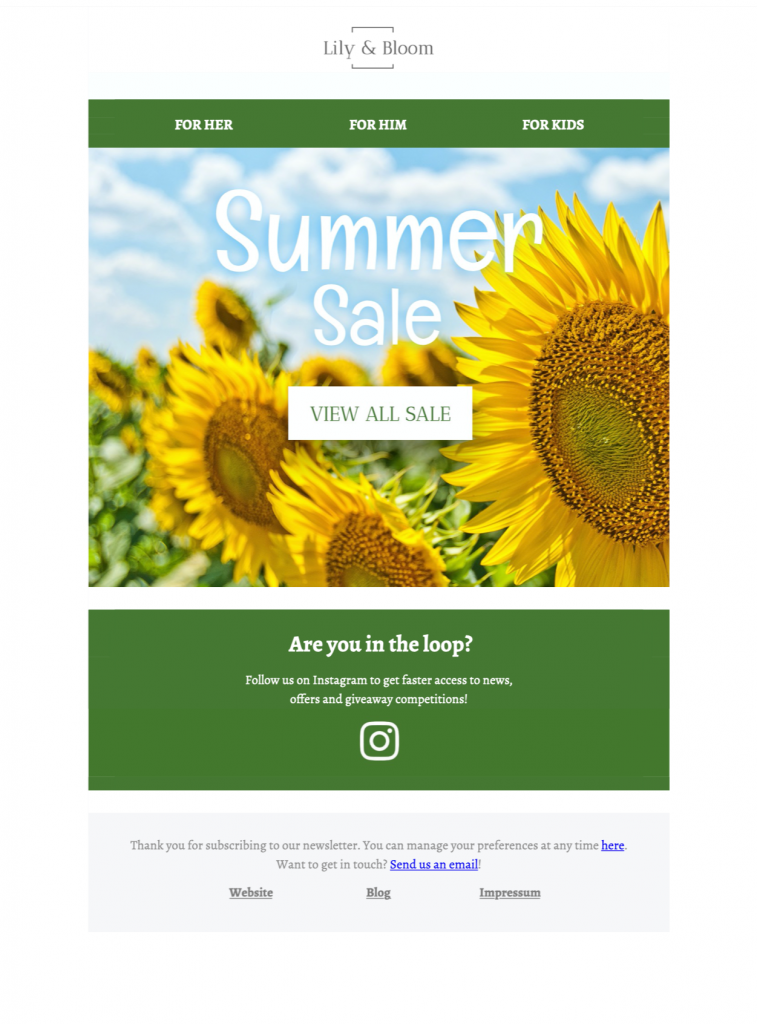
Summer sale email template with sunflower design

Summer Sale Email Template: 8 Strong Campaign Checks

This summer sale email template combines a cheerful sunflower theme with a clear promotional layout. Customize the offer, imagery, colors, and call to action in Mail Designer 365, then adapt the responsive design for your brand and audience.

Edit the Summer Sale email template in Mail Designer 365

See all Mail Designer 365 email templates

Already a Mail Designer 365 user? Open the Design Idea here.

Plan a focused summer sale campaign

Use this summer sale email template to keep the discount, eligible products, deadline, and checkout destination consistent for every reader.

Lead with one clear offer, show the end date where readers can see it, and use a specific button label such as “Shop the summer sale.” Keep supporting copy short and make the discount or seasonal benefit easy to understand at a glance.

Customize and test the summer sale email template

Replace the sample products and text with your campaign content, confirm that every link points to the intended landing page, and preview the design on desktop and mobile. Send a test message before launch to check the offer details, personalization, and image display.

Template workflow:

  • Replace the sample offer, products, dates, and button destination.
  • Customize the sunflower palette and typography for your brand.
  • Preview the responsive desktop and mobile layouts.
  • Send directly or export for a compatible email service.
  • Test links, personalization, tracking, and footer details.
  • Archive an approved copy and a reusable undated master.

Works with:

Mailchimp logo

campaign monitor logo

sendinblue logo

drip logo

direct mail logo

Mailjet logo

mailerlite logo

activecampaign logo

1. Define one strong summer sale offer

Choose the eligible products, discount, currency, audience, start time, end time, time zone, exclusions, inventory limits, delivery conditions, and returns policy before editing. The headline and main button should describe the same offer as the landing page. Avoid stacking several competing promotions in one message. If availability can change after delivery, link to a maintained page and explain that stock is limited rather than implying that every item will remain available.

2. Keep the sunflower design readable

The bright sunflower visual creates a strong seasonal cue, but essential sale information should remain live text rather than appearing only inside artwork. Keep body copy on a quiet background and check text and button contrast against the W3C contrast guidance. Write concise alt text for meaningful product images and test the summer sale email template with images blocked so readers can still identify the sender, offer, deadline, and next step.

3. Pair the subject line and preview text

Use the subject line to name the seasonal value and the preview text to add the deadline or eligibility. Do not imply a larger discount, free delivery, or broader product range than the landing page supports. For segmented campaigns, vary the selection only when location, climate, purchase history, or inventory makes it more relevant. Keep a general version for readers who do not fit a reliable segment.

4. Check the summer sale email template on mobile

Preview wide and narrow layouts. Confirm that the headline appears before supporting details, product crops remain useful, buttons have descriptive labels, and tap targets are separated. Keep one primary action and make secondary links visually quieter. If a multi-column product block stacks on mobile, verify the reading order and ensure each price and button remains attached to the correct item.

5. Test inbox output, links, and tracking

Send tests to representative desktop and mobile inboxes. Open every product, terms, delivery, contact, social, and unsubscribe link; confirm that redirects preserve intended campaign parameters. Review personalization fallbacks, sender and reply addresses, footer and consent text, plus the plain-text alternative. The destination page should repeat the same discount, date, availability, and promise shown in the email.

6. Archive the approved campaign and a clean master

Save a dated approval copy with the audience, subject, preview text, offer, products, links, and tracking values. Keep a separate reusable master without expired prices or dates. Before reusing it next summer, repeat the offer, accessibility, inbox, landing-page, and operational checks. Browse more Mail Designer 365 Design Ideas if another layout better matches the sale or audience.

Privacy Settings / Datenschutz-Einstellungen