
Summer Staycation Email Template: 7 Easy, Practical Ideas
Use this summer staycation email template to showcase local holiday ideas, nearby experiences and seasonal offers. Customize the imagery, destinations, copy and call to action in Mail Designer 365, then test every travel link before sending.


1. Choose a local audience and one useful offer
Decide whether the campaign serves residents, hotel guests, families, couples, day-trippers, or another defined audience. Feature a small set of nearby experiences with one primary action for booking, enquiry, itinerary details, or the full offer instead of mixing unrelated summer ideas.
2. Verify dates, prices, and availability
Confirm opening dates, operating hours, locations, eligibility, prices, booking windows, capacity, cancellation terms, transport notes, and weather contingencies. Assign an owner to recheck every time-sensitive detail immediately before the send and update the landing page at the same time.
3. Customize the visible staycation design
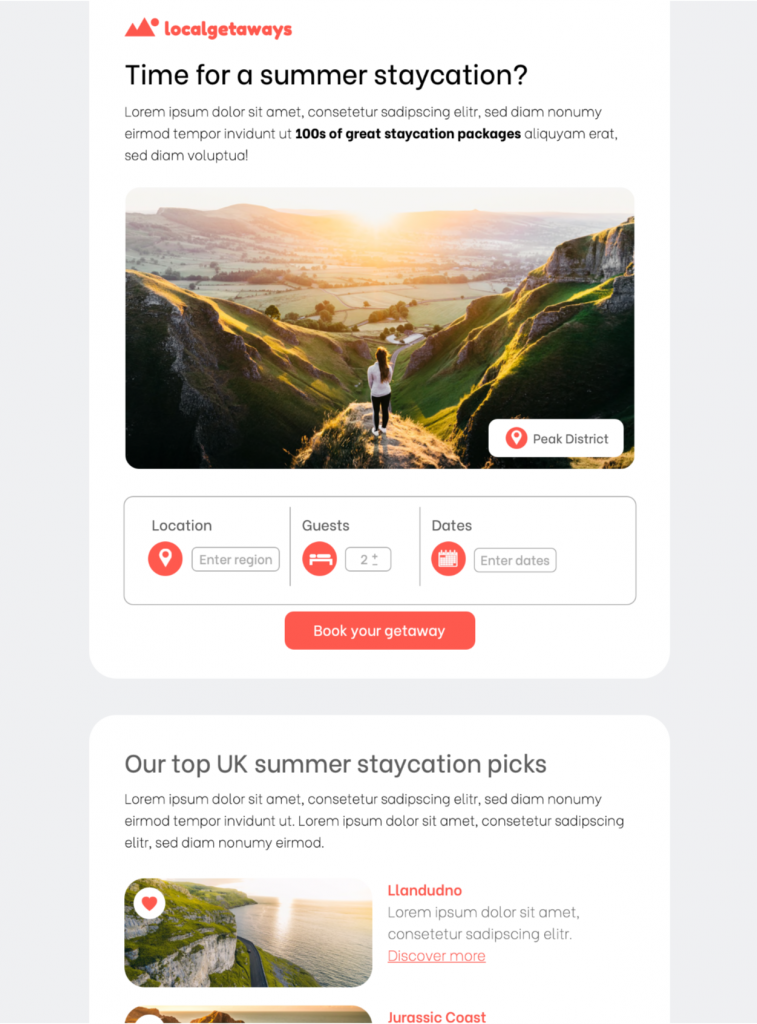
The supplied template uses an airy, image-led travel layout. Replace the sample photos and text with approved local recommendations, then adapt colors, typography, logo, content blocks, and buttons in Mail Designer 365. Keep the destination name, main benefit, and booking action easy to scan.
4. Protect live text, contrast, and image alternatives
Keep dates, prices, locations, and calls to action in readable live text whenever possible. The W3C contrast guidance recommends at least 4.5:1 for normal text and 3:1 for large text. Add concise alternatives to meaningful destination images so the campaign remains useful when images are blocked.
5. Pair the subject line with preview text
Use the subject line for the main local idea or seasonal benefit, then let preview text add a destination, date, price, or availability detail. Avoid repeating the same wording twice and update both fields whenever the offer or booking conditions change.
6. Review the summer staycation email template on mobile
Check the design on a narrow screen and verify the order of destinations, dates, prices, descriptions, and buttons. Send tests to representative inboxes, review with images disabled, and confirm that important actions do not depend on color or hover behavior alone.
7. Test destination, booking, and tracking paths
Open every destination, booking, map, calendar, terms, privacy, and unsubscribe link from the test message. Verify tracking parameters, regional behavior, availability messages, booking totals, and confirmation pages. Archive the approved email with its audience, subject, dates, destinations, links, and final proof so the next campaign starts from a reliable master. Keep the summer staycation email template as a reusable master, then duplicate it for each audience or destination instead of rebuilding the layout.
Works with:







