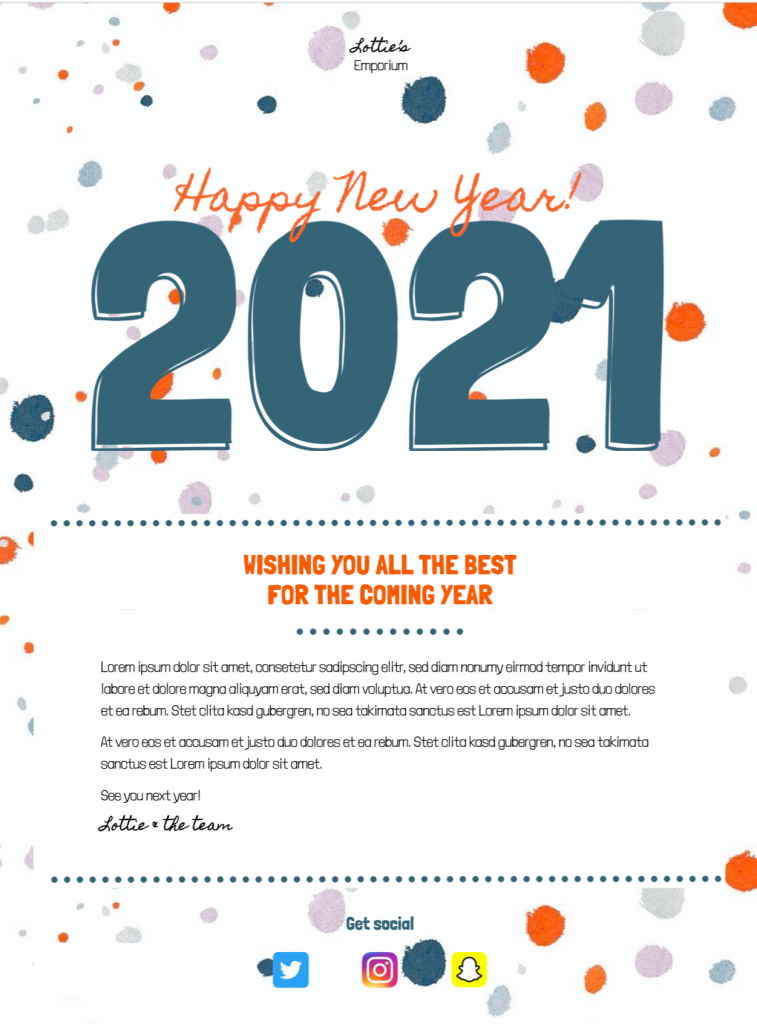
Customize New Year email templates for your audience
These New Year email templates are intended for businesses, associations, shops, and service teams sending customers or members a seasonal message at the turn of the year. It provides a practical starting point in Mail Designer 365 while leaving the wording, branding, links, and campaign details under your control.
Essential information to include
Before sending, check a sincere New Year greeting, a short reflection or thank-you, relevant opening-hour information where necessary, and a forward-looking message appropriate to the relationship. Keep the most important information near the beginning and make every date, condition, address, and destination specific to the recipient’s situation.
Design strengths for this campaign
Effective New Year email templates balance a recognizable seasonal greeting with a clear sender identity. This design uses a seasonal composition that gives the greeting strong visual emphasis without overwhelming the message or obscuring the sender’s identity. Its responsive structure helps the core message remain readable across common screen sizes, while editable content areas make it suitable for a branded campaign.
Customize the template in Mail Designer 365
Use the drag-and-drop tools to adapt the year, greeting, imagery, colors, and typography; add your logo; personalize the salutation; and keep any promotional message secondary to the seasonal purpose. Preview the finished email on desktop and mobile, test every link, and send a proof before delivering the campaign to your audience.
Review the finished email before sending
Read the message once from the recipient’s perspective. Confirm that the sender name is recognizable, the subject and preview text match the content, personalization has a sensible fallback, and the main action leads to the intended page. Check spelling, dates, times, prices, offer conditions, and contact information. A test send should also confirm that the design remains readable when images are blocked and that important information is available as text.
Make the message easy to use
Use descriptive button text, readable type sizes, sufficient color contrast, and concise image alt text. Do not place essential dates, instructions, or offer conditions only inside an image. Keep the reading order logical and avoid several competing buttons. These choices help recipients understand the campaign quickly and make the template more resilient across different email apps and accessibility settings.
Keep the final version focused on one use case and one primary action. Clear information and a recognizable sender are more useful than adding unrelated sections simply to make the email longer.