
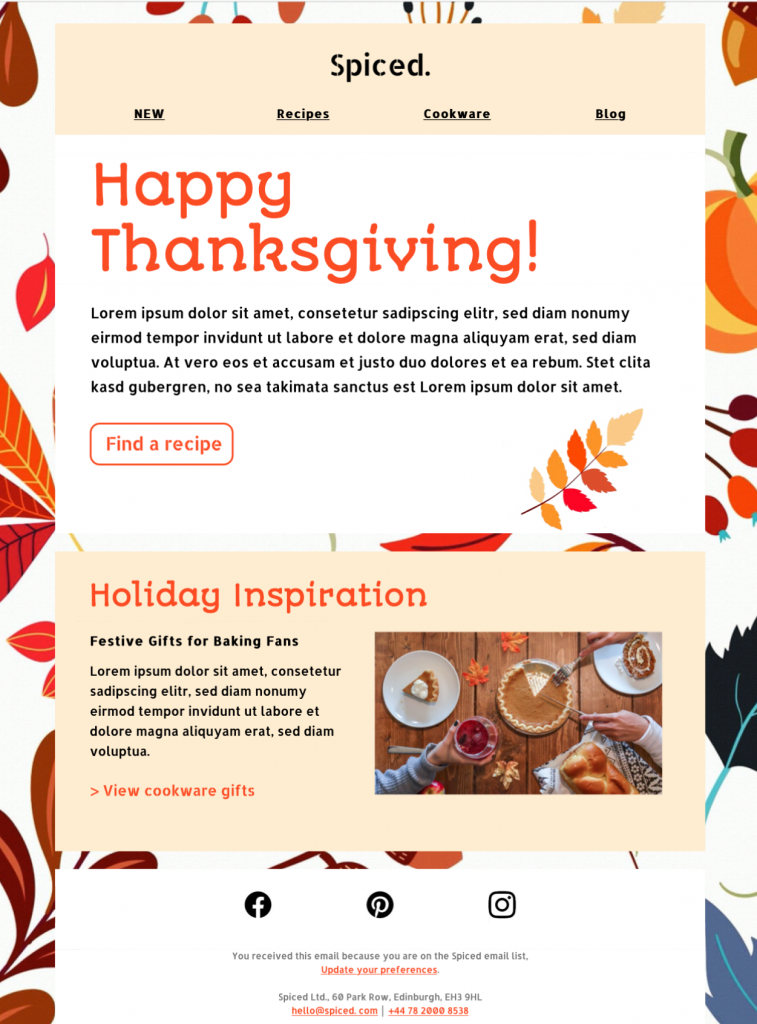
Thanksgiving Email Template for Warm Seasonal Campaigns
This Thanksgiving email template gives retailers, restaurants, local businesses, and community organizations a warm way to thank subscribers and share a seasonal message. The illustrated design combines an autumnal hero image with clear content sections, so you can adapt it for a Thanksgiving sale, customer appreciation message, event invitation, or holiday opening-hours update.
Open this Thanksgiving email template in Mail Designer 365, replace the sample wording and images with your own, and adjust colors, links, and calls to action to match your brand before sending.


Already a Mail Designer 365 user? Open the Design Idea here.
How to customize this Thanksgiving email template
Start by tailoring the headline to the purpose of your campaign. A sincere thank-you works well for customer appreciation, while a concise offer and deadline make the design suitable for a seasonal promotion. Add the practical details readers need, such as dates, opening hours, delivery cutoffs, reservation information, or event times.
Keep the Thanksgiving message useful
Use the main visual to establish the seasonal mood, then keep supporting copy easy to scan on desktop and mobile. Link the primary button to the most relevant destination and test every link before sending. Mail Designer 365 also lets you preview the responsive layout and export or send the finished design through your preferred workflow.
Ideas for different audiences
Retailers can highlight a limited-time offer, restaurants can promote Thanksgiving menus or reservations, and service businesses can thank clients while sharing holiday availability. Nonprofits and community groups can adapt the same layout for donation appeals, volunteer updates, or event invitations without turning the page into a generic holiday article.
What to include before you send
Give readers one clear reason to act and make the next step obvious. For a promotion, include the offer, eligible products, deadline, and any important conditions near the main button. For a restaurant or event email, show the date, location, reservation deadline, and contact details. A customer thank-you can stay simpler, but it should still link to a useful destination rather than relying on a decorative button.
Before publishing your campaign, replace every placeholder, confirm that images have meaningful alternative text, and check the mobile preview. Send a test email to yourself and a colleague so you can verify spacing, links, and the sender information in a real inbox. These final checks help your Thanksgiving email template feel personal and dependable without adding unnecessary copy.
Key Features:
- Sales & Seasonal
- Customise for your business
- Mobile responsive
- Send via your ESP
- Send via your own email address
- Export as HTML
- Use the W3C image decision tree when choosing alt text for seasonal images.
Works with:







