
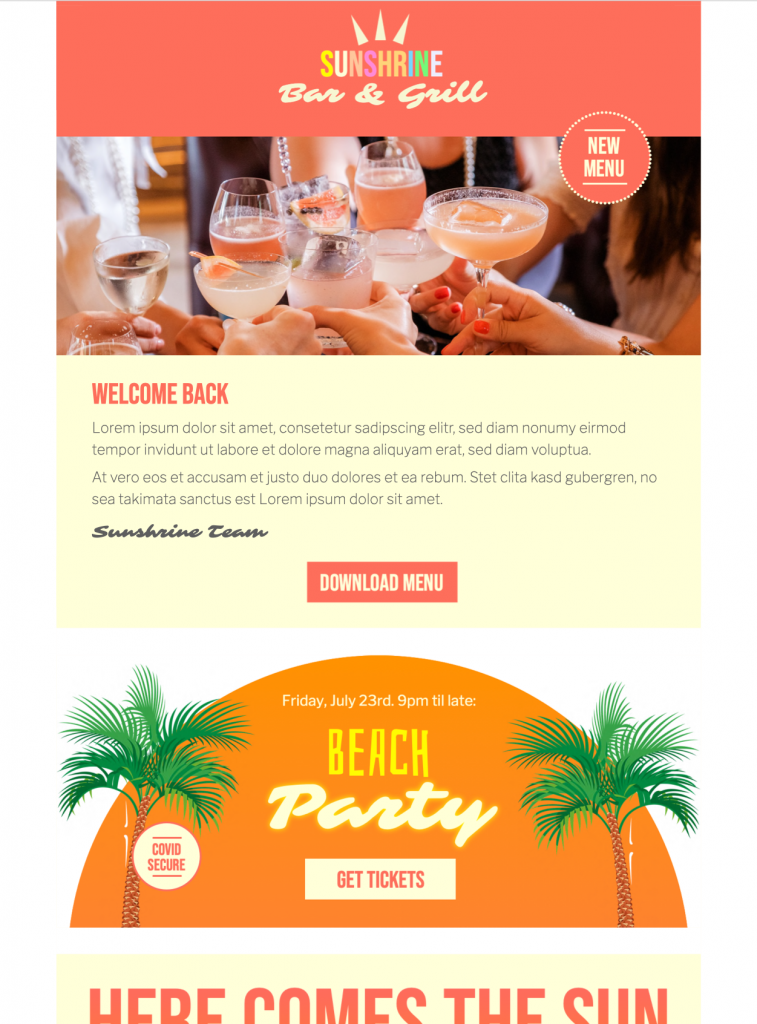
Bar Email Template: 5 Checks for Happy Hour Promotions
Use this bar email template to promote a happy hour, seasonal menu, drinks offer, or restaurant event. Customize the responsive design in Mail Designer 365, then send it through your preferred email workflow.


Key Features:
- Sales & Seasonal
- Premium Template (learn more)
- Customise for your business
- Mobile responsive
- Send via your ESP
- Send via your own email address
- Export as HTML
Works with:








Customize this bar email template for your promotion
This bar email template gives bars, pubs, restaurants, cafés, and hospitality teams a polished starting point for a happy-hour invitation. Replace the sample content with the offer, location, date, and opening hours your guests need, then adapt the colors and imagery to your venue.
Keep the main message in the bar email template easy to scan. Recipients should understand what is being offered, when it is available, and how to visit or reserve a table without searching through the email. If the promotion has restrictions, include them close to the offer rather than hiding them in an image.
What to include in a bar email template
- A specific offer: Use the bar email template to state the discounted drink, menu item, bundle, or event clearly.
- Date and time: Include the day, start time, end time, and time zone when relevant.
- Venue details: Add the correct address and a useful directions or reservation link.
- Eligibility and terms: Explain minimum purchases, participating locations, age restrictions, or exclusions.
- One primary action: Guide readers to reserve, view the menu, get directions, or share the event.
Write a clear subject line and opening
Use a subject line that describes the event rather than relying only on excitement. “Happy hour this Friday from 5–7 PM” is more informative than a vague invitation. Keep preview text useful by adding the venue, featured offer, or reservation detail that does not fit naturally in the subject line.
Open the email with the main benefit and timing. Avoid placing every essential detail inside the hero image, because some recipients block images and screen readers cannot interpret decorative text. Follow the W3C image-alt decision tree when deciding which images need descriptive alternatives. Repeat the offer, time, and primary action as real text in the email.
Adapt the design to your bar or restaurant
In the bar email template, replace the sample image with photography that represents the venue and promotion accurately. Use brand colors for headings, buttons, and accents while maintaining enough contrast for comfortable reading. Short sections and generous spacing make the message easier to review on a phone.
Choose one dominant call-to-action button and use a label that explains the destination, such as “Reserve a table,” “View the happy-hour menu,” or “Get directions.” Confirm that every link opens the correct location page and that telephone numbers and map links work on mobile devices.
Segment and schedule the campaign carefully
Send the campaign to guests who have a legitimate relationship with the venue and have agreed to receive marketing email. Local audience segments can be more useful than a large general list for a time-sensitive bar promotion. If the event is limited to one location, make that clear in both the email and the audience selection.
Schedule the first announcement early enough for guests to make plans, then consider a concise reminder closer to the event. Avoid repeatedly sending the same promotion to recipients who have already reserved or opted out.
Test the happy-hour email before sending
- Preview the desktop and mobile versions.
- Send a test email to more than one email client.
- Check the date, weekday, hours, prices, address, and legal terms.
- Test reservation, menu, map, and unsubscribe links.
- Confirm that important information remains understandable when images are disabled.
After these checks, send the finished bar email template through Mail Designer 365 or export it to the supported email platform used by your venue.