
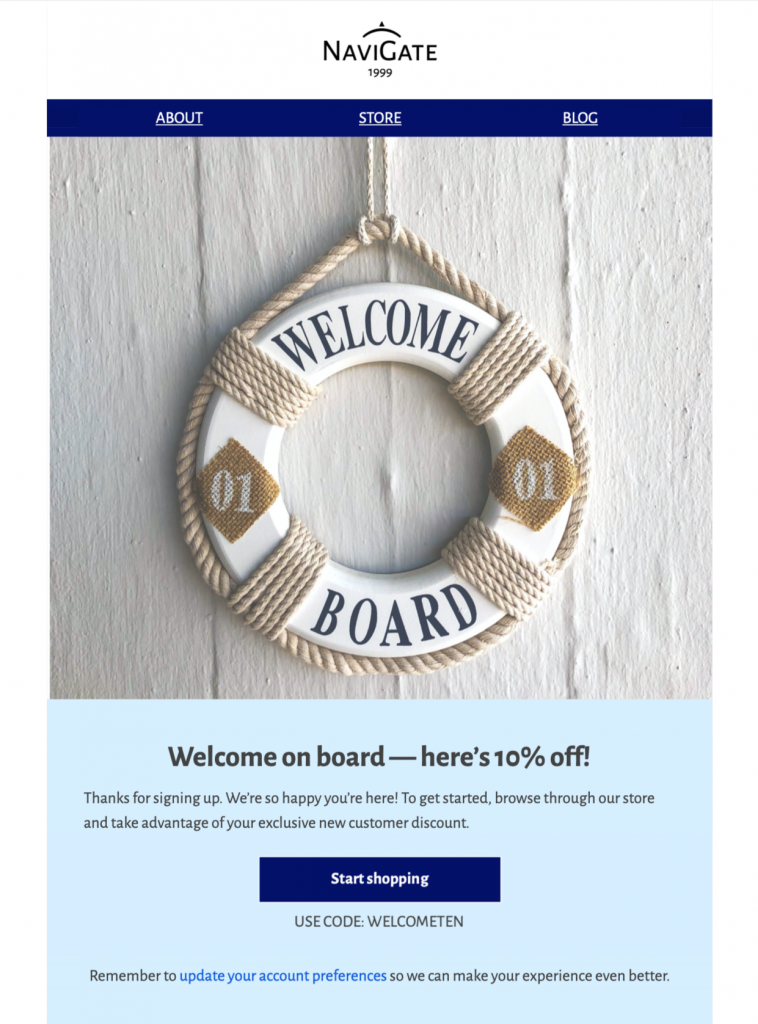
Customize an HTML Welcome Email Template
Use this HTML welcome email template to greet new subscribers or customers with a friendly, nautical-themed design. Customize the introduction, helpful next steps, branding, and call to action in Mail Designer 365, then preview the responsive layout before sending.


Already a Mail Designer 365 user? Open the Design Idea here.
Plan your HTML welcome email template
Use one clear onboarding goal for the message. Welcome a new subscriber, explain what they will receive, and guide them toward the next useful action. That action might be confirming preferences, completing an account profile, downloading a resource, or exploring a product category. Keep the promise in the email consistent with the signup form so readers immediately recognize why the message arrived.
Open with a friendly greeting and a short introduction to your brand. Set expectations for message frequency and content, and provide a visible way to manage preferences. If the email includes an incentive, state the value, eligibility, expiration date, and redemption terms close to the offer. Avoid several competing buttons; one specific call to action such as “Complete your profile” or “Explore your welcome guide” usually gives new readers a clearer path.
Customize and test the welcome email
Replace the nautical sample message and imagery with your own brand colors, logo, product photography, and live text. Keep essential information out of images and write concise alternative text for meaningful visuals. Check color contrast, heading order, link wording, and button size so the design works for keyboard, screen-reader, and mobile users. Mail Designer 365 lets you preview the responsive layout before export or sending.
Personalization should use reliable data and a sensible fallback. If a first name is missing, a neutral greeting such as “Welcome” is better than an empty field. Verify the sender name, reply-to address, physical address, privacy links, and unsubscribe or preference controls. Do not ask for sensitive information by email.
Check the complete onboarding journey
Send test messages to common desktop and mobile inboxes, inspect the preview text, and click every link. Confirm that the landing page matches the email promise and works without requiring unexpected steps. Test any coupon, account activation, or download from beginning to end. Confirm that analytics and campaign labels identify the welcome message correctly. For additional ideas, browse the Mail Designer 365 email templates and review the W3C accessibility design tips.
Key Features:
- Transactional & Automated
- Customise for your business
- Mobile responsive
- Send via your ESP
- Send via your own email address
- Export as HTML
Works with:







