
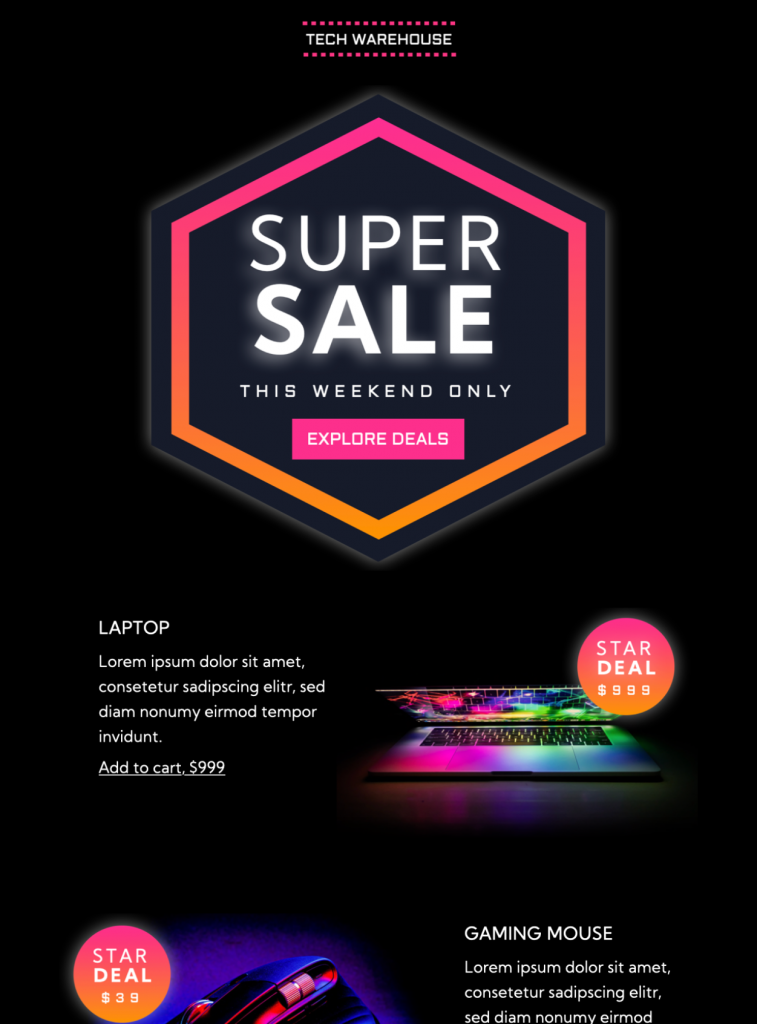
Super Sale HTML Email Template
The super sale HTML email template gives retail and ecommerce campaigns a bold, technology-focused layout for a limited-time promotion. Its dark background, neon pink and orange accents, large sale badge, product sections, price callouts, and Explore Deals button make the offer easy to recognize at a glance.
Customize the Super Sale HTML Email Template
Replace the sample store name, product names, prices, and placeholder text with accurate campaign details. Keep the strongest offer near the top and use the product blocks for a small, intentional selection rather than filling the email with every discounted item. The existing laptop and gaming-accessory examples make the design especially suitable for technology retailers, but the layout can support other product categories when the imagery and copy are updated consistently.
In Mail Designer 365, adjust the colors, type, images, text, and links to match your brand. The dark canvas and bright gradient accents already create strong contrast. If you change that palette, check that the main sale message, prices, and call-to-action button remain easy to read.
Explain the offer clearly
State what is discounted, who can use the offer, and when it ends. Replace the sample weekend-only wording unless that timing is true for your campaign. If different products have different reductions or conditions, show those details beside the relevant item and link to a page with the complete terms.
A clear subject line and preview text should identify the sale without exaggeration. Avoid urgency claims that the landing page cannot support. The email and destination page should show matching prices, availability, currencies, and closing times.
Build focused product sections
Use concise product names, short benefit-led descriptions, accurate prices, and one obvious action for each featured item. Keep image crops consistent so recipients can compare products quickly. When a product is unavailable, replace or remove that block before sending rather than directing readers to an empty page.
The super sale HTML email template works best when its hero offer and product cards support one another. The top section can summarize the campaign, while the lower blocks provide concrete choices. This keeps the email useful for readers who scan only the first screen and for those who continue to the product details.
Check accessibility and mobile layout
Add descriptive alternative text to meaningful product images and do not place essential prices or deadlines only inside graphics. Maintain readable type sizes and strong text contrast on the dark background. Buttons and linked text should be easy to identify without relying on color alone.
Preview the campaign at mobile width and confirm that the sale badge, product names, prices, and buttons remain readable without horizontal scrolling. Keep tap targets separated and avoid long blocks of small text beneath the products.
Test every sale link before sending
Send a test copy and open every product and offer link on desktop and mobile. Verify the subject line, preview text, from name, currency, discount terms, coupon codes, stock information, and expiration time. Confirm that the landing page matches the offer shown in the email.
Review the message after images are disabled and check that recipients can still understand the campaign. Remove placeholder copy, sample prices, and unused links. Once the content and destination pages agree, the super sale HTML email template is ready for scheduling.
Plan the send early enough for recipients to act before the deadline. If the sale spans several days, use follow-up messages only when they add useful information, such as a genuine closing reminder or an updated product selection. Keep each message consistent with the same offer terms.
After scheduling, retain a final test copy for reference. It provides a record of the prices, links, and wording that recipients received and makes later campaign review more reliable.


Key Features:
- Sales & Seasonal
- Customise for your business
- Mobile responsive
- Send via your ESP
- Send via your own email address
- Export as HTML
Works with:







