
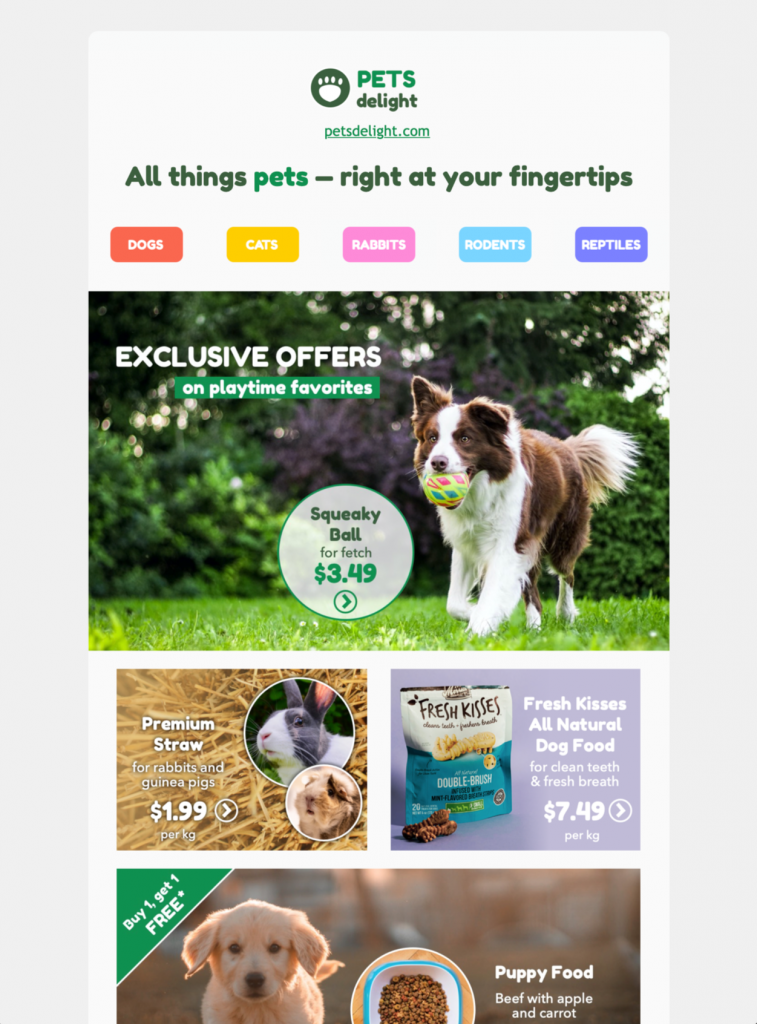
pet email template for shops and animal care

Pet Email Template for Shops and Animal Care

This pet email template helps pet shops, groomers, shelters, and animal-care brands present products or services in an eye-catching ecommerce layout. Exclusively available in Mail Designer 365—sign up free today to get started.

Edit email design in Mail Designer 365

See all Mail Designer 365 email templates

Key Features:

  • Sales & Seasonal
  • Customise for your business
  • Mobile responsive
  • Send via your ESP
  • Send via your own email address
  • Export as HTML

Works with:

Mailchimp logo

campaign monitor logo

sendinblue logo

drip logo

direct mail logo

Mailjet logo

mailerlite logo

activecampaign logo

Plan a pet email template around one audience need

Decide whether the campaign should promote products, announce grooming availability, share adoption information, explain a care service, or invite customers to an event. Lead with the most useful benefit and use one prominent button that takes readers to the matching shop, booking, donation, or information page.

Present products and services accurately

Use clear names, current prices, availability, sizes, ingredients or materials, delivery timing, and relevant restrictions. For appointments, state the service area, duration, preparation requirements, cancellation policy, and how customers can book. Avoid health or performance claims that are not supported.

Customize the animal-care design

Replace the sample logo, colors, photography, sender details, button label, and destination with your own brand elements in Mail Designer 365. Keep essential details as live text rather than placing them only inside images. Use photographs that match the promoted animals, products, and services.

Write responsibly for pet owners

Use a helpful tone and distinguish general product information from veterinary advice. If content relates to nutrition, medicine, behavior, or animal welfare, direct readers to qualified professionals or authoritative guidance where appropriate. Segment the list by species, location, service interest, or purchase history when it improves relevance.

Test accessibility and campaign details

Use readable type, sufficient contrast, descriptive links, and meaningful image alternatives following W3C accessibility guidance. Preview mobile and desktop layouts, send a proof, open every link, and verify prices, appointment details, tracking parameters, sender information, legal footer, preference controls, and unsubscribe link. Browse more Mail Designer 365 email templates if another layout better fits the campaign.

Keep the destination consistent

Confirm that the landing page uses the same product names, prices, service details, availability, and promised benefit as the email. Keep the destination available for the full campaign period and provide a clear contact route for order, booking, adoption, or accessibility questions.

Privacy Settings / Datenschutz-Einstellungen









