
Book Promotion Email Template: 5 Launch Tips
Start using this HTML email template today in Mail Designer 365
Exclusively available in Mail Designer 365! Announce a new book or product launch with this exciting email design. Sign up free today to get started.


Key Features:
- Sales & Seasonal
- Customise for your business
- Mobile responsive
- Send via your ESP
- Send via your own email address
- Export as HTML
Works with:








This book promotion email template helps authors, publishers, agencies, educators, and content teams introduce an eBook or print title with a clear visual hierarchy and focused call to action. Customize the design for a launch announcement, preorder, limited-time offer, lead magnet, or reader follow-up.
Choose the audience and campaign goal
Decide what success means before editing the template. A launch campaign may ask readers to buy the book, a lead-generation campaign may offer a free download, and an existing-customer campaign may promote a related guide. Use one primary action and make it obvious in the headline, copy, and button.
- Authors: Introduce the promise of the book and add a brief, credible author note.
- Publishers: Highlight the category, release date, formats, retailers, and review information.
- Businesses: Explain the practical problem the eBook helps solve and what readers will learn.
- Educators and nonprofits: State the intended audience, topic, access conditions, and permitted use.
Customize the book promotion email template
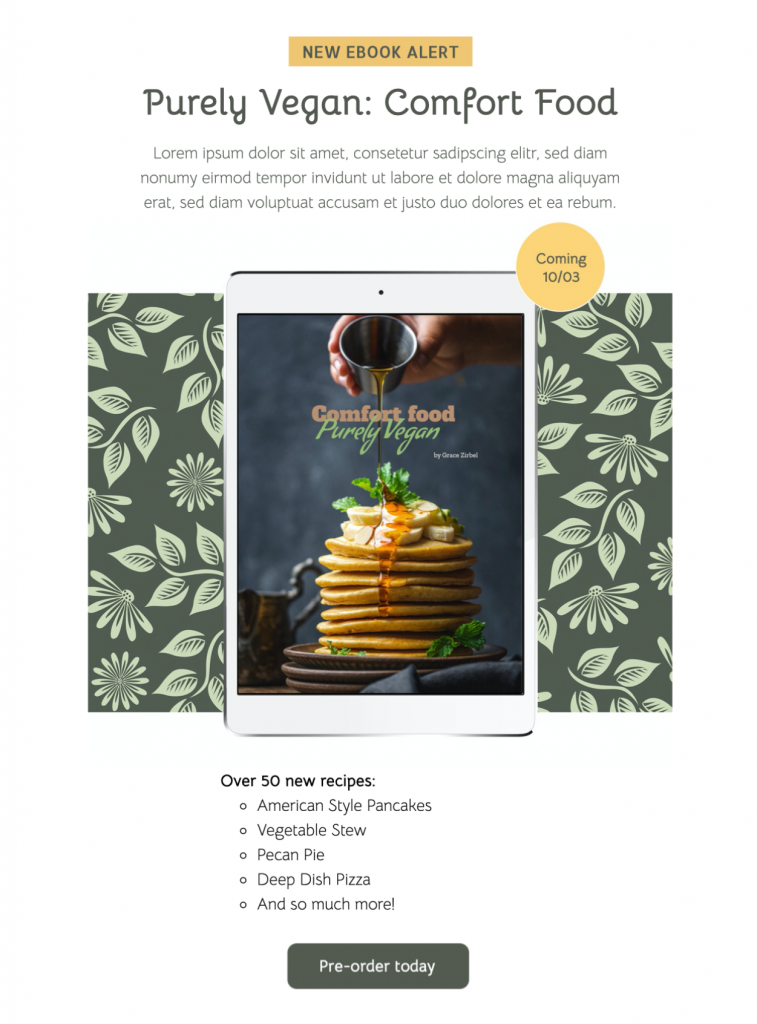
Replace the sample cover with the final approved artwork and keep the title readable at mobile size. Add a concise description, publication or availability date, price when relevant, and one or two proof points. If you use a testimonial, award, ranking, or sales figure, confirm that it is accurate and can be substantiated.
Use a specific button label such as “Buy the eBook,” “Read a sample,” “Preorder the book,” or “Download the guide.” Link directly to the matching destination rather than a general homepage. If the book is available from several retailers, consider one landing page that lists the choices without crowding the email with competing buttons.
Plan a useful eBook launch sequence
The template can support more than one stage of a launch, but each email should have a distinct job. An announcement can introduce the topic and date. A second message can share a sample chapter or author interview. A launch-day email can lead directly to purchase or download, and a later follow-up can ask readers for feedback.
Avoid sending the same message repeatedly. Change the angle and segment recipients by their relationship to the title. Existing customers may need a practical use case, while new subscribers may need more context about the author or organization.
Accessibility and mobile design
Keep the book title, value proposition, price, and call to action as live text rather than placing them only inside the cover image. Use meaningful alternative text for the cover and other informative images. Maintain strong contrast, a logical heading order, and descriptive link text. Review the W3C image accessibility guidance for practical alt-text examples. Do not rely on color alone to distinguish formats, availability, or discounts.
Preview the book promotion email template on a narrow screen. Check that the cover does not dominate the first view, paragraphs remain short, and the primary button is easy to tap. If you include several quotes or benefits, place the most persuasive one first and keep secondary material below the main call to action.
Test links, delivery, and claims
Send proofs to reviewers who know the title and campaign. Verify the spelling of the author name, title, subtitle, publication date, price, discount deadline, retailer links, tracking, and reply-to address. Test the destination page on mobile and confirm that a free download or sample can actually be accessed.
Preview the email in common desktop and mobile inboxes, including dark mode where possible. Check the version with images disabled so the live copy still communicates the offer. If personalization is used, supply a sensible fallback and test it with representative records.
Avoid keyword overlap with other book pages
This page owns the customizable book promotion email template intent. General book-marketing strategy, lists of launch examples, subject-line collections, free-download delivery emails, and unrelated product-launch templates should remain separate pages. Keeping the focus narrow helps readers and search engines understand which need this design addresses.
Customize this book promotion email template in Mail Designer 365, then send a proof with the final cover, copy, and links before launch.