
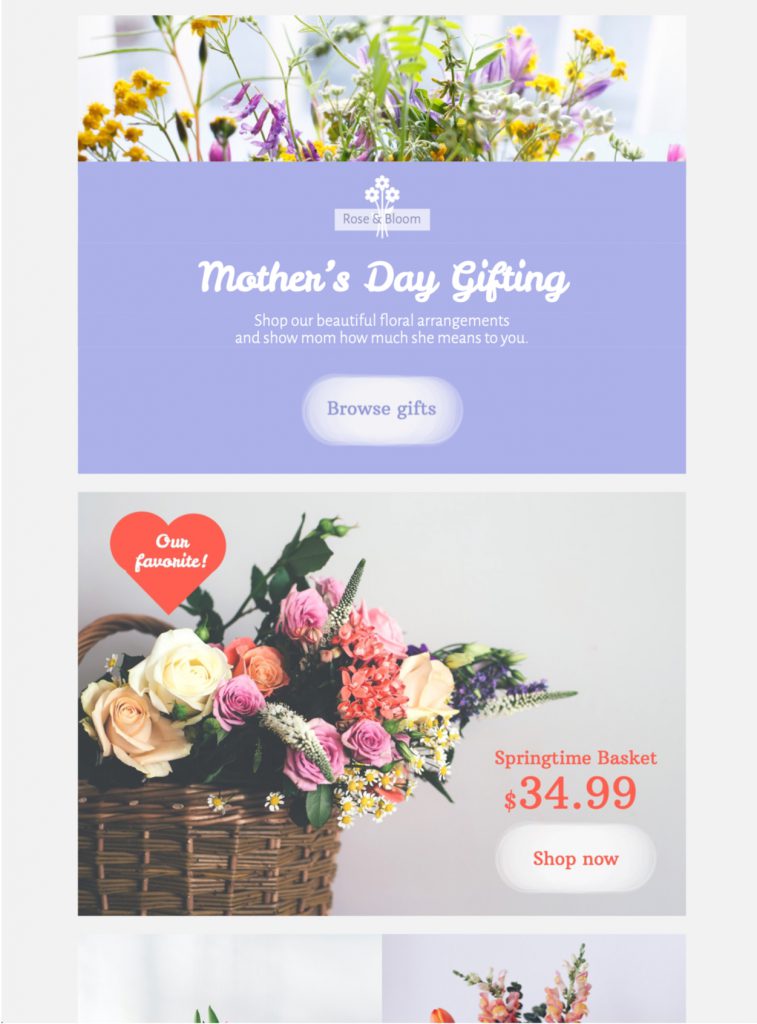
Start using this Mother's Day email template today in Mail Designer 365
Exclusively available in Mail Designer 365! Promote your Mother's Day gift range with help from this charming pastel HTML email template. Sign up free today to get started with this Design Idea.

Already a Mail Designer 365 user? Open the Design Idea here.
Key Features:
- Sales & Seasonal
- Customise for your business
- Mobile responsive
- Send via your ESP
- Send via your own email address
- Export as HTML
Works with:








Mother's Day Email Template
Customize this Mother's Day email template
This charming pastel Mother's Day email template gives retailers, restaurants, service businesses, nonprofits, schools, and community organizations a flexible starting point for a thoughtful seasonal message. Use the design to share a curated offer, invite readers to an event, thank customers and supporters, or present a simple way to celebrate the mothers and caregivers in their lives.
Plan the message around one audience
Define who should receive the campaign before adapting the sample copy. Existing customers may respond to a loyalty benefit or early access, while new subscribers may need more context about the brand. Restaurants and hospitality teams can focus on reservations or packages. Schools and nonprofits can use the layout for appreciation, fundraising, or community events. A clear audience makes the headline, imagery, and call to action easier to choose.
Mother's Day can also be sensitive for some recipients. If it fits your audience and email program, offer a preference option before the campaign so subscribers can pause Mother's Day messages. Use inclusive language where appropriate and avoid assumptions about family structure.
Adapt the pastel design in Mail Designer 365
Replace the sample logo, headline, images, and supporting text with approved assets. The soft color palette can complement flowers, food, wellness, fashion, home products, or an appreciation message, but it can also be adjusted to your brand colors. Keep enough contrast between text and backgrounds, make buttons easy to identify, and use descriptive alt text for meaningful images.
Choose one strong hero image and let the live text explain the essential offer or event details. Avoid placing prices, dates, discount codes, or booking information only inside artwork. Readers who block images and people using screen readers should still understand the purpose of the email and where the primary link leads.
Campaign ideas for this Mother's Day design
- Share a concise seasonal collection with one primary shopping link.
- Promote a restaurant reservation, brunch, workshop, or local event.
- Offer a service package, appointment, or digital gift option.
- Send a warm appreciation message to customers, members, or volunteers.
- Invite donations or participation in a community initiative.
Write clear seasonal copy
Lead with the practical value of the campaign rather than a generic greeting alone. If an offer has a deadline, state the date and time zone. Confirm prices, availability, shipping cutoffs, collection times, reservation details, exclusions, and redemption rules. Button labels such as “View the collection,” “Reserve a table,” or “Join the event” set a clearer expectation than a vague “Learn more.”
Use the subject line to identify the real reason for the email and the preheader to add a useful detail. The inbox promise should match the first visible section of the design. Avoid unsupported urgency and review the tone with someone who understands the audience.
Test the Mother's Day email before sending
Preview the Mother's Day email template at desktop and mobile widths, then send test messages to the email clients your recipients use most. Check headline wrapping, image crops, button size, color contrast, link destinations, and the visibility of any conditions. Verify the sender name, reply address, subject line, preheader, contact information, unsubscribe link, and tracking parameters.
Review every date, price, code, and destination page shortly before scheduling. If the campaign supports reservations, delivery, or an event, confirm capacity and deadlines. Make sure the landing page uses the same offer language as the email so readers receive a consistent experience after clicking.
How this template stays distinct
This page owns the general Mother's Day email template intent. Separate landing pages continue to serve a dedicated Mother's Day promotion, gifting design, and flower-sale use case, while editorial articles cover campaign ideas and broader best practices. Keeping those purposes distinct reduces keyword overlap and helps readers choose the most relevant design or guide.
Ready to create the campaign? Edit the template in Mail Designer 365, replace the sample message with your verified Mother's Day content, and send a tested version to your audience.