Email templates for schools and universities help education teams communicate clearly throughout the academic year. Summer is drawing to a close and for many, this signals the return to school or university. Especially in the education sector, strong communication is important the whole year round.
To help you build up an effective email strategy for your institution, we've added four brand new Design Ideas for education to the Design Chooser. Start editing them today!
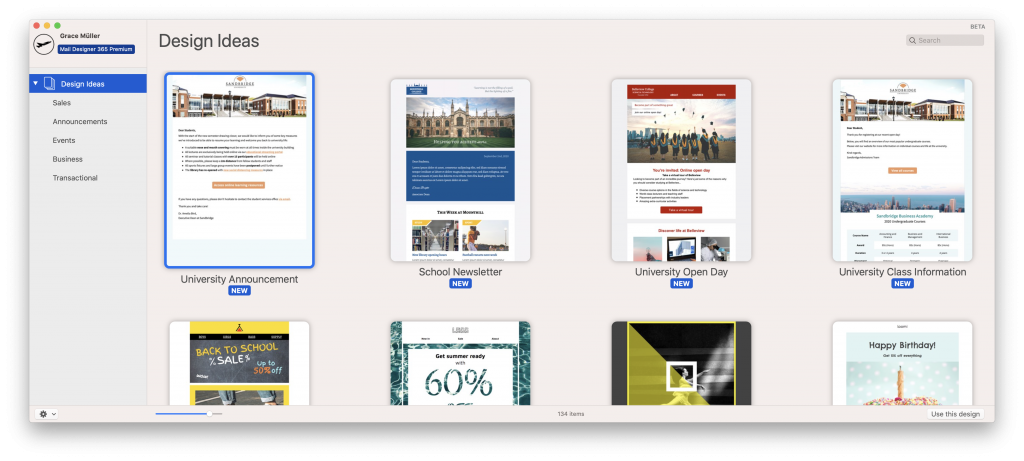
Back to School Announcement Email Template
Use this clear and well-arranged layout to communicate your most important back to school messages to staff and students in style. This Design Idea is perfect for announcing new changes, welcoming back students, and sharing important news.
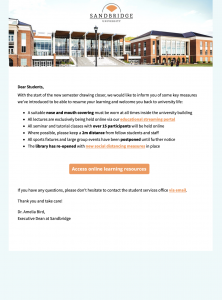
Key features:
- Clean, well-organised design
- List layout for presenting key information
- Call-to-action (CTA) to link to resources and further information
Open in Mail Designer 365 or try it now for free.
School Newsletter Email Template
Pique your students' interest with a regular email newsletter for your latest news stories and announcements. This elegant Design Idea is great for schools as well as colleges, universities and other educational institutions.
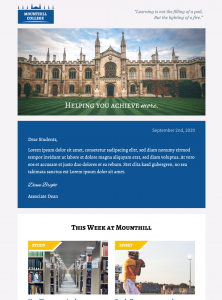
Key features:
- Make it your own: Integrate your school colors and logo
- Space for your personalised greeting
- Magazine style layout for your most important stories and updates
Open in Mail Designer 365 or try it now for free.
University Open Day Email Template
If you have a major event coming up and want to promote your school or university to potential new students, this bold email template is the place to start.
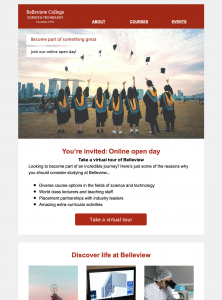
Key features:
- Captivating design: great for promoting your school or university
- Bold CTA (call to action) button for signing up to your event
- Use the combi layout to list more benefits of your institution
Open in Mail Designer 365 or try it now for free.
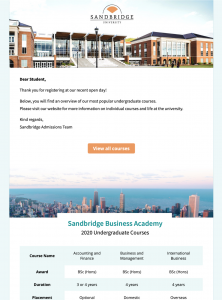
University Class Information Email Template
A modern table layout helps you clearly present key details about a course, class, study program, or timetable in your next email. This Design Idea is exclusively available in Business Premium plans. Learn more.
Key features:
- Clean, clear-cut email design for presenting information
- Mobile responsive tables (Business Premium) help the reader process and compare course details
- Vibrant buttons clearly direct the reader to more information
Open in Mail Designer 365 or try it now for free.
More Great Resources for Educators
Mail Designer 365 is the perfect communication solution to help you welcome new students, update faculty members, stay in touch with alumni and promote your educational institution. Learn more about Mail Designer 365 for Education.
Until next time,
Your Mail Designer 365 Team
Educational email templates for clear school communication
Educational email templates give schools, colleges, and universities a reliable starting point for messages that students, families, faculty, and alumni can understand quickly. The four designs below cover announcements, newsletters, events, and fundraising, while leaving room for each institution's branding and voice.
Start by choosing the audience and one action for the message. A back-to-school announcement might direct families to a handbook, while an alumni campaign may invite graduates to register or donate. Keeping one primary call to action makes the email easier to scan and measure.
How to customize email templates for schools and universities
Replace every sample headline, image, date, and link before sending. Apply your official colors and logo consistently, but keep strong contrast between text and backgrounds. Use short paragraphs, descriptive headings, and button labels that explain the destination, such as “View the academic calendar” or “Register for open day.”
- Schools: Share term dates, classroom updates, parent information, and emergency notices.
- Universities: Promote admissions events, campus services, research news, and alumni programs.
- Departments: Adapt the same design system for faculty news, clubs, athletics, or fundraising.
Accessibility and mobile checks for education emails
Many recipients will open institutional email on a phone. Preview the design at mobile width, check that buttons are easy to tap, and keep essential information in live text instead of embedding it only in an image. Add meaningful alternative text to informative images and leave purely decorative images with an empty alt attribute. Avoid tiny type, low-contrast color combinations, and vague links such as “click here.”
Educational email templates should also work for people using assistive technology. Use a logical heading order, write descriptive link text, and do not rely on color alone to communicate deadlines or status. If a message contains a timetable or complex policy, link to an accessible web page or document as well.
Test each school or university email before sending
Send a proof to colleagues who represent the intended audience. Check names, dates, tuition or event details, every link, the reply-to address, and the sender identity. Preview the message in common desktop and mobile inboxes, including dark mode where possible. Confirm that personalization has a sensible fallback and that the unsubscribe and institutional contact details are present.
For campaigns sent to different groups, create separate segments instead of placing every announcement in one long newsletter. Students, parents, prospective applicants, faculty, and alumni usually need different subject lines and calls to action. This makes educational email templates more relevant and helps engagement reporting show which message actually worked.
Build a reusable education email system
After customizing a design, save approved header, footer, typography, and button styles for future campaigns. A reusable system speeds up weekly newsletters and urgent notices while reducing inconsistencies. Keep the purpose of this page distinct from individual back-to-school or event templates: it is the broad collection for ongoing school and university communication.
Create educational email templates with Mail Designer 365, then test the finished campaign with real content before sending it to your community.
Get started with Mail Designer 365 today