
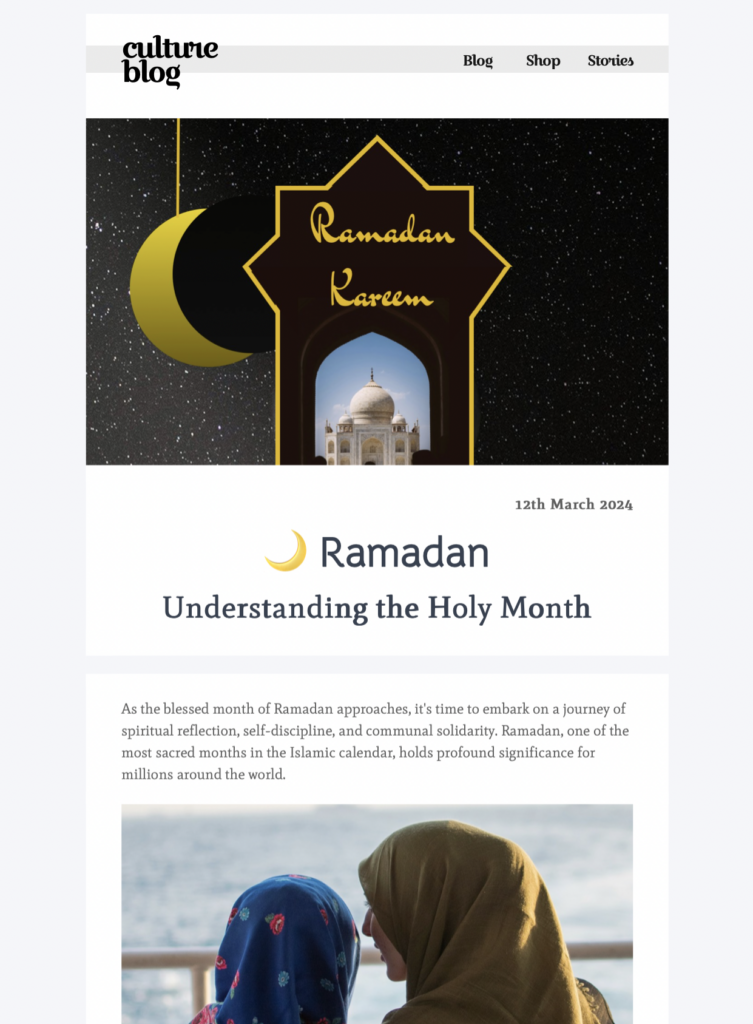
Exclusively available in Mail Designer 365! Use this Ramadan email template to educate subscribers about the history and origin of the Islamic Holy Month.
Key Features:
- Edit on your Mac – from macOS 10.13
- Seasonal greeting template
- Customise for your business with drag & drop editor
- Mobile responsive design
- Send to your audience via Mail Designer 365
- Cross platform collaboration with Crew Chat
Who this Ramadan email template is for
This design is intended for organizations that want to share a thoughtful Ramadan message or educational campaign. Community groups, schools, charities, cultural organizations, employee teams, retailers, restaurants, and service businesses can adapt it to their audience and purpose. Before sending, decide whether the email is primarily a greeting, an event invitation, an educational message, a donation appeal, or a practical announcement.
Respectful context matters more than decorative styling. Involve a knowledgeable colleague, community member, or subject specialist when you are writing for an audience whose traditions you do not share. Avoid treating Ramadan as a generic seasonal promotion, and make sure commercial offers are appropriate for your recipients and brand relationship.
Customize the Ramadan email template with care
Replace the sample copy with information that is accurate for your campaign. If you are announcing an iftar, fundraiser, schedule change, community program, or charitable initiative, include the date, time, location, registration requirements, accessibility information, and a clear contact. Ramadan follows the Islamic lunar calendar, and observance dates can vary by location and moon-sighting practice, so confirm dates with an authoritative local source before sending.
Choose greetings that fit the sender, audience, and timing. “Ramadan Mubarak” and “Ramadan Kareem” are widely recognized, but language preferences can differ. A sincere plain-language message may be more suitable than an elaborate greeting. Do not make assumptions about whether every recipient is fasting or how they observe the month.
Ramadan email template design and accessibility guidance
The template provides a calm visual foundation that you can align with your organization’s colors and imagery. Preserve strong contrast between text and background, keep paragraphs concise, and use clear headings. Avoid using culturally significant symbols as decoration without understanding their meaning. If you add photographs, secure appropriate permission and choose images that reflect the campaign honestly.
Keep essential details as live text rather than placing them only inside an image. Add descriptive alternative text to informative images, use meaningful link labels, and make buttons large enough to tap on a phone. Check the smartphone preview for headline wrapping, spacing, image cropping, and the order of content.
Ramadan email template campaign use cases
You can adapt the layout for a community iftar invitation, adjusted business hours, charitable giving campaign, educational resource, employee message, school program, restaurant menu, or a considered customer greeting. If the campaign includes donations, explain who receives the funds, how they will be used, and whether any deadline applies. If it includes an event, clarify capacity and registration status.
For a greeting email, keep the message warm and concise. For an educational campaign, cite or link to reliable resources and review factual claims. For commercial content, lead with relevance and transparency rather than urgency. A respectful subject line and preheader should state the purpose without stereotypes or exaggerated promises.
Check the Ramadan email template before sending
Send test messages to colleagues or reviewers and check desktop and mobile versions. Verify the sender name, reply-to address, subject, preheader, dates, time zone, names, transliterations, event details, donation links, prices, and legal footer. Click every link and confirm that it reaches the intended page with the expected tracking parameters.
Review the email with images disabled and confirm that its meaning and action remain clear. Check alternative text, color contrast, keyboard-readable links, and whether the message still feels respectful outside its visual design. If the email represents a community or partner organization, obtain final approval from the relevant owner.
A clear role in the Ramadan content cluster
This page owns the specific Ramadan email template intent: a customizable design in Mail Designer 365. Separate pages about Ramadan greeting wording, campaign examples, newsletters, historical background, or general religious-holiday marketing should keep their own primary keywords. That separation prevents overlap and helps each resource answer one distinct question.