
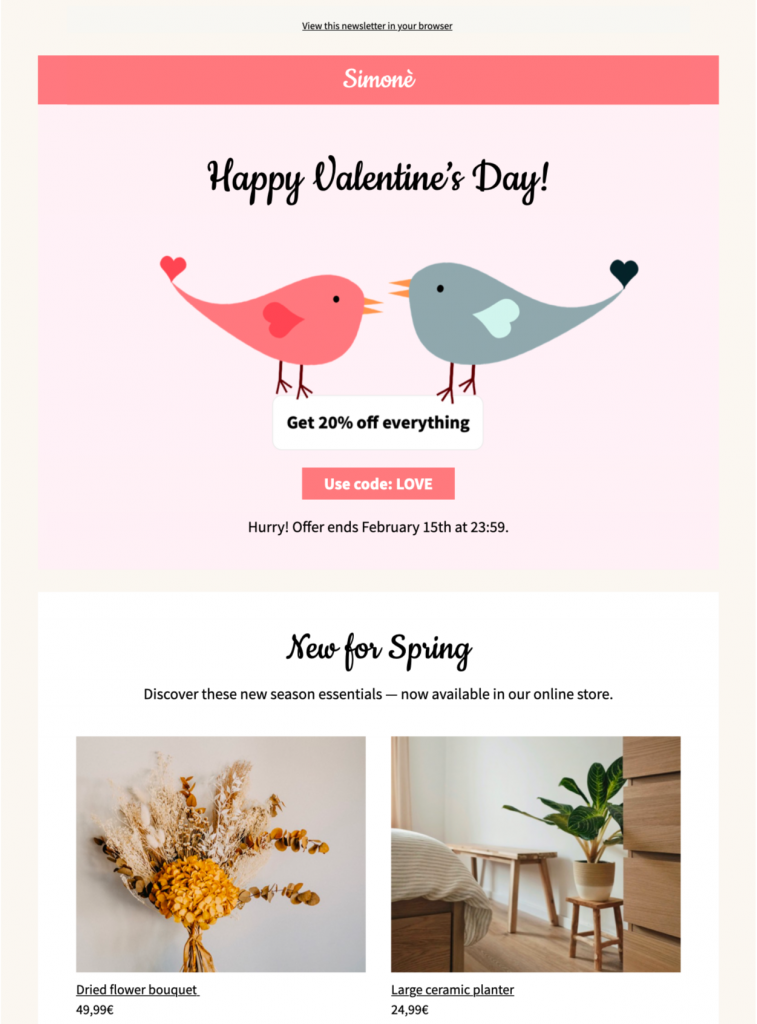
Use this Valentine HTML template to present a seasonal offer with clear terms, a focused call to action, and a warm lovebird design. Customize the message, imagery, products, colors, and links in Mail Designer 365, then verify the complete customer journey before sending.
Build a clear Valentine's Day offer
Decide whether the campaign promotes a percentage discount, fixed saving, gift with purchase, bundle, event, or limited collection. State the exact products or categories included, currency, minimum spend, promotion code, start and end time, time zone, availability, and exclusions. If stock or prices may change, compare the email with the live destination shortly before sending.
The lovebird preview gives the message a warm seasonal focal point while leaving room for a concise offer and direct action. Replace its sample copy and product details with approved campaign information rather than relying on the artwork to explain the promotion.
Customize the Valentine HTML template
Adapt the colors, typography, imagery, spacing, and call-to-action wording in Mail Designer 365 so the design fits your brand and offer. Keep the primary benefit and deadline easy to scan, and use descriptive button text such as “Shop the Valentine's Day offer” instead of a generic “Click here.”
Add concise alternative text for meaningful images. Keep the offer value, product names, code, date, price, and legal conditions as live text so the message remains understandable when images are blocked.
Segment without duplicating the campaign
Choose an audience that is eligible for the promotion and has a reasonable relationship with the product. If different customer groups need different recommendations, make controlled copies of the Valentine HTML template and vary only the relevant products, opening line, or destination. Preserve the same verified terms wherever the offer itself is unchanged.
Use inclusive language that does not assume every reader celebrates Valentine's Day in the same way. A self-care, friendship, appreciation, or gift-focused angle can broaden the campaign while preserving its commercial purpose.
Test accessibility and the purchase journey
Use readable type, sufficient contrast, logical content order, and descriptive links. The W3C accessibility guidance for designers provides a useful pre-send reference. Preview the message on desktop and mobile with images enabled and blocked.
Test every product, category, privacy, unsubscribe, and offer link. Where practical, complete the customer journey through the destination or checkout to confirm the code, price, inventory, delivery promise, and expiration details match the email.
Archive the approved Valentine campaign
Keep the final Valentine HTML template with its audience, offer terms, approvals, test results, and destination URLs. That record provides a verified starting point for a future seasonal campaign without carrying forward an expired code or deadline.
