
Holiday newsletters give retailers a direct route from the inbox to the checkout during Black Friday, Cyber Week, and the wider 2026 holiday season. With Mail Designer 365, you can design, schedule, and send campaigns that make the offer clear, work on mobile, and give every featured product a direct path to purchase.
This guide combines practical holiday email design advice with a concrete 2026 Black Friday sending plan, segmentation ideas, and a pre-send checklist.
Jump to section:
- Why Holiday Newsletters Matter
- Key Holiday Sales Occasions
- How to Design a Sales Email That Converts
- Black Friday Email Sending Strategy
- Stress-Free Holiday Newsletters with Mail Designer 365
- Holiday and Black Friday Email FAQ
- Holiday Email Marketing Checklist
- Professional Email Design Service
- Try Mail Designer 365 free
Why Holiday Newsletters Matter
Email marketing remains one of the most effective ways to reach customers during the holiday season. Studies show that Black Friday and Cyber Week email campaigns often generate some of the highest ROI for retailers. Creating effective holiday newsletters to reach customers early in their inbox ensures your offers are seen before the competition.
To maximize results, consider:
-
- Segmenting your audience for personalized promotions
- Writing benefit-driven subject lines to improve open rates
- Optimizing send times to match your audience’s behavior
By following a strategic approach, your holiday newsletters can boost engagement and increase revenue during the busiest shopping period of the year.
Holiday Sales Occasions: From Black Friday to Christmas
The holiday season is packed with opportunities to connect with customers and boost sales — if you plan your campaigns strategically. Here’s a breakdown of key occasions to target with high-impact holiday newsletters:
Black Friday
Kick off the holiday shopping frenzy with attention-grabbing campaigns. Emails highlighting limited-time deals, exclusive discounts, or early-bird offers perform especially well. Timing is everything: schedule your emails ahead to land in inboxes before the competition.
Cyber Week
Following Black Friday, Cyber Week keeps the momentum going. Focus on urgency-driven promotions and digital deals. Personalized emails based on previous purchases or browsing behavior can significantly increase conversions.
Small Business Saturday & Giving Tuesday
Highlight the unique value of small businesses or special charitable promotions. These days offer a chance to engage with customers who are motivated by supporting local businesses or giving back, adding a personal touch to your holiday newsletters.
Christmas & Holiday Countdown
As the season progresses, festive-themed emails and gift guides can drive sales. Countdown campaigns reminding customers of shipping deadlines or limited-stock items create urgency and encourage last-minute purchases.
Post-Holiday / New Year Promotions
Even after Christmas, the holiday shopping period isn’t over. Encourage gift card redemptions, post-holiday deals, and early promotions for the New Year to keep customers engaged.
With careful planning and well-designed emails, each of these occasions can be a high-impact opportunity to connect with your audience and maximize sales. Using tools like Mail Designer 365 lets you prepare holiday newsletters ahead of time, schedule them strategically, and get results.
How to Design a Sales Email That Converts
A strong sales email should answer three questions immediately: what is the offer, why is it valuable, and what should the reader do next? Design the first mobile screen around those answers before adding decorative elements.
Put the primary CTA above the fold
Place one clear action near the top of the email so readers do not have to scroll to find the next step. Use specific button copy such as “Shop the Black Friday sale” or “Save 25% today” instead of a vague “Click here.” Repeat the same primary action after a longer product section, but do not introduce competing actions in the opening area.
Use a live-text button
Build the CTA as a text button rather than baking the words into an image. Live text remains readable when images are blocked, scales more reliably across email clients, and makes the action easier to identify. Give the button strong color contrast and enough space around it for comfortable tapping. Mail Designer’s text buttons and badges are designed for this job.
Make the offer unmistakable
State the discount or benefit in the headline and repeat any essential conditions nearby: the end date, eligible products, minimum order, or shipping restriction. Real HTML text is the best option. If important wording appears in a promotional image, repeat it as real text and add concise alt text that describes the image accurately. The customer should still understand the offer when images are turned off.
Design mobile first
In Adobe’s 2025 holiday ecommerce analysis, 56.4% of US online transactions took place on smartphones. Start with a single-column mobile layout, short paragraphs, comfortably sized type, and buttons that are easy to tap. Preview the subject line, preheader, opening offer, CTA, product cards, and checkout links on a narrow screen before refining the desktop version.
Link every featured product
Do not make shoppers hunt for an item after it catches their attention. Link each product image, product name, price or offer line, and product-specific button directly to the relevant product page. Use the same destination and consistent tracking parameters across those elements, and remove any placeholder or outdated links before sending.
Black Friday Email Sending Strategy for 2026
Black Friday falls on Friday, November 27, 2026. Treat the date as the peak of a campaign sequence rather than the first time customers hear about your offer.
When to send Black Friday deals
Begin planning and testing six to eight weeks before Black Friday. In early November, introduce gift guides, wish lists, early access, bundles, or free-shipping offers. Reserve the strongest urgency for Black Friday weekend so subscribers still have a reason to open later messages.
Klaviyo’s 2026 Black Friday sending guide reports that 9–10 a.m. ET was its customers’ busiest marketing hour on Black Friday 2024, with more than 420 million messages sent; order volume then peaked at 1.3 million orders between noon and 1 p.m. ET. This is a useful planning reference, not a universal winning hour. Schedule by each recipient’s local time where possible and test morning, midday, and evening sends against clicks, conversions, and revenue per recipient.
Do not ignore the weekend. Mailchimp’s 2025 peak-season analysis found that its customers’ email and SMS order rates were about twice as high on weekends as on weekdays, while weekend send volume was roughly 60% lower. That makes a well-targeted Saturday or Sunday campaign a worthwhile test.
How often to send
Build frequency gradually. A practical starting cadence is one useful campaign per week in early November, two or three messages in the final week, and a segmented sequence across Black Friday itself. Klaviyo Academy’s BFCM daily sending guide uses three Black Friday emails as a reference plan:
- Morning: announce the sale to active subscribers.
- Afternoon: follow up with recently engaged contacts and high-intent window shoppers.
- Evening: feature top sellers or a last-chance angle for deal hunters and highly engaged subscribers.
Treat this as a segmented schedule, not permission to send every message to every contact. Suppress customers who purchased during the previous day, reduce frequency for less-engaged subscribers, and stop sending when the offer is no longer relevant. Watch unsubscribe, complaint, click, and conversion rates throughout the weekend.
Who to send to
A single “send to everyone” list wastes the information you already have. Build target groups around intent and value:
- VIPs and loyal customers: reward them with early access, a reserved quantity, or an added service benefit.
- Recent customers: recommend compatible or complementary products and suppress anything they just purchased.
- Browsers and window shoppers: highlight viewed categories, saved items, or popular alternatives.
- Deal-responsive subscribers: lead with the saving, deadline, and best-value products.
- Local audiences: use store-specific hours, collection options, or geographically available offers.
- Less-engaged contacts: send fewer messages or a single reactivation offer rather than the full sequence.
With Mail Designer Campaigns, you can design and send from the same workflow, organize contacts with contact attributes, and schedule targeted campaigns ahead of the busiest days. Keep each segment’s offer, product selection, subject line, and landing page aligned.
Stress-Free Holiday Newsletters with Mail Designer 365
Turn Heads with Ready-to-Use Holiday Templates
Mail Designer 365 includes dozens of ready-to-send sales templates, perfectly suited for holiday newsletters. Templates save time while ensuring professional designs that grab attention and drive clicks.
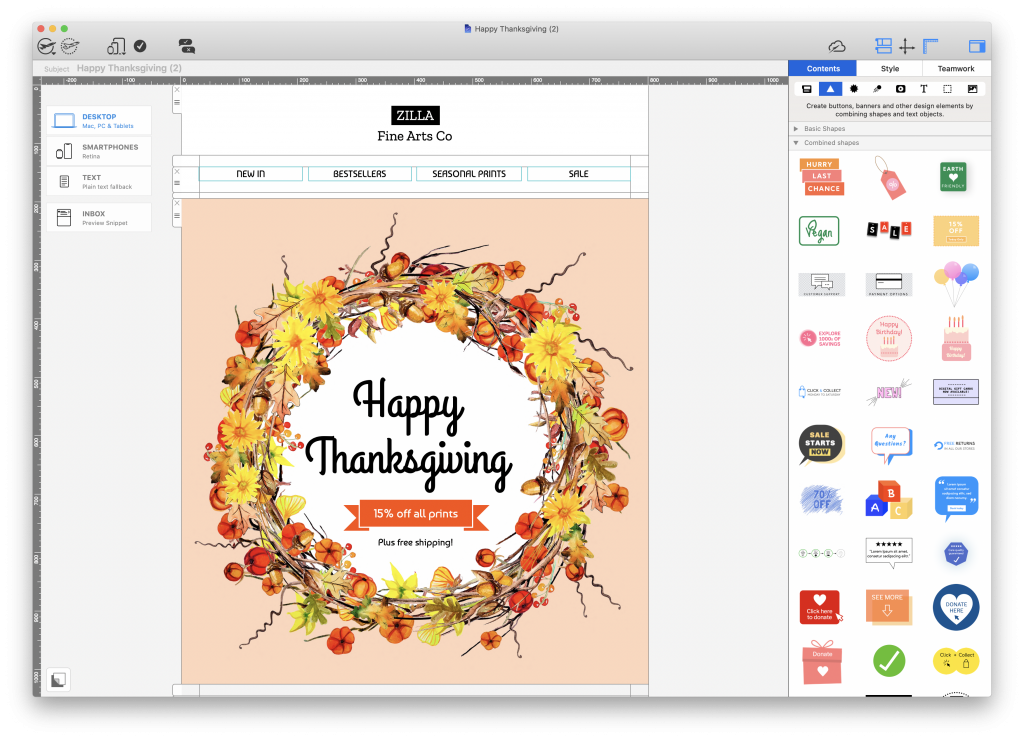
Vibrant Thanksgiving email design – exclusively available in Mail Designer 365
Add Flair with Integrated Design Tools and Graphics
Bring your holiday newsletters to life with high-quality design tools. Create custom eyecatchers and text-buttons, apply image filters, or experiment with Blend Modes for a unique look. The app sidebar also includes hundreds of ready-made graphic elements to drag and drop into your design:

Send Emails Directly via the App
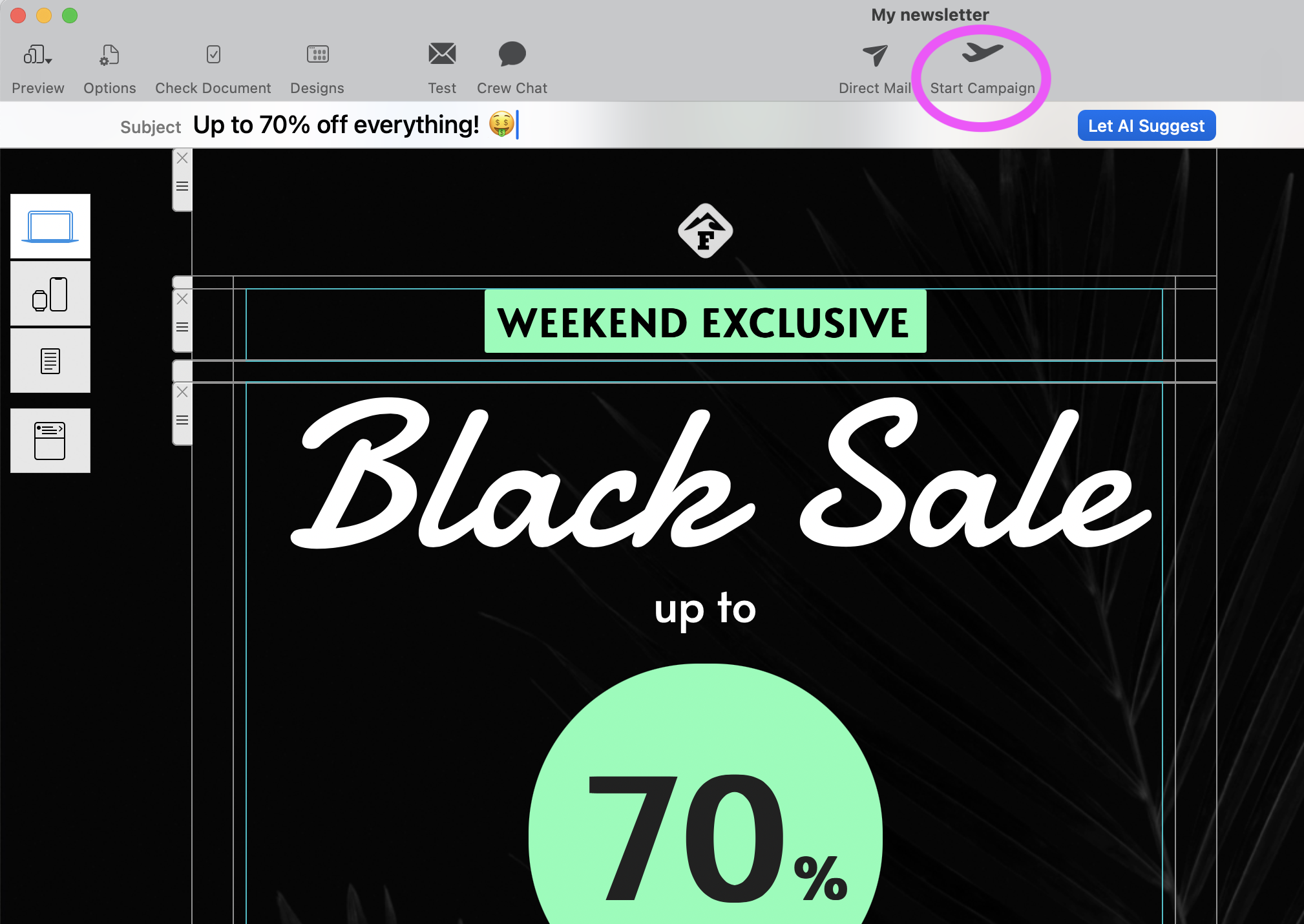
No need for multiple platforms — build and send newsletters all within Mail Designer 365. Once your design is ready, click Start Campaign to send directly to your contacts.
Schedule Now and Save Time Later
Avoid the Black Friday rush by preparing and scheduling your sales emails weeks in advance. Use the integrated scheduling tools to stay organized and flexible. Update campaigns from any device or browser — your planned campaigns are always accessible in the Scheduled Campaigns view.
Holiday and Black Friday Email FAQ
When should I start sending Black Friday emails?
Start testing and building anticipation six to eight weeks before Black Friday, then begin customer-facing teasers or early-access messages in early November. Increase urgency during the final week and Black Friday weekend.
How many Black Friday emails should I send?
There is no safe universal number. One weekly message in early November, two or three in the final week, and up to three segmented messages on Black Friday is a practical test plan for an engaged retail list. Send fewer messages to less-engaged contacts and exclude recent purchasers.
What should a Black Friday email include?
Show the offer in real text, place a live-text CTA above the fold, state the deadline and conditions, use a mobile-first layout, and link every featured product directly to its product page.
Should I send the same deal to everyone?
Usually not. VIPs, recent customers, window shoppers, local audiences, and deal-responsive subscribers have different needs. Adjust the offer, products, timing, and frequency for each group, and suppress contacts for whom the message is no longer relevant.

Holiday Newsletters: Email Marketing Checklist
Use this quick checklist to prepare your campaigns and ensure no details are missed:
- Segment your audience for personalized promotions
- Draft short, benefit-driven subject lines
- Choose or customize professional holiday templates
- Add clear calls-to-action (CTAs) and eye-catching graphics
- Schedule campaigns ahead of key dates like Black Friday, Cyber Week, and Christmas
- Test email layouts on desktop and mobile
- Review links, images, and promotions before sending
- Analyze post-campaign metrics and refine for future emails
Following this checklist will help you create holiday newsletters that are both effective and stress-free.
Need a polished holiday campaign without building it yourself?
The Mail Designer professional Design Service creates custom email designs for your brand, offer, and audience. It is a paid option for teams that want an experienced designer to turn their Black Friday or holiday brief into a ready-to-customize campaign.