email templates for AWeber: complete upload guide

email templates for AWeber are easy to create, export, and test with Mail Designer 365. Follow this practical guide to prepare a polished campaign for your AWeber audience.

Create custom made HTML email templates for the AWeber email marketing platform.

email templates for AWeber

Mail Designer 365 is the best HTML email editor for AWeber. Create a stunning HTML email design with the easy-to-use drag & drop editor and export to AWeber in just a few clicks. Use your Mail Designer 365 template for transactional emails, automated email campaigns, sales, promotions, and more.


Try for free

HOW IT WORKS

Create a HTML email for AWeber

  1. Build your HTML email design in Mail Designer 365 and select "Share” > “Website / HTML…
  2. Enter the image URL prefix for the online server where you will be hosting your images. You will need this later on so that your images can be located and displayed accurately in your design. (Learn more about this step here.)
  3. Following export, select the images in the folder and upload them to the server from the previous step.
  4. Sign in to your AWeber account and go to “Create a message” > “HTML Editor.”
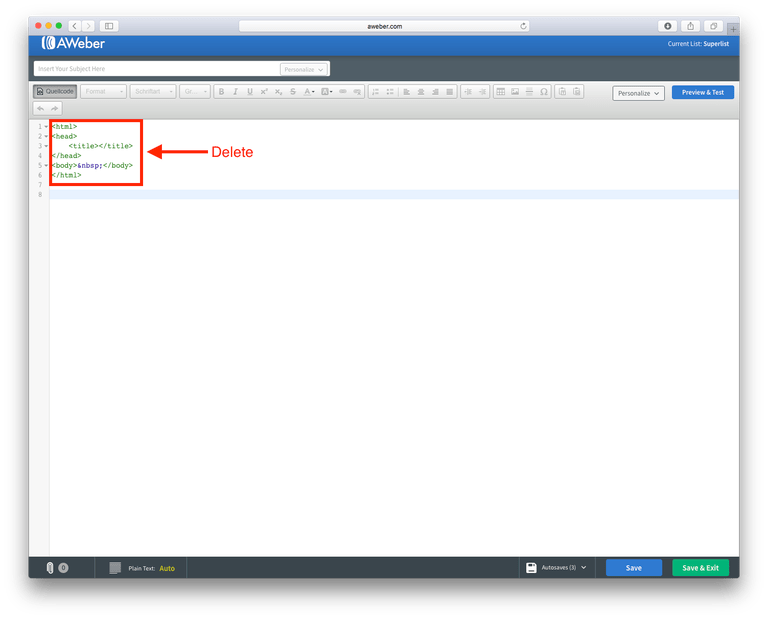
  5. Give your campaign a subject and click on "Source code."
  6. Delete the default code in the source code box.
  7. Locate the content.html file in the HTML export folder. Right click the file, and open it with a text editor. Copy the entire code and paste it into the source code box to upload your newsletter.
  8. You can now click on "Schedule a broadcast" to send your Mail Designer 365 HTML design via the AWeber platform.

Use your HTML email design with the AWeber platform.

Need support?

Our team is always on hand ready to give you support. If you have specific questions regarding HTML export to AWeber, or just need some extra help getting set up, get in touch!

Mail Designer 365 works seamlessly with all leading email marketing services. If you're looking for a different service, check out our full range of integrations and compatible platforms on our integrations page.

Start using Mail Designer 365 with AWeber...

Mail Designer 365 helps you create stylish, professional HTML emails on your Mac to use with AWeber. Sign up for free to see what you can achieve.


Try for free

*Disclaimer: This post contains affiliate links.*

email templates for AWeber: a 7-step preflight checklist

email templates for AWeber work best when design, export settings, and campaign details are checked together.

  1. Finish the responsive layout. Preview desktop and mobile versions in Mail Designer 365.
  2. Confirm links and calls to action. Check every destination.
  3. Add useful image descriptions. Clear alt text improves accessibility.
  4. Export the finished HTML. Include the HTML and visual assets needed by AWeber.
  5. Upload to AWeber. Create a campaign and import the exported design.
  6. Review campaign details. Check the subject, preview text, sender, audience, and tracking.
  7. Send test emails. Verify links, images, personalization, and unsubscribe behavior.

This workflow keeps email templates for AWeber consistent with the source design. Correct the layout in Mail Designer 365, export again, and replace the imported HTML when a preview differs.

Keep each AWeber template focused

Give every campaign one primary message and one clear action. Save successful email templates for AWeber as reusable starting points while updating copy, links, and imagery for each send.

Privacy Settings / Datenschutz-Einstellungen