
Frequently Asked Questions
When connecting via SonicWall SCP or SonicWall IKEv1 with DHCP, VPN Tracker 365 for Mac requests an IP address from the SonicWall gateway using the DHCP protocol. For this request, VPN Tracker 365 modifies the MAC address slightly, making it different from the actual MAC address of your device. This allows administrators to assign a fixed IP address when your Mac is connected via LAN or WiFi and a different IP when it’s connected through VPN.
This modification sets a specific bit in the MAC address, marking it as a self-assigned address rather than a factory-assigned one.
Example:
Original MAC address: 00:1B:63:B7:42:23
VPN Tracker MAC address: 02:1B:63:B7:42:23
Starting with macOS 15 Sequoia, Apple defaults to using a rotating MAC address for WiFi connections, labeled as a “Private Wi-Fi Address” in System Settings. To prevent connectivity issues related to this feature, VPN Tracker 365 reports the actual hardware address (with the minor modification described above) instead of the one used in “Rotating” or “Fixed” modes.
On iOS, VPN Tracker cannot retrieve a MAC address directly. Instead, it generates a random value once and stores it for future use. VPN Tracker for iOS then uses this stored value as the MAC address.
- Multiprotocol VPN support
- High speed connections
- Zero-config VPN - thanks to TeamCloud & Personal Safe technology
This link will directly take you to your profile administration:
https://apple.co/2Th4vqI
You will find all running subscriptions under "Subscriptions." You can also disable the automatic extension of your subscriptions.
- Visit the license transfer page and log into the account which holds the license you would like credit for
- Select the license you would like to exchange and confirm the license conversion. Your promo code for the remaining durations will be sent to your account’s email address. Go to my.vpntracker.com portal and log in with the account you would like to add the license to.
- Click on “Buy additional licenses or upgrades” and add an additional license. Additional information on adding licenses can be found here:
- Apply the promo code to your order at the bottom of the page, check the Terms and Conditions and click "Pay now"
- You'll need to be a Manager or Organizer in your team – multi-admin support is currently rolling out to teams – reach out if you'd like this enabled for your Team right away.
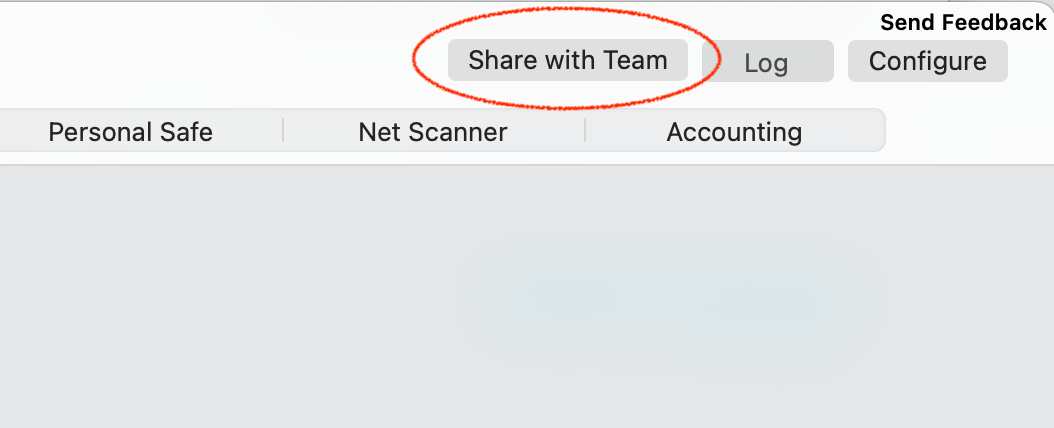
- Select a connection in VPN Tracker and choose the 'Share with Team' option from the Status or Configure views
A note on new users
The person receiving the connection needs to be a member of your VPN Tracker team and has to have set up their TeamCloud encryption keys.
This happens automatically when they open VPN Tracker and other Team members are online. If another team member is not available, their TeamCloud setup can also be confirmed by a Team manager under my.vpntracker.com.
- PPTP VPN connections are not supported, as iOS and Android do not support PPTP passthrough
- For IPsec VPN connections, it's possible you may have to adjust your settings for NAT-T.
You can create and edit connections right inside my.vpntracker.com using any browser. Thanks to advanced engineering, this works with the same data security you know from VPN Tracker on the Mac.
It works like this
- Choose your device brand and model
- Enter your connection details
To save your new connection:
- You enter your equinux ID password
- Your encrypted secure master key is fetched from my.vpntracker
Now a program is run locally on your device through your browser that handles encryption:
- The local encryption program decrypts the master key on your device
- Then it uses your master key to encrypt the new connection data
- The fully encrypted connection is then uploaded to your Personal Safe or TeamCloud on my.vpntracker
- Your Mac, iPhone or iPad can then fetch the encrypted connection, ready for you to connect
So there you have it. Integrated connection editing on my.vpntracker with the full security and end-to-end encryption you know from VPN Tracker for Mac.
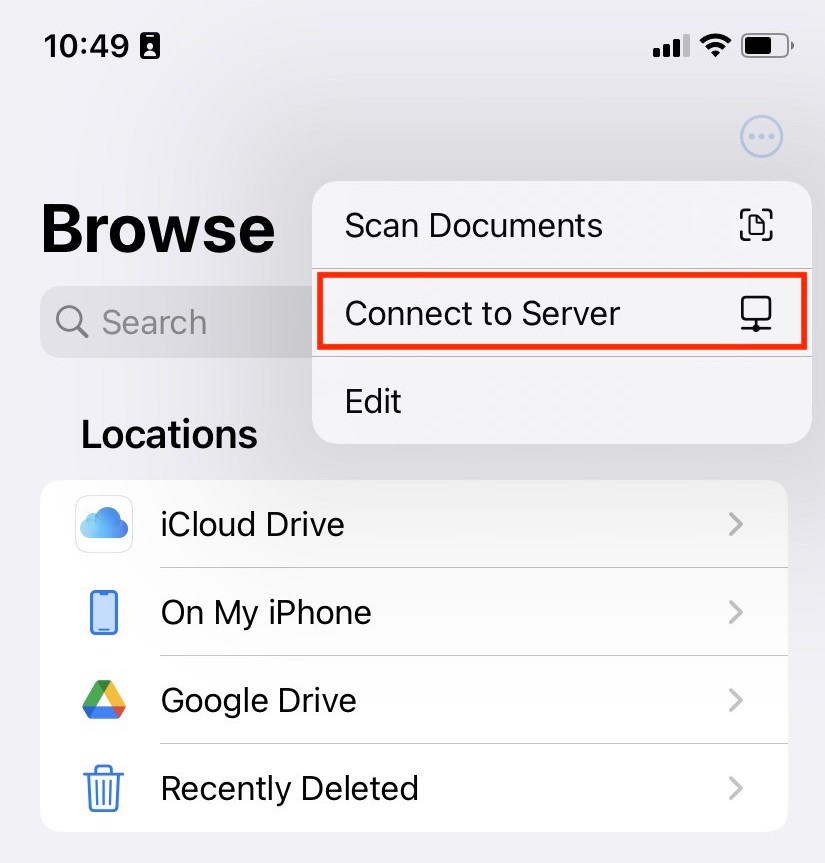
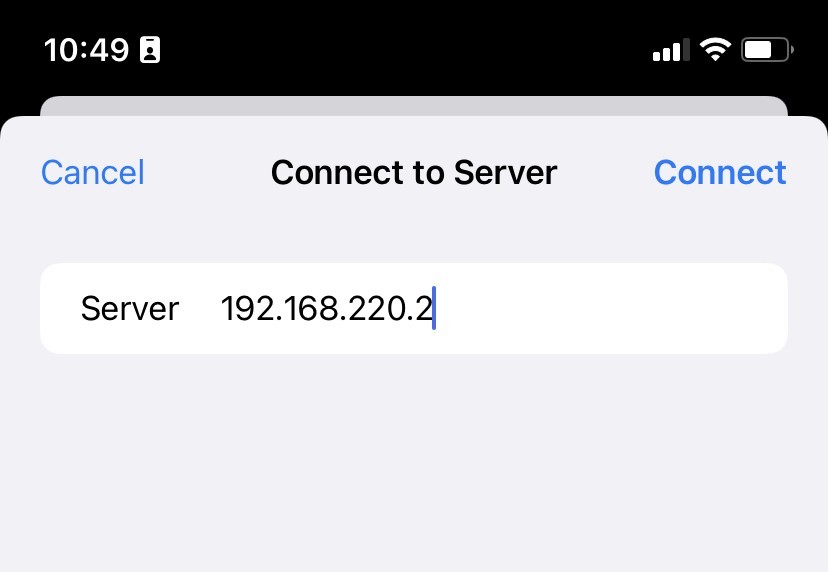
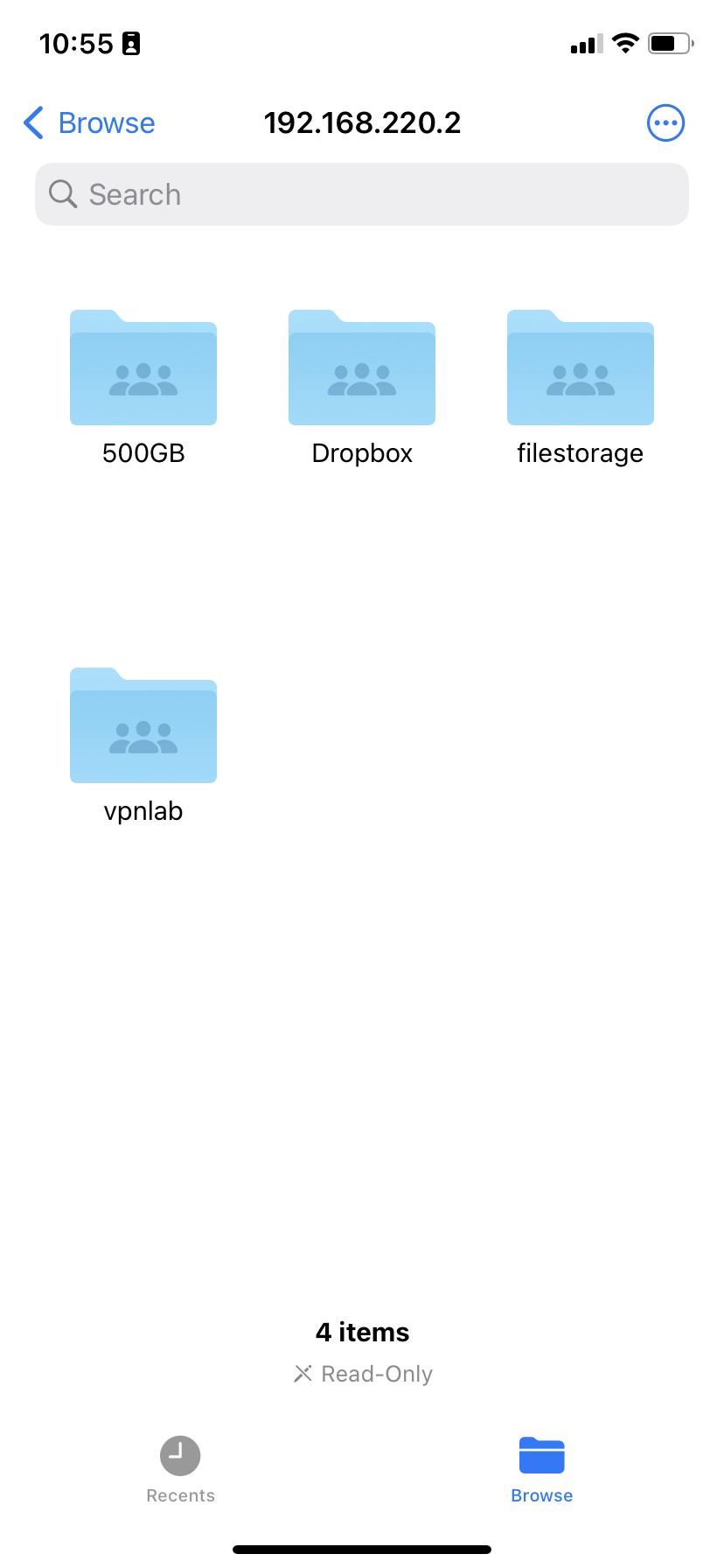
You can access files on your network file storage on your iPhone or iPad using the Files app. Here's how it works:
- Open the Files app
- Tap the ··· option button and choose "Connect to Server" (or hit ⌘+k on your iPad keyboard
- Enter your file server's IP address or hostname
- Enter your username and password when prompted
Can't see your file shares?
If you just see an empty directory instead of shares, you may need to add the share you're trying to access to the path.
For example: If you are trying to access the file share work on the server 192.168.50.2, enter the server address as smb://192.168.50.2/work
Accessing connections on iOS
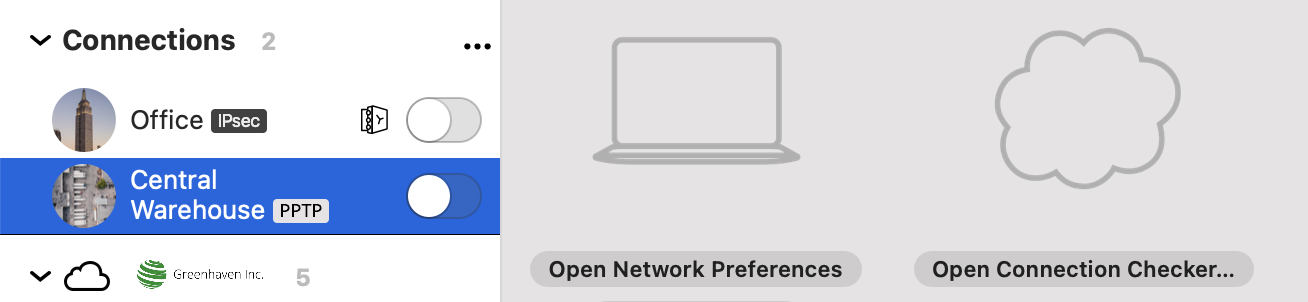
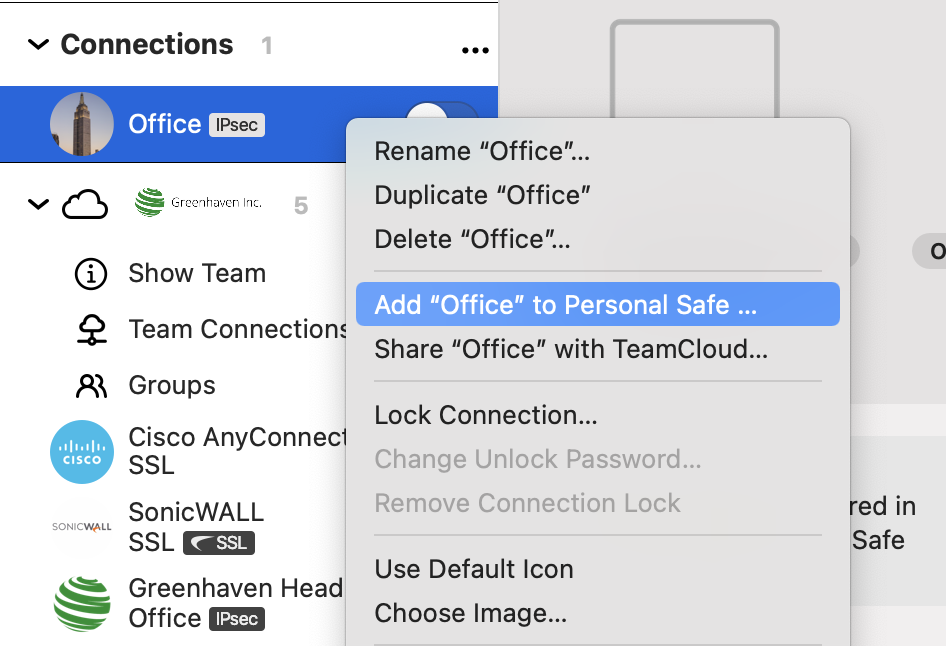
When you sign in to VPN Tracker for iOS with your equinux ID and password, your Personal Safe and TeamCloud connections will show up in the app. Use the filter in the top left corner of the app to only see TeamCloud connections from your team or personal connections from Personal Safe.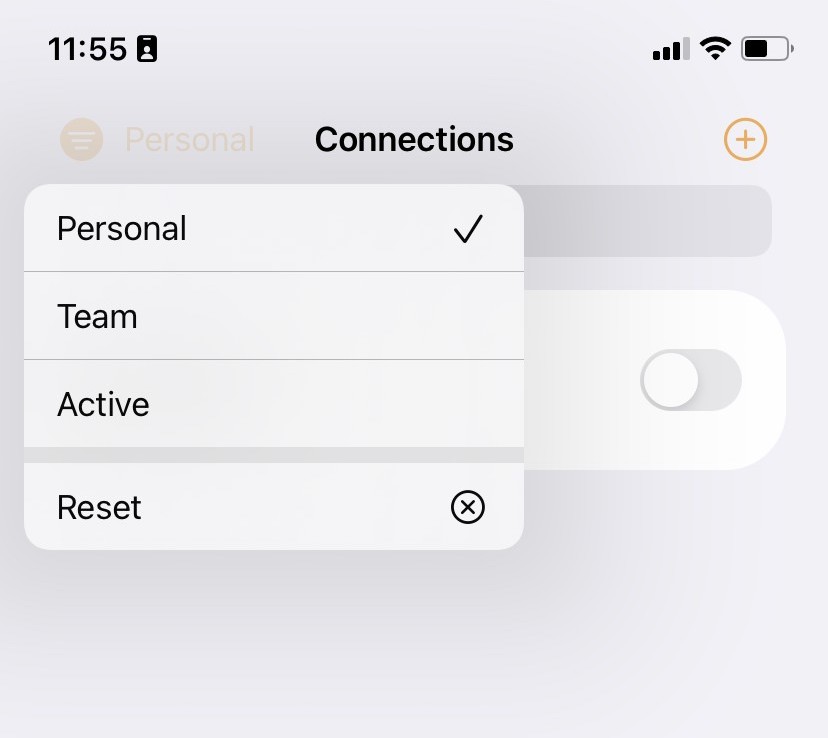 Important: If you have connections which you have only saved locally on your Mac, these will not be available on your other devices. To get those connections onto your iPhone or iPad, right click the connection and choose "Add to Personal Safe" or "Share with TeamCloud".
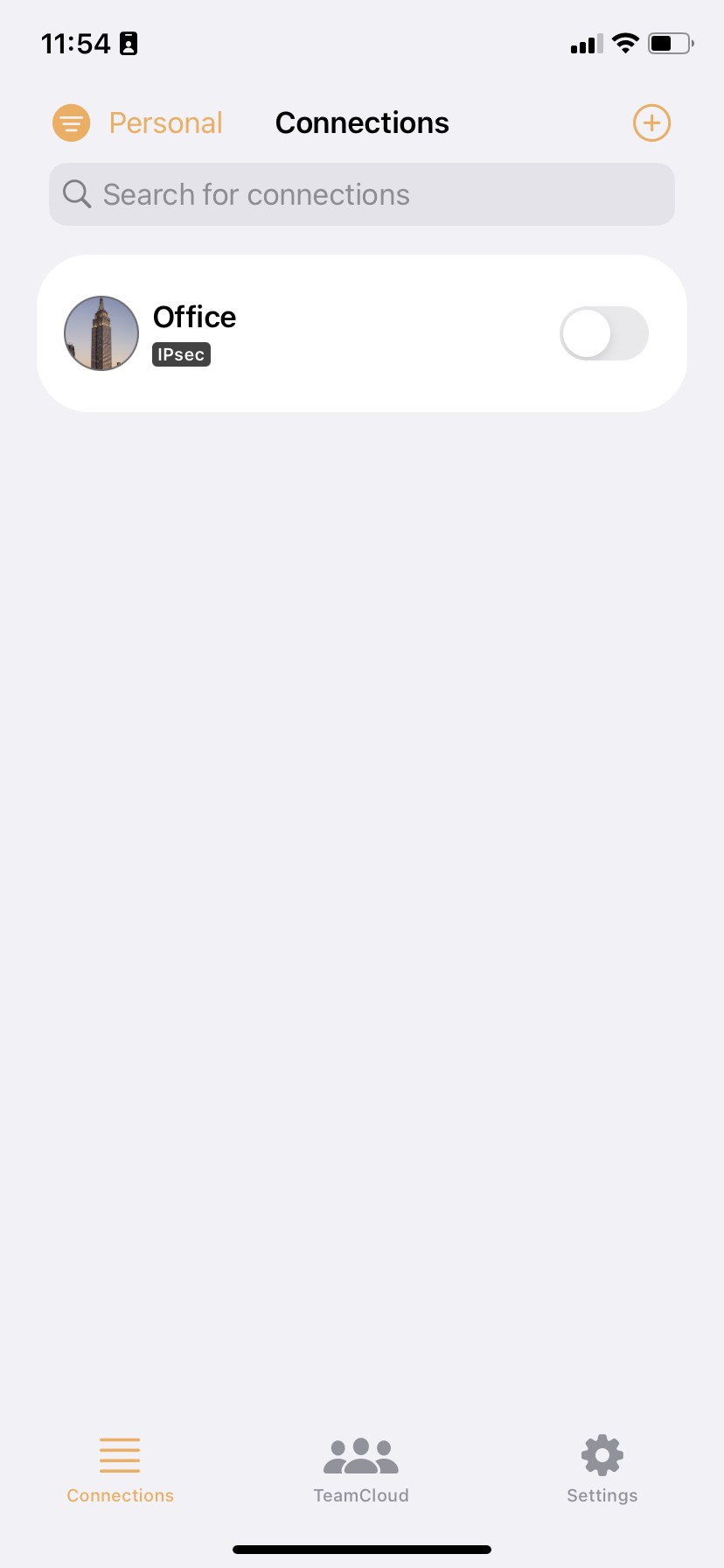
 Those connections will show up on your iPhone or iPad.
You can access file servers on your iPhone and iPad using VPN Tracker for iOS and the Files app:
- Connect to your VPN
- Open the Files app
- Tap the ··· icon in the top right corner
- Choose 'Connect to Server'
- Enter your file server hostname or IP address (e.g.
fileserver.internal.example.com) - Sign in with your company login credentials when prompted
You should now see your file server volumes as you do on macOS.
Troubleshooting tips
If you experience trouble listing your files, there are a few things to try:
- Enter the full volume path, not just the server hostname: e.g. if you are connecting to the share called
Marketingon your fileserver, enterfiles.internal.example.com/Marketing - Ask the person who manages the file server to enable SMBv2 as well as SMBv3 (iOS uses some v2 features to set up the connection)
- Try a 3rd party file server app from the App Store. Some of them offer better compatibility with certain file server configurations
PPTP VPN is currently not supported by VPN Tracker for iPhone / iPad.
Workarounds
Many VPN gateways support more than one VPN standard. Check your VPN gateway or ask your network administrator and see if a compatible protocol can be enabled instead.
Tip: Hide Unsupported Protocols
Inside VPN Tracker, go to Settings → Connection Settings to hide unsupported connections from your list.
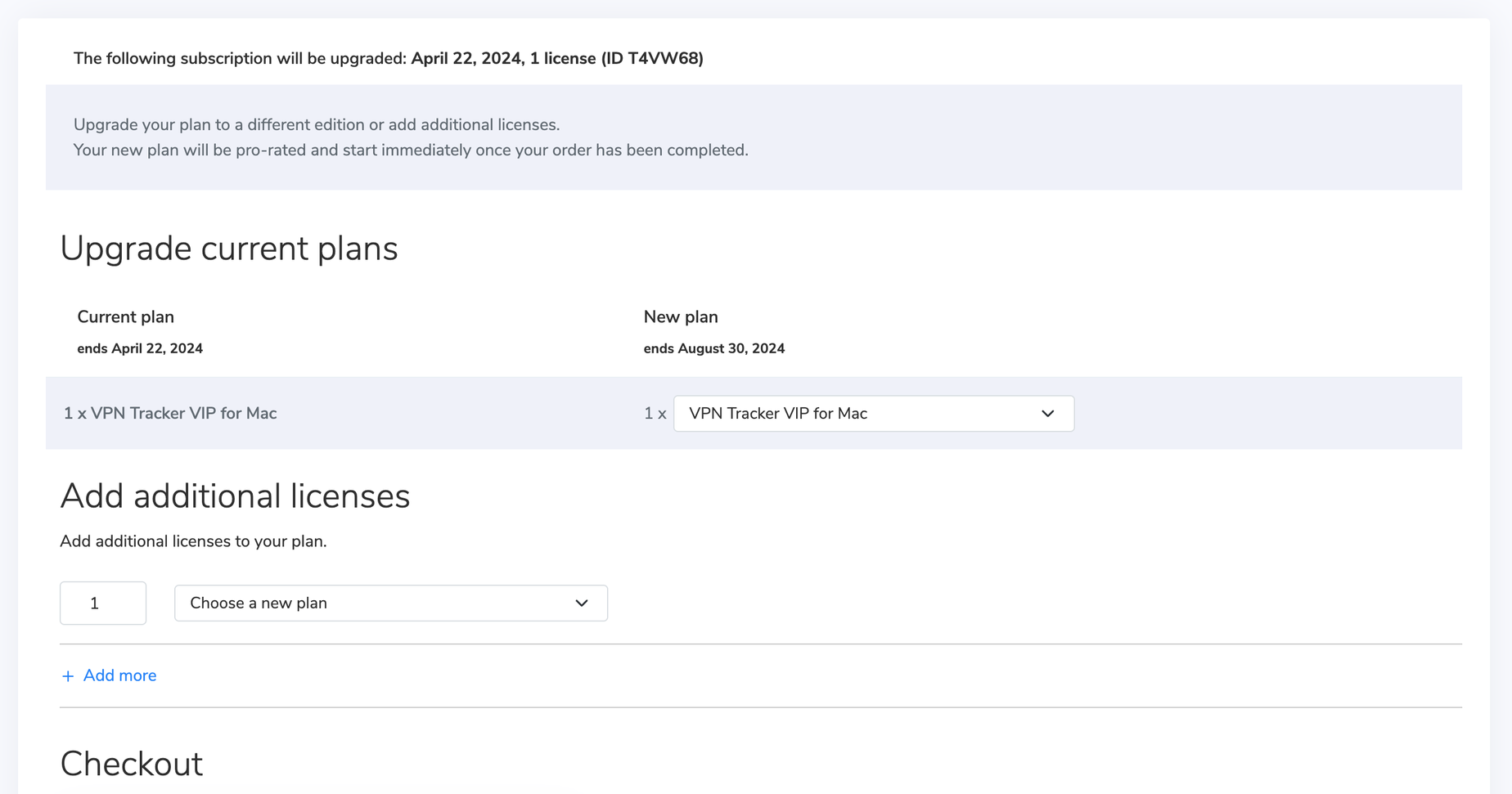 The remaining value of your current plan will be credited toward your new plan.
Alternatively, you can choose a new VPN Tracker plan that contains iOS support.
- Open VPN Tracker and add a new WireGuard® connection
- Upload your WireGuard® configuration file or scan your QR code
- Save your connection to your account using secure end-to-end encryption
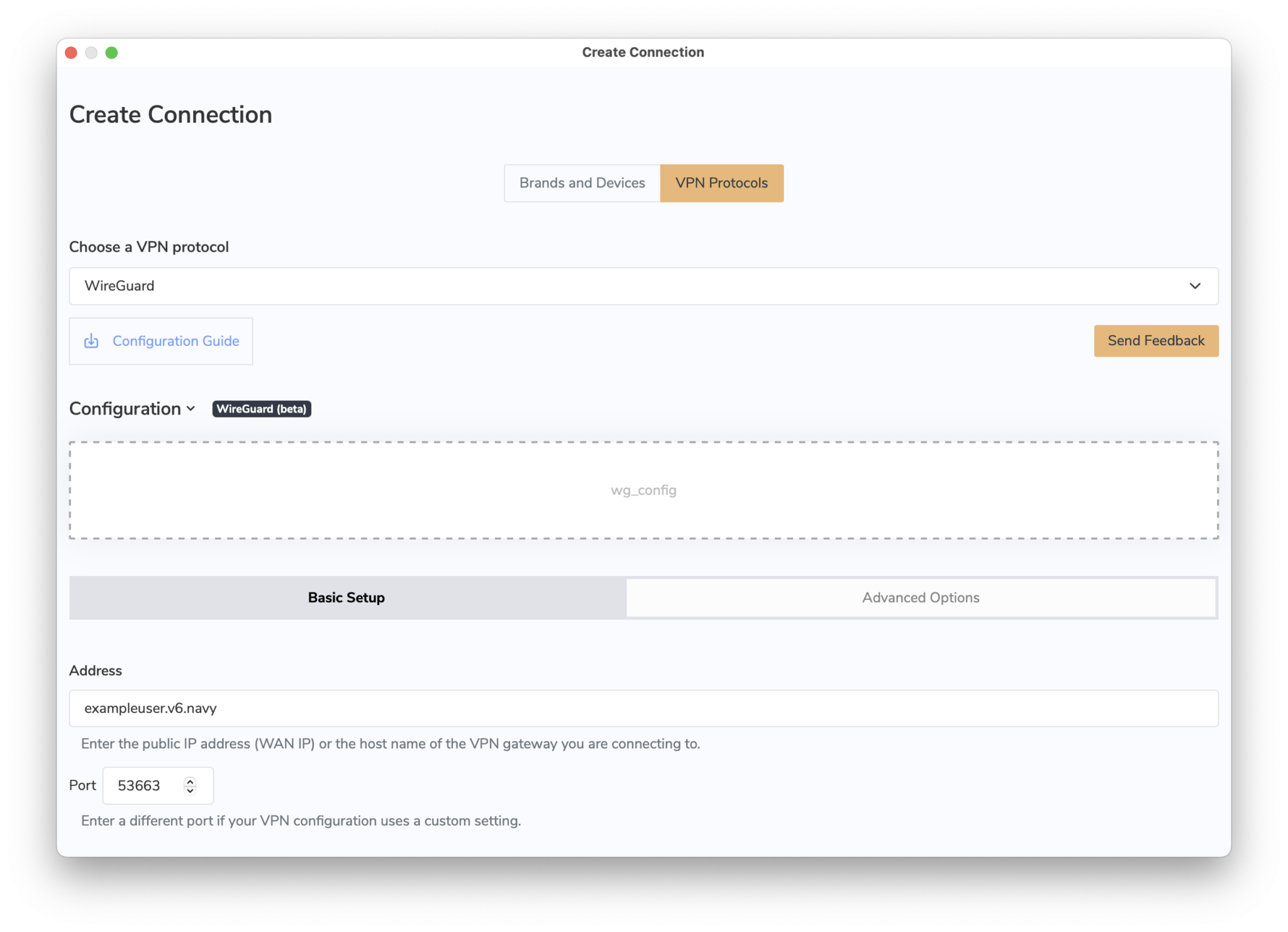 You can now connect to your WireGuard® VPN server on Mac, iPhone or iPad.
→ More information on connecting to WireGuard® VPN in VPN Tracker
WireGuard® is a registered trademark of Jason A. Donenfeld.
You can now connect to your WireGuard® VPN server on Mac, iPhone or iPad.
→ More information on connecting to WireGuard® VPN in VPN Tracker
WireGuard® is a registered trademark of Jason A. Donenfeld.
- Log in to your my.vpntracker.com account
- Select your team in the top left corner
- On the left side choose "Team Cloud"
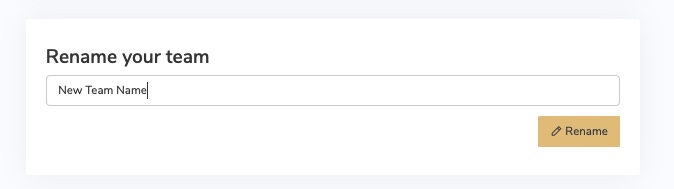
- Scroll down to the section "Rename your team"
- Enter your new Team Name and press "Rename"
- Log in to your my.vpntracker.com account
- Select your team in the top left corner
- On the left side choose "Team Cloud"
- In the Invite section at the top, enter your new Team Member's name and company email address, then click "Send invitation".
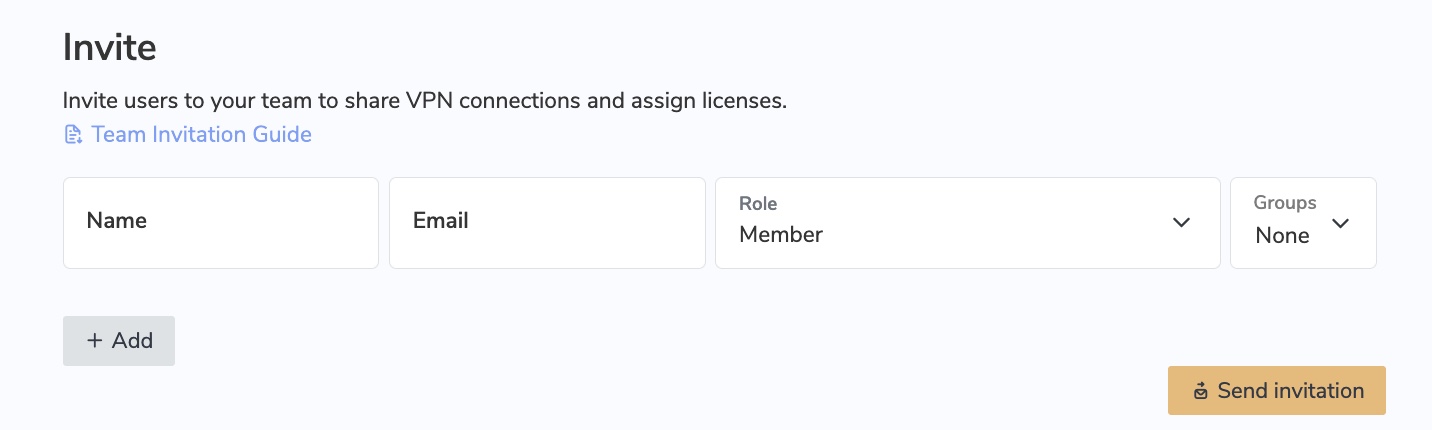
- The invited team member will then receive an automatic email invitation with a personalised link to click on and join your team.
- Tip: Each VPN Tracker 365 user needs their own, personal equinux ID. After the user receives a team invitation from you and clicks the invite link, they can either create a new equinux ID or log in using their existing account.
- In case the user does not receive the invitation email, you can access the invitation link by clicking on "Details" next to the user name
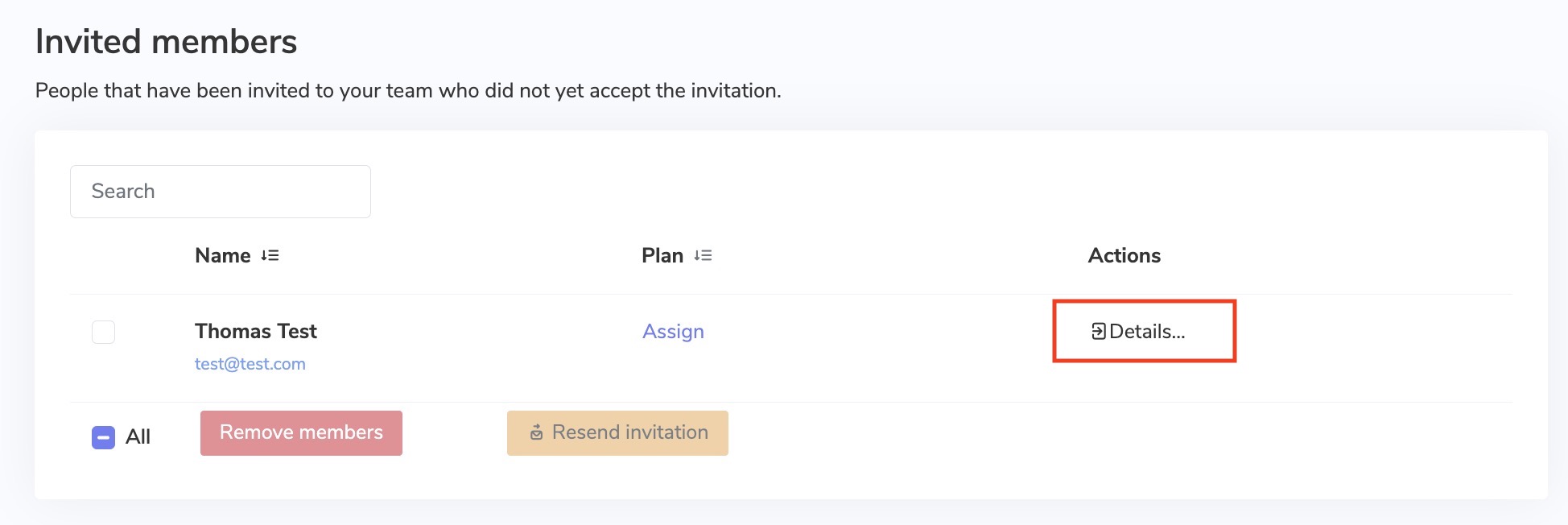
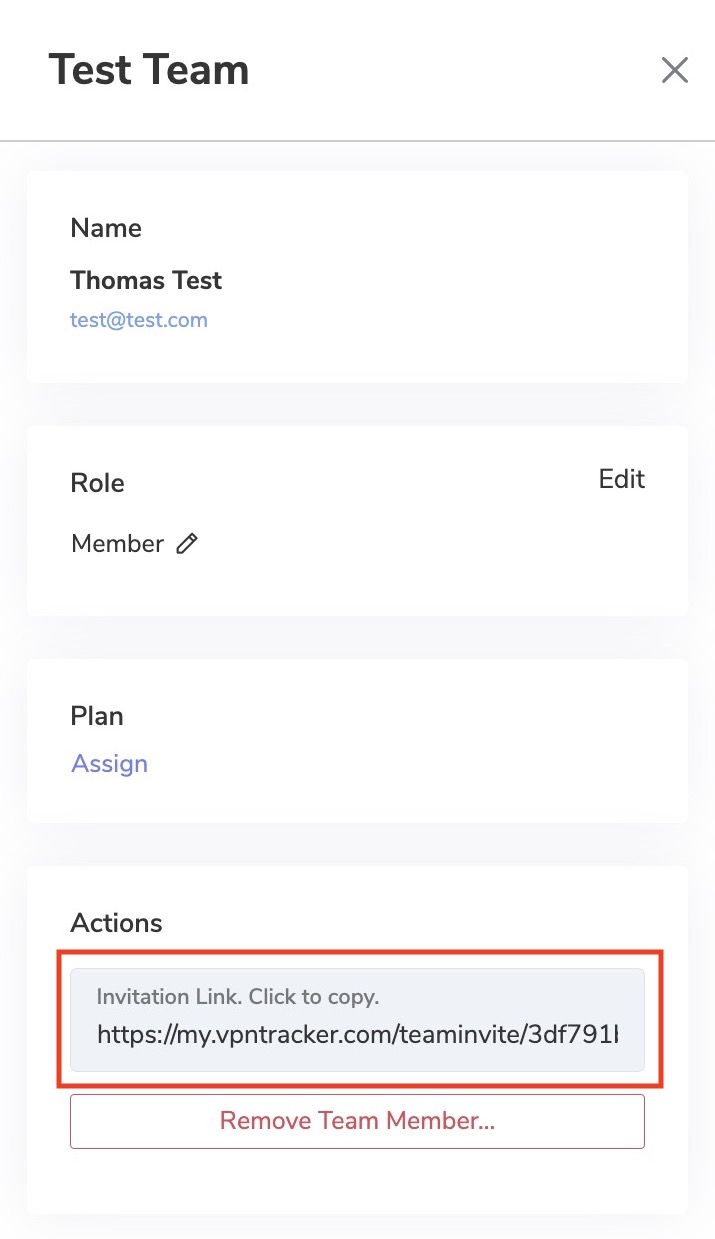
- Once a team member has accepted your email invitation, you will be notified via email
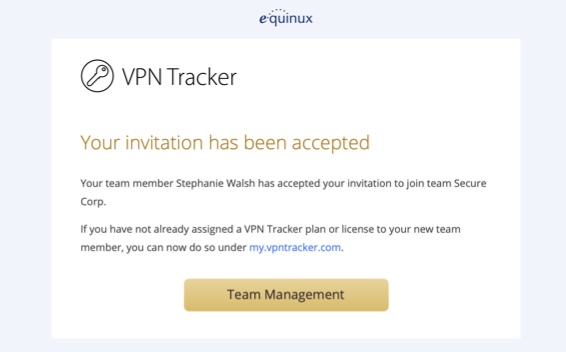
If you have already purchased a VPN Tracker license but would like to change to a different product, you have two options:
1. Purchase an upgrade
In most cases you can upgrade your existing plan. The VPN Tracker store will automatically pro-rate your purchase based on the remaining value of your current product.
Go to your my.vpntracker upgrade page to see your upgrade options.
2. Convert your product to store credit If you purchased with a different account or want to swap to a different product line altogether, you can convert your existing license to store credit and put that towards your new purchase:
- Visit our store promocode transfer page and follow the steps to receive your promocode
- Choose your new product on the my.vpntracker store
- Enter your promocode during checkout
What does this mean?
When DoH is enabled, it bypasses your DNS server and instead, domains you enter into your browser are sent via a DoH-compatible DNS server using an encrypted HTTPS connection.This is intended as a security measure to prevent others (e.g. your ISP) from seeing the websites you are trying to access. However, if you're using a DNS server provided by your VPN gateway, it allows DNS queries to run outside the VPN tunnel. Moreover, if the VPN specifies a DNS server that resolves internal host names, these are either not resolved at all or resolved incorrectly when DoH is enabled.
How to disable DNS over HTTPS in Firefox
To ensure all your DNS queries run via your VPN's DNS, you will need to disable DoH in Firefox. To do so, open your Firefox browser, go to Firefox > Preferences > Network Settings and deselect the checkbox by "Enable DNS over HTTPS":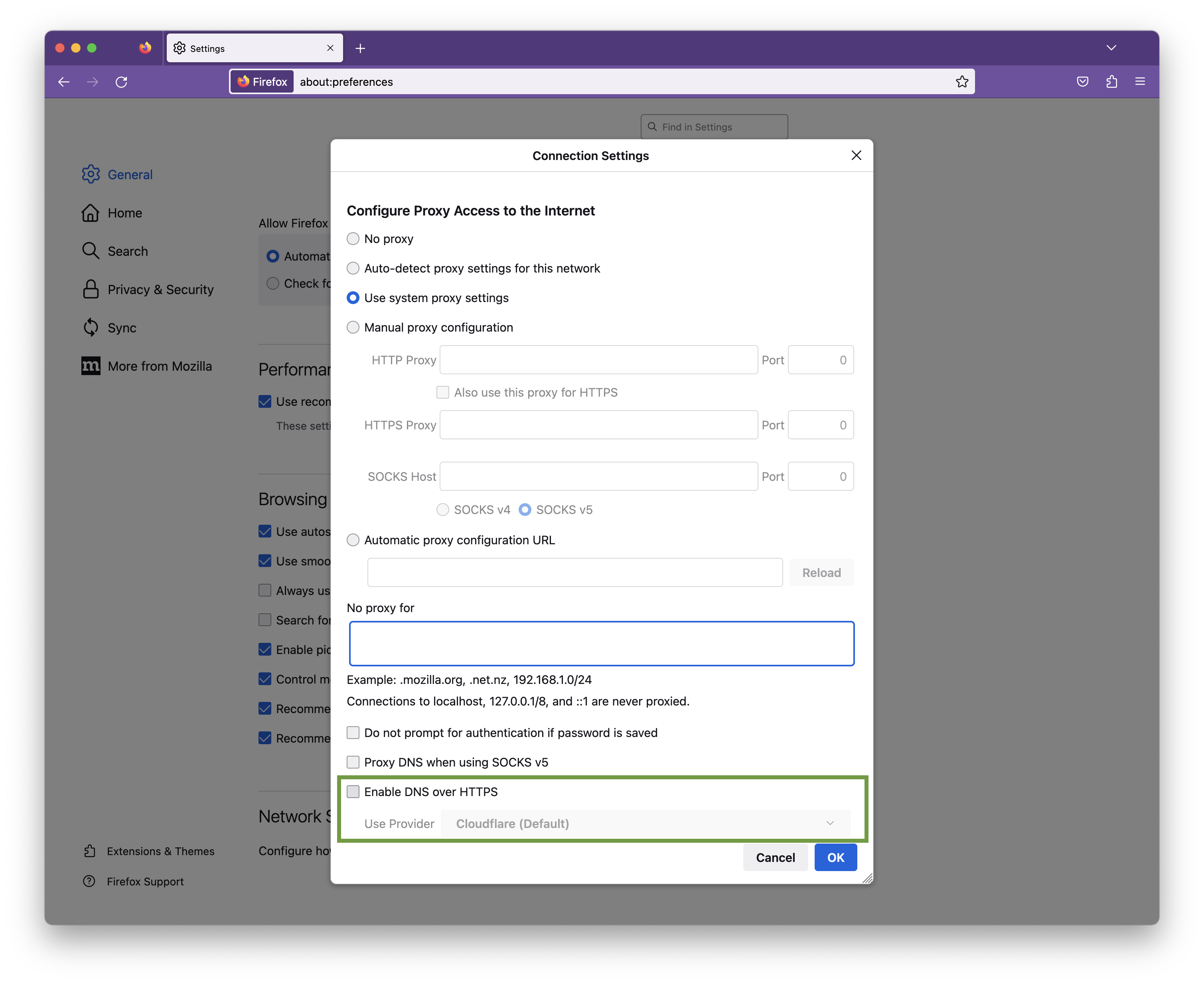
Click OK to save your changes.
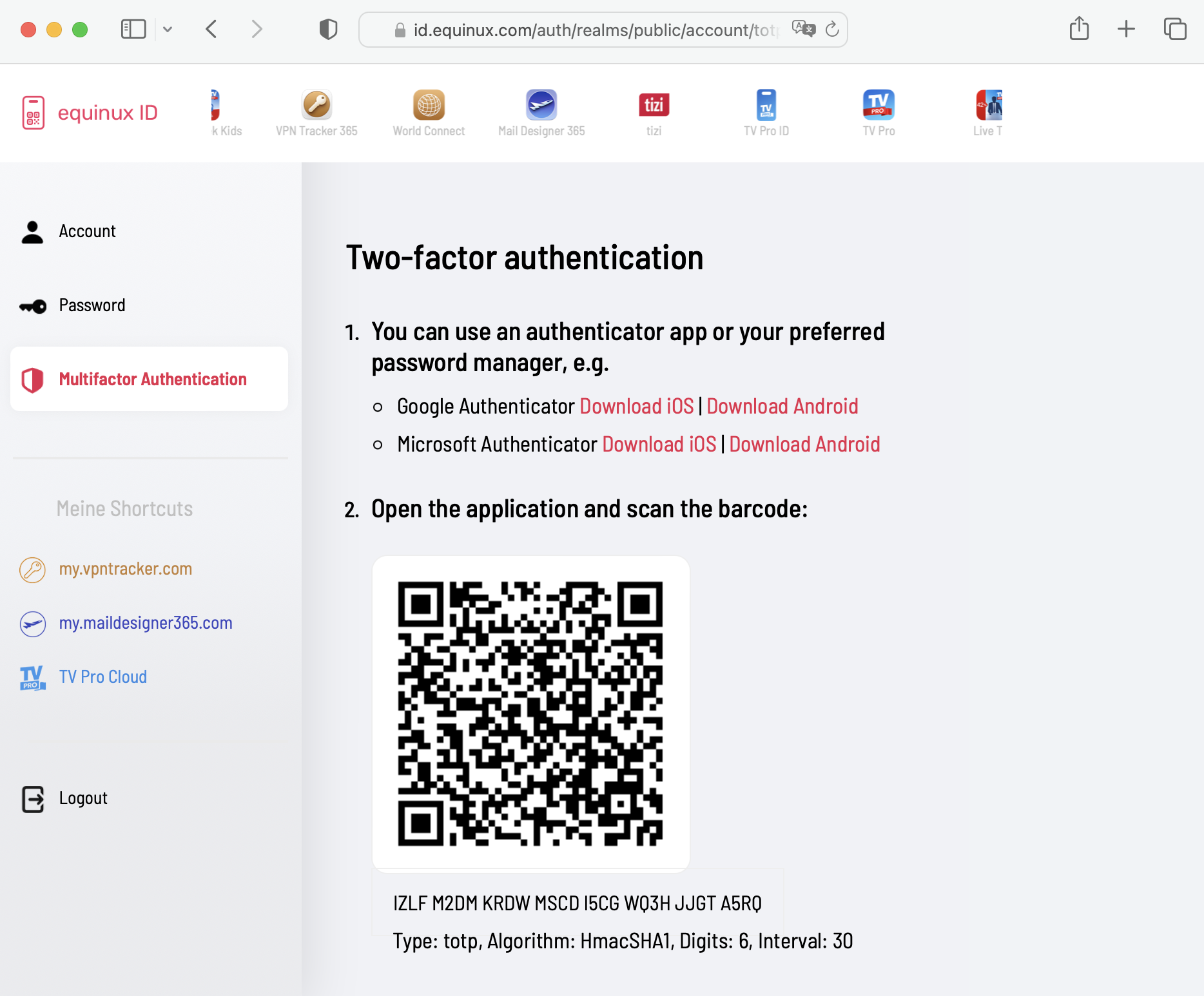
equinux 2FA supports all major authentication and password apps, including:
- Google Authenticator
- Microsoft Authenticator
- Twilio Authy
- 1Password
- FreeOTP
- Bitwarden
If your VPN connection is configured to be Host to Everywhere, all non-local network traffic is sent over the VPN tunnel once the connection has been established. All non-local traffic includes traffic to public Internet services, as those are non-local, too. Those services will only be reachable if your VPN gateway has been configured to forward Internet traffic sent over VPN to the public Internet and to forward replies back over VPN, otherwise Internet access will stop working.
A possible workaround is to configure a Host to Network connection instead, where only traffic to configured remote networks will be sent over VPN, whereas all other traffic is sent out like it is when there is no VPN tunnel established at all. In case the remote network are automatically provisioned by the VPN gateway, this has to be configured on the VPN gateway, automatic provisioning has to be disable in VPN Tracker (not possible for all VPN protocols), or the Traffic Control setting has to be used to override the network configuration as provided by the gateway (Traffic Control is currently not available on iOS).
A Host to Everywhere setup may be desirable for reasons of anonymity or to pretend to be in a different physical location (e.g. a different country), since all your requests will arrive at their final destination with the public IP address of the VPN gateway instead of your own one. Also that way you can benefit from any maleware filters or ad blockers running on the VPN gateway, yet it also means that the gateway can filter what services you have access to in the first place. If Host to Everywhere is desired but not working, this has to be fixed on at the remote site, since what happens to public Internet traffic after being sent over the VPN is beyond VPN Tracker's control.
If the connection is configured to use remote DNS servers without any restrictions, all your DNS queries will be sent over the VPN. Before any Internet service can be contacted, its DNS name must be resolved to an IP address first and if that isn't possible, as the remote DNS server is not working correctly or unable to resolve public Internet domains, the resolving process will fail and this quite often has the same effect in software as if the Internet service is unreachable.
A possible workaround is to either disable remote DNS altogether, if not required for VPN usage, or to configure it manually, in which case it can be limited to specific domains only ("Search Domains"). By entering a search domain of example.com, only DNS names ending with example.com (such as www.example.com) would be resolved by the remote DNS servers, for all other domains the standard DNS servers will be used as configured in the system network preferences.
Using a remote DNS server may be desirable to filter out malicious domains, to circumvent DNS blocking of an Internet provider, to hide DNS queries from local DNS operators (since DNS is typically unencrypted), or to allow access to internal remote domains that a public DNS server cannot resolve, as they are not public. For the last case, configuring the internal domains as search domains is sufficient. For all other cases, the issue must be fixed at the remote site, since what happens to DNS queries after being sent over the VPN is beyond VPN Tracker's control.
- Tap the connection. The connection card appears.
- Tap on “Feedback”
- Provide a short description of the connection problem
- Tap on Send
- Edit your connection.
- Navigate to the “Advanced Options” section.
- In “Additional Settings”, change the setting “Connect using IPv4 or IPv6” to “Use IPv4”.
- Save your connection and start your connection.
sudo networksetup -setv6off Wi-Fi
Note: If your Wi-Fi interface has a different name (e.g., `en0`), replace "Wi-Fi" with the correct name. You can check the name of the interface using this command:
networksetup -listallnetworkservices
3. After entering the command, you'll be prompted to enter your admin password.
This will completely disable IPv6 for your Wi-Fi connection.
- Protocol Explanation:
- Point-to-Point Tunneling Protocol (PPTP): PPTP is a protocol that facilitates the secure transfer of data between a user's device and a VPN server. It creates a tunnel through which data is encapsulated, providing a secure connection.
- Encryption and Security:
- Encryption: PPTP employs various encryption methods to secure the data transmitted through the tunnel, making it difficult for unauthorized parties to intercept or decipher.
- Ease of Setup:
- User-Friendly Setup: PPTP is known for its simplicity and ease of setup. It's often the preferred choice for users who prioritize a straightforward configuration process.
- Compatibility:
- Widespread Compatibility: PPTP is compatible with a wide range of devices and operating systems, including Windows, macOS, Linux, iOS, and Android, making it accessible for users across different platforms.
- Speed and Performance:
- Performance Considerations: PPTP is recognized for its relatively fast connection speeds, making it suitable for activities like streaming and online gaming.
- Considerations for Security-Conscious Users:
- Security Concerns: While PPTP offers a convenient solution for many users, it's important to note that some security experts have raised concerns about its vulnerability to certain types of attacks. Users with high-security requirements may want to explore alternative VPN protocols like OpenVPN or L2TP/IPsec.
- Choosing the Right VPN Protocol:
- Consider Your Needs: When selecting a VPN protocol, it's essential to consider your specific requirements, including the balance between ease of use and the level of security needed for your online activities.
Please be aware that we cannot process refunds in the following scenarios:
- Non-usage of the app or service
- Failure to cancel your account within the cancelation period
- Lack of features or functionality on your subscribed plan
- Purchases made in error
- Exceptional circumstances beyond our control
- Violations to our Terms of Use
- VPN Tracker for Mac BASIC - 1 Connection
- VPN Tracker for Mac PERSONAL - 10 Connections
- VPN Tracker Mac & iOS EXECUTIVE - 15 Connections
- VPN Tracker Mac & iOS PRO - 50 Connections
- VPN Tracker Mac & iOS VIP - 100 Connections
- VPN Tracker Mac & iOS CONSULTANT - 400 Connections
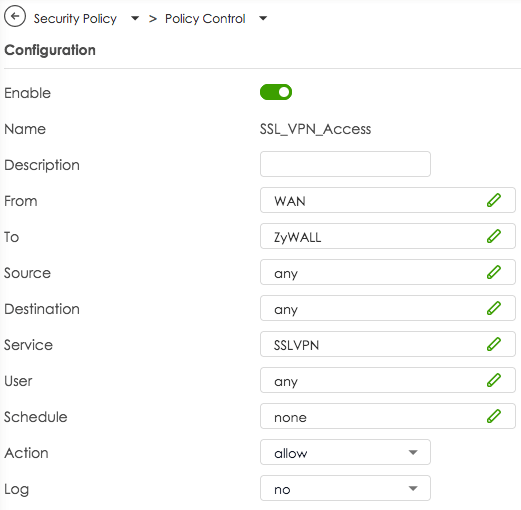
By default Zyxel creates firewall policies to allow traffic to flow from SSL VPN to LAN zone and from LAN to SSL VPN zone. Those rules are required to allow VPN traffic flow once the connection has been established. But there is no policy that actually allows VPN management traffic at the WAN port, client requests arriving at the WAN port are discarded by the firewall.
To allow an OpenVPN connection on the WAN port, you first have to create an own policy. In the main navigation, select Security Policy > Policy Control, click on the + Add button and create a policy that allows traffic for the service SSLVPN to flow from WAN to ZyWALL. Please see screenshot below.
If your OpenVPN connection drops after a while, it may be due to the rekeying period. Test whether extending the period can solve the problem.
Proceed as follows:
- Edit your OpenVPN connection in VPN Tracker
- Navigate to "Advanced Settings > Phase 2"
- Change the Lifetime value to 28800 (which corresponds to a period of 8 hours)
If this doesn't resolve your issues, may also want to check your interoperability keep-alive, activity, and dead peer detection settings.
If you continue to have problems with your VPN connection, please send us a TSR report.
Convert Your Products into Store Credit
If you wish to change the number of your licenses, you have the option to convert your existing license into store credit. You can then use this credit for your next purchase:
- Visit our Store Promo Code Transfer Page and follow the instructions to receive your promo code.
- Select your new products in the my.vpntracker Store.
- Enter your promo code during the checkout process.
Note: If the remaining value of your old product exceeds the amount for the new product, you will receive an additional promo code for the remaining value.
'Your Sonicwall' is either currently unreachable or is not a valid SonicWall appliance. Would you like to save this connection anyway?
When starting the connection, the following appears:
Connection Error
'Your Sonicwall' is not a SonicWall SSL VPN server.
In such cases, we recommend switching to VPN Tracker. VPN Tracker is available for both Mac and iOS. An added advantage is that once a connection is set up, it’s immediately available on both devices, as VPN Tracker securely syncs the settings through the Personal Safe.
Update September 2024: SonicWall has introduced another update with SonicOS 6.5.4.15-116n, which has rendered SSL VPN functionality non-operational for many SonicWall devices.
Update November 2024: This issue seems to be addressed by the SonicOS 6.5.4.15-117n update. For more information, please visit:
https://www.sonicwall.com/support/knowledge-base/mobile-connect-breaks-after-upgrade-to-sonicos-6-5-4-15/240903132324983
-
What are connection drops during rekeying?
Connection drops during rekeying occur when the VPN connection is interrupted during the key update (rekeying). This causes traffic to not be processed for a short period, which is particularly problematic for stable connections such as video conferences.
-
Why does the problem occur during rekeying?
The problem arises because, when using TCP with OpenVPN, the firewall does not accept any traffic during the rekeying process. This leads to an interruption of the traffic.
-
What impact do connection drops have on a video conference?
During a video conference, connection drops during rekeying can result in a complete interruption of the traffic. This causes the connection to break, disrupting or even ending the video conference.
-
Why is TCP susceptible to this problem?
According to OpenVPN, TCP is problematic for VPN connections because it is more sensitive to traffic congestion during network disruptions or the rekeying process. OpenVPN therefore recommends using UDP instead, as it can better handle rekeying processes.
-
What solution does VPN Tracker provide for the problem?
VPN Tracker offers a particularly user-friendly solution: when establishing a connection, VPN Tracker automatically sets the rekeying timer to 24 hours. This significantly minimizes connection drops due to rekeying processes, keeping the connection especially stable. Additionally, VPN Tracker supports switching to UDP, which allows for an even more reliable connection.
-
Why should the rekeying timer be set to 24 hours?
A longer rekeying cycle reduces the frequency of connection drops. By setting the timer to 24 hours— as VPN Tracker does by default— the likelihood of the rekeying process being triggered during a critical phase, such as a video conference, is decreased.
-
What advantages does VPN Tracker have when using UDP over TCP?
VPN Tracker makes it easy to configure UDP, which offers faster connections and less sensitivity to packet loss. UDP is more efficient and resilient to interruptions during the rekeying process, which is particularly beneficial for bandwidth-intensive applications like video conferencing or streaming.
-
What recommendations does VPN Tracker provide for companies to optimize their VPN connections?
For companies relying on stable connections, VPN Tracker offers simple and effective solutions:
- By default, the rekeying timer is set to 24 hours to minimize connection drops.
- It is recommended to use UDP instead of TCP whenever possible to further enhance performance.
- Check your Wi-Fi connection: Make sure Wi-Fi is enabled on your device and connected to the correct network.
- Check cable connections: If you are using a wired connection, ensure the cable is securely connected and undamaged.
- Restart the router: Disconnect the router from the power source for about 30 seconds, then plug it back in. Wait a few minutes for the connection to re-establish.
- Contact an administrator or provider: If the problem persists, there may be an issue with your internet provider. Contact your administrator or your internet provider's customer service.
- Use a mobile hotspot: If you have access to mobile data, try setting up a hotspot to test the connection.
- You can see and configure if your currently active VPN connection excludes certain internet addresses in the connection configuration: In VPN Tracker, select the connection, choose "Edit," and then "Advanced Settings." In the "Traffic Control" area, there may be internet addresses listed that the VPN restricts access to.
- To check if your firewall excludes certain internet addresses, temporarily disable your firewall and try again the action in VPN Tracker that triggered the error message.
- Check your firewall settings for blocked applications or websites. Some firewalls allow specific IP addresses, domains, or applications to be selectively blocked or allowed.
- If you find that a rule is blocking access, you can adjust this rule or add an exception to allow access to specific websites or services.
- If you are still unable to gain access to certain areas, contact your firewall manufacturer's support or your IT support.
LCP: PPP peer accepted proposal but also modified it which isn't allowed.Please update your Sonicwall to at least SonicOS 6.5.4.15-117n to fix this problem. For more information, please visit: https://www.sonicwall.com/support/knowledge-base/mobile-connect-breaks-after-upgrade-to-sonicos-6-5-4-15/240903132324983
 Our experience also shows that IPsec connections are significantly more performant, so we likewise recommend using IPsec.
- Send keep-alive ping every
This option controls whether and how often VPN Tracker sends keep-alive pings. A keep-alive ping is not a normal ping, and is not considered tunnel traffic by the VPN gateway, so it does not keep the connection alive at the gateway. The sole purpose of these pings is to keep the connection alive through firewalls and NAT routers between VPN Tracker and the gateway when no other tunnel traffic is being sent.
- Disconnect if inactive for
This option controls if and after how long VPN Tracker will disconnect due to inactivity. Only tunnel traffic is considered activity, keep-alive pings sent from either side and protocol management traffic are not considered tunnel traffic.
- Consider the peer dead if no sign of liveliness for
This option controls if and after what time VPN Tracker will disconnect due to no sign of life. Any traffic from the gateway is considered a sign of life, regardless of whether it is tunnel traffic, keep alive ping, or protocol management traffic.
This option has no effect if the gateway is not configured to send pings (
--pingoption orpingin the server configuration file), because without pings enabled, there may be no tunnel or management traffic for quite some time, but this is not proof that the gateway is no longer alive, since it won't send anything if there is nothing to send. With ping enabled, the gateway would at least send keep-alive pings in such a situation, and if those don't arrive either, the gateway has most likely dropped the connection or gone offline.
Yes, you can print to your home printer while connected to VPN Tracker away from home. To ensure a seamless remote printing experience, follow these steps:
1. Assign a Static IP Address to Your Printer
- Access your router’s web interface by entering its IP address in a web browser (e.g., 192.168.1.1 or 192.168.0.1).
- Navigate to the LAN or DHCP settings.
- Assign a static IP address to your printer (e.g., 192.168.50.100) so it remains consistent.
2. Configure Your Mac for Remote Printing
- Connect to your > Printers & Scanners on your Mac.
- Click "+" to add a new printer.
- Select the IP tab and enter the static IP address assigned to your printer.
- Choose the correct printer driver to ensure compatibility.
3. Avoid Bonjour for Remote Printing
Apple’s Bonjour service helps detect devices on local networks but does not work reliably over VPN due to its reliance on multicast DNS (mDNS). Instead, always connect to your printer using its static IP address.
4. Check Firewall & Network Settings
- Ensure that your firewall allows print traffic over VPN.
- Verify that the printer and VPN settings do not block remote connections.
By setting up a static IP address, avoiding Bonjour, and ensuring proper firewall rules, you can print documents remotely via VPN Tracker without issues.
Dynamic DNS (DynDNS or DDNS) is a service that assigns a fixed domain name (like yourname.dnsprovider.com) to your home internet connection. This is especially useful when your internet provider assigns you a dynamic IP address – meaning your address can change at any time, such as after a router reboot or every 24 hours.
Why does this matter for remote access?
If you’re trying to connect to your home network remotely (via VPN, remote desktop, file server, etc.), these changing IP addresses can make it difficult to reach your router reliably. DynDNS solves this problem by keeping track of your current IP and automatically updating your domain name to match.
In simple terms
Think of DynDNS like a postal forwarding service when you move — instead of sending your VPN request to an outdated address, it always forwards it to your current one. That way, you can connect to your home network even if your IP has changed, without needing to check or reconfigure anything manually.
What happens when using Dynamic DNS?
- You connect using the same hostname every time (e.g.
yourname.dnsprovider.com) - Your current IP address is updated automatically in the background
- You avoid connection issues caused by changing IPs
- Remote access becomes stable and hassle-free
The WireGuard protocol itself does not support 2-Factor Authentication (2FA) for VPN connections. However, when using WireGuard connections with VPN Tracker, you can enhance your overall security by enabling 2FA for your VPN Tracker account.
This means your VPN configuration and access are protected with an additional layer of security, while your WireGuard connections remain end-to-end encrypted for maximum protection.
Using VPN Tracker is the best way to benefit from the performance and security of WireGuard, along with modern account-level protections like 2FA.
Yes, this is possible. You can migrate an existing TheGreenBow IKEv1 connection to VPN Tracker by exporting the relevant connection data and manually entering it into VPN Tracker.
How to extract the required information:
- Open TheGreenBow and select the desired connection.
- Open the configuration menu and choose “Export”.
- In the next dialog, enable “Do not protect exported VPN configuration” to export the data in plain text.
- Save the file to a location of your choice.
Key information needed in VPN Tracker:
1. Gateway Address
The IP address or hostname of your VPN endpoint. In TheGreenBow, this is listed as “Remote VPN Gateway”.
2. Remote Networks
In VPN Tracker, you must define which networks should be reachable through the VPN tunnel. These are called Remote Networks or Target Networks, and correspond to:
Phase 2 > Network ConfigurationRemote LAN / Remote Network
Typical entries include:
192.168.1.0/24– a full subnet10.0.0.0/16– a larger network range172.16.0.10/32– a single host
Enter these under the “Remote Networks” or “Target Networks” section in VPN Tracker. Ensure these match the configuration on the VPN gateway, otherwise traffic might not be routed correctly.
Tip: If you're unsure, use 0.0.0.0/0 as a temporary setting. This allows access to all remote networks (if permitted). You can restrict this later as needed.
3. Preshared Key (PSK)
If you don’t already have the PSK, you can find it in the exported file under the “Authentication” section.
4. XAuth Credentials
Username and password for extended authentication (if used).
5. Local ID and Remote ID
These values define the identities of both VPN peers during the IKE handshake. They are especially important if:
- the VPN gateway doesn’t identify by IP address (e.g. due to NAT or dynamic IPs),
- certificates or advanced authentication profiles are used,
- the gateway expects a specific identity (e.g. FQDN or custom ID).
In the exported file, these are typically found under “ID Type”, “Local ID”, and “Remote ID”.
Enter them in VPN Tracker under “Identifiers” > Local / Remote, and use the correct format (e.g. FQDN, email address, Key ID, or IP address).
6. Encryption and Authentication Settings
Pay close attention to the algorithms used for Encryption, Authentication, and Hashing, and replicate them in VPN Tracker under Phase 1 and Phase 2 settings.
- Log in at my.vpntracker.com.
- Navigate to your desired team → Members → Add Members.
- Enter the email address support@equinux.com in the Email field, set the name to equinux Support, and assign the role Admin.
- Click on Send Invitation.
- You can view the invitation you just sent under the Invitations tab.
If VPN Tracker fails to install its system components – for example, with an OSSystemExtensionErrorDomain error 10 – this is often caused by blocked system extensions or third-party security software on macOS. Here's how to resolve the issue:
Check macOS system settings (security warning)
Go to System Settings > Privacy & Security and scroll down. If you see a message like “System software from ‘equinux’ was blocked”, click “Allow”. Then restart your Mac.
Check for interfering network extensions (e.g. Bitdefender)
Some apps like Bitdefender install their own network components that may block VPN Tracker:
- Open System Settings > General > Login Items & Extensions
- Click the icon next to “Network Extensions”
- Uncheck securitynetworkinstallerapp.app and any other suspicious extensions
- Restart your Mac
Check System Integrity Protection (SIP)
If SIP has been disabled or modified – usually only in developer setups – macOS may block system extensions. SIP should normally remain enabled for VPN Tracker to function properly.
Reinstall VPN Tracker
Fully remove VPN Tracker from your Mac, restart the device, and reinstall the app. Important: When launching the app for the first time, click “Allow” when prompted by macOS to approve the system extension – do not dismiss or ignore it.
Still having trouble? VPN Tracker Support will be happy to assist you further.
To enable VPN Tracker to load its required system extensions via your MDM system, follow these steps:
1. Add a System Extension Policy
Create or edit a System Extension Policy payload in your MDM system.
Required values:
- Team Identifier: CPXNXN488S
- Allowed System Extension Types: Depending on your configuration, you can choose to allow all or specify only
Network Extensions.
2. Apply the Team Identifier Rule
The Team Identifier CPXNXN488S should be added under the allowed team identifiers. This setting ensures that all system extensions signed by the VPN Tracker team are trusted.
Important: The Team Identifier rule takes precedence over global "Allow All" settings. If a Team Identifier is present, the system will only allow extensions signed by listed identifiers—even if "Allow All" is enabled.
3. Push the Configuration
Save and deploy the updated configuration profile to your target Macs. After installation, VPN Tracker should be able to load its system extensions without requiring user approval.
If the Remove button is missing on my.vpntracker.com, the user is likely an Administrator.
- Edit the user and change their role to Member.
- Save the change.
- Open the user again and click Remove.
To update your password, login first to my.vpntracker.com/user/settings and then click on Manage Password… near the bottom of the page.
The client IP range must be outside of the target or remote network. Adjust the client IP range accordingly.
When this happens, you may notice slower VPN performance or occasional connection drops. VPN Tracker includes safeguards to help prevent disconnections for many VPN protocols, but performance effects cannot be fully corrected in software.
If your TP-Link model offers an option to disable hardware offloading, switching it off will resolve the issue. Note that doing so may occasionally reduce Internet performance when the router is under heavy load, as the router must process all traffic without hardware acceleration. This setting is usually available on business-class TP-Link models, while most consumer models do not include it but still use hardware acceleration.
Symptoms:
The OpenVPN client gets stuck during connection setup and eventually runs into a timeout before a TLS connection is established.
A typical message is “Waiting for RESET”.
Cause:
The TLS handshake is not completed successfully because the required UDP packets do not reliably reach the server.
Common reasons include:
- Restrictions or filtering on firewall, router, or ISP level
- Overly aggressive UDP timeouts on NAT gateways
- MTU or fragmentation issues (e.g. PPPoE, DS-Lite, mobile networks, IPv6/IPv4 translation)
- Network devices or providers that prioritize, throttle, or block UDP traffic
Because UDP is connectionless, these issues often occur without any meaningful error message.
Resolution:
Switch the OpenVPN transport protocol from UDP to TCP.
TCP is significantly more robust than UDP:
- TCP maintains a real connection state
- Lost packets are automatically retransmitted
- Firewalls and NAT devices usually handle TCP traffic more favorably
- MTU-related issues are less critical
This allows the TLS handshake to complete successfully and restores a stable VPN connection.
Symptoms:
The VPN connection setup fails or gets stuck during startup. The server is reachable, but the tunnel is not established.
Cause:
Jumbo frames may be enabled on the client's network. The resulting increased MTU was not fully supported across the network path, causing VPN packets to be lost.
Solution:
Disable jumbo frames on the client's network or configure a standard MTU. After disabling jumbo frames, processes that determine and apply the correct path MTU can work properly, allowing the tunnel to be established.
You should see a SonicWall login page. If the page loads but you still cannot connect using VPN Tracker, please contact our support.
If the page does not load, here are some common issues and possible solutions:
- Check whether you have a firewall or endpoint security solution installed, such as Little Snitch or Symantec Endpoint Protection. Temporarily disable these tools or add an exception for your VPN gateway address.
- Try connecting using a different internet connection. For example, enable Hotspot mode on your iPhone and attempt to connect through your hotspot. If this works, the issue is likely related to your internet router or internet service provider.
- If you cannot reach the VPN gateway even with a different internet connection, contact your VPN administrator to verify that the gateway is running.