
Frequently Asked Questions
Why does Mail Designer 365 prompt me to sign in every time I want to use the app?
Generally speaking, you should only have to log in to Mail Designer 365 when you first install the app (to ensure this is the case, we would always recommend that you have downloaded the latest version of Mail Designer.)
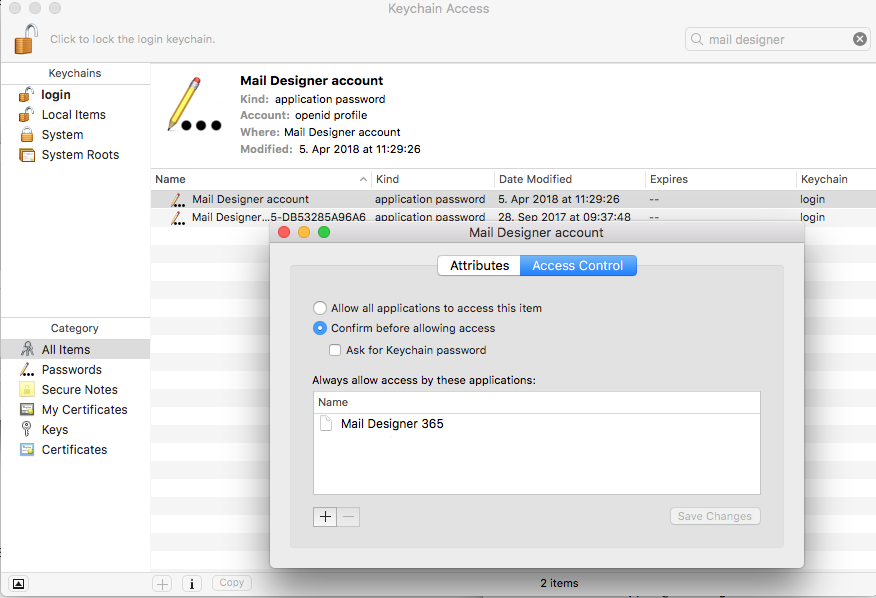
However, despite this, it can sometimes be the case that your Mac doesn't store your login details in the Keychain. To manually fix this problem and stop the app prompting you to sign in every time you open it, please do the following:
 Your login details for Mail Designer 365 should now be stored on your Mac. If you are still experiencing problems, please send us your debug logs and let us know via support@maildesigner365.com.
- Quit the Mail Designer 365 app.
- Open the "Keychain Access.app"
- Search for "Mail Designer" using the search field in the upper right corner of the window.
- Here you should find the entry "Mail Designer account." Double click on this entry to get details.
- Go to the "Access Control" tab and check to see if Mail Designer 365 is located under the "Always allow access to these applications" list.
- If you cannot see Mail Designer 365 on the list, please press the "+" underneath the list, find Mail Designer 365, and add it.
- Restart the app and login if prompted.
Your login details for Mail Designer 365 should now be stored on your Mac. If you are still experiencing problems, please send us your debug logs and let us know via support@maildesigner365.com.