
Frequently Asked Questions
How do I add a Mailchimp Placeholder to my design which isn't on the list?
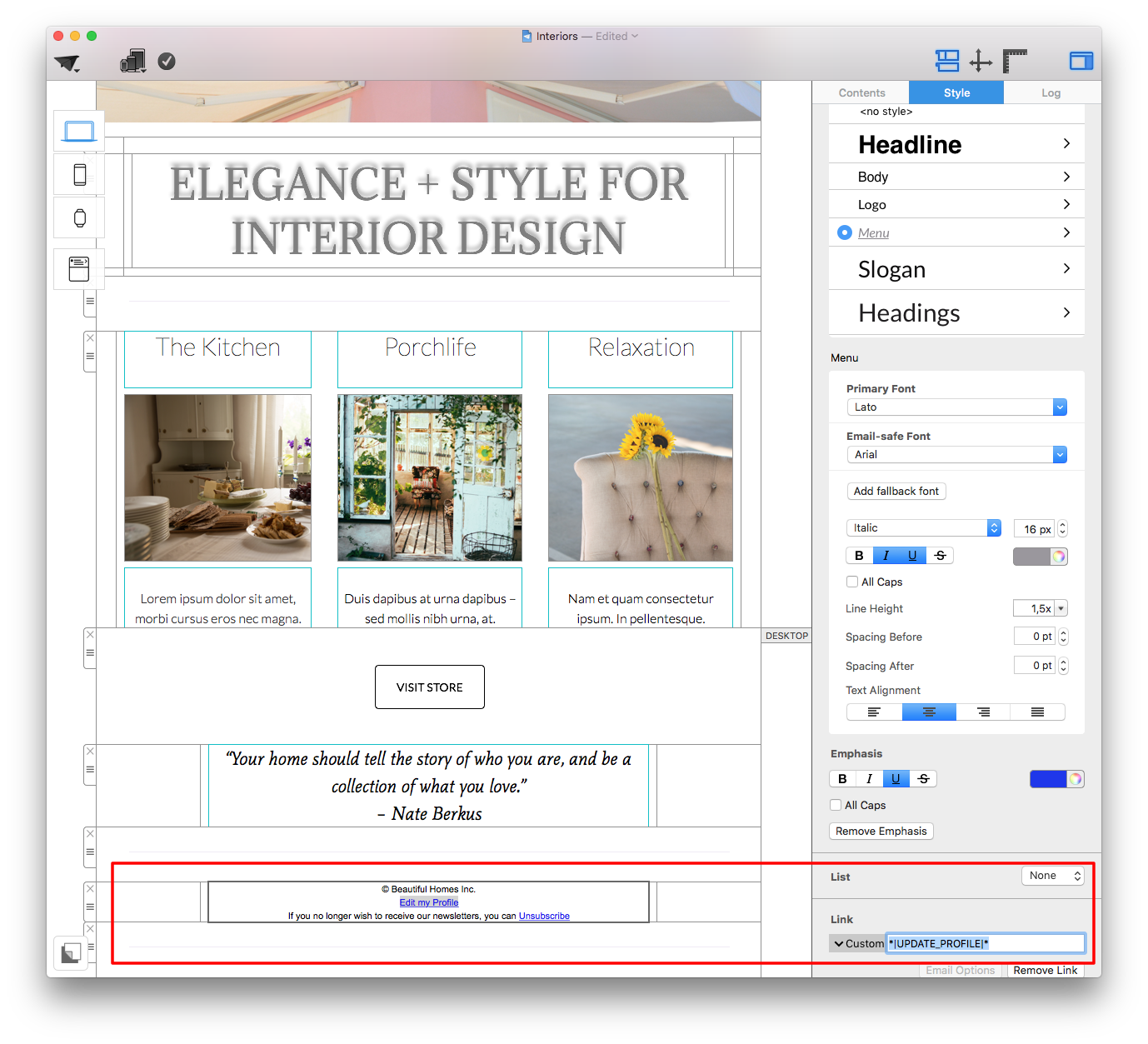
To add a Mailchimp placeholder to your design which doesn't appear on the list (e.g. "Edit my Profile" or "Show Newsletter in Browser") please carry out the following steps:
 If you are unsure of how to label your placeholders, use Mailchimp's cheatsheet to find the correct label for any merge tag they support.
You can access the most important placeholders directly, as explained here, for other placeholders and custom merge tags.
If you are unsure of how to label your placeholders, use Mailchimp's cheatsheet to find the correct label for any merge tag they support.
You can access the most important placeholders directly, as explained here, for other placeholders and custom merge tags.
- In a text layout block, type the text you want readers to see (i.e. "Edit my Profile.")
- Highlight your selected text, then, in the sidebar, select "Add Link" from the "Style" tab.
- Choose link type "Custom."
- Enter your placeholder into the space provided (e.g. *|UPDATE_PROFILE|*)
If you are unsure of how to label your placeholders, use Mailchimp's cheatsheet to find the correct label for any merge tag they support.
You can access the most important placeholders directly, as explained here, for other placeholders and custom merge tags.