Frequently Asked Questions
How do I delete the custom content (graphics, images, etc.) I have added?
To delete your custom content, try the following:
‣ Click on the appropriate icon within the "Contents" tab to identify the location of your custom content. ‣ Choose this icon if you added custom content to your graphics section:‣ Choose this icon if you added custom content to your GIF/animated graphics section:
‣ Choose this icon if you added custom content to your backgrounds and photos section:
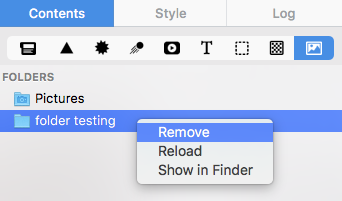
‣ Choose this icon if you added a custom folder with images and graphics:
‣ Once you have chosen, scroll down to the "Custom" section:
‣ Right-click on the image or graphic that you want to delete. ‣ Choose "Move to Trash" from the drop-down menu.
‣ To remove a folder, you will need to right-click on the folder and choose "Remove."