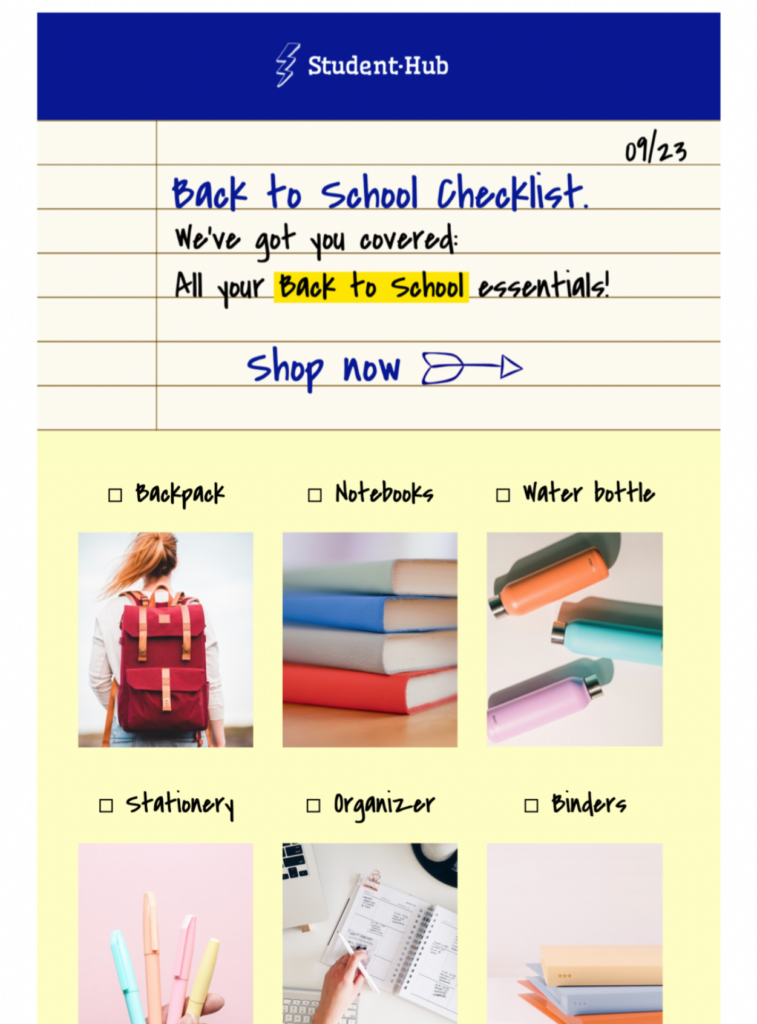
Back to School Email Templates for Checklist Campaigns
These back to school email templates help retailers, schools, and education brands share a practical checklist in a creative notebook-style design. Exclusively available in Mail Designer 365—sign up free today to get started. Follow W3C accessibility guidance when writing checklist labels and image descriptions.
1. Choose one checklist audience
Decide whether the campaign is for families, students, teachers, school staff, or education customers. Keep each item relevant to that audience instead of combining unrelated shopping, enrollment, and classroom tasks.
2. Confirm every date and requirement
Verify term dates, enrollment deadlines, supply requirements, sizes, prices, availability, shipping cutoffs, and regional differences before sending. Link each time-sensitive item to the current source of truth.
3. Keep checklist items easy to scan
Use short labels, a clear order, and live text for essential instructions. Group related items, distinguish required tasks from optional ideas, and ensure that meaning does not depend on color alone.
4. Review back to school email templates on mobile
Check the notebook-style design on a narrow screen, confirm that checklist labels remain readable, and test the hierarchy with images disabled. Add concise alt text to meaningful images and keep the primary action visible.
5. Test links, tracking, and the final send
Open every enrollment, product, calendar, policy, privacy, and unsubscribe link from a test message. Verify tracking parameters and landing-page details, then archive the approved audience, dates, checklist, links, and proof for the next campaign.
Key Features:
- Sales & Seasonal
- Customise for your business
- Mobile responsive
- Send via your ESP
- Send via your own email address
- Export as HTML
Ready to send?
You've got your email template, now it's time to send! Schedule and send emails in Delivery Hub.