
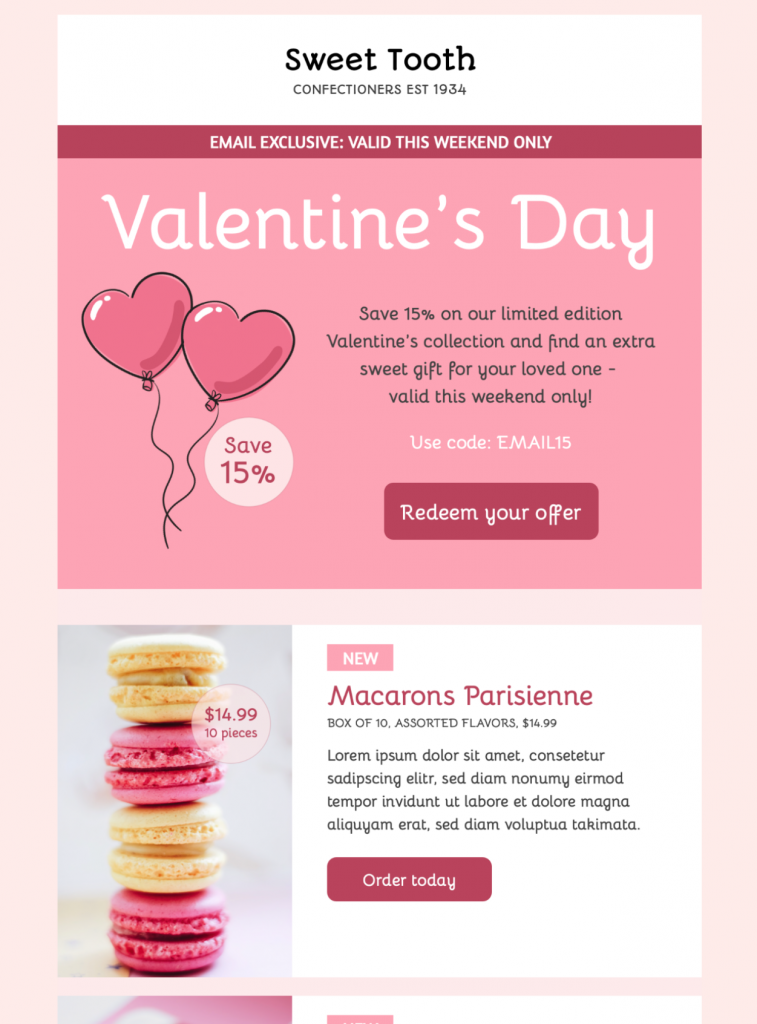
Create a Valentines Day promotion email template for a time-limited offer, discount code, and featured products. Customize this seasonal sales design in Mail Designer 365.
Key Features:
- Edit the offer, product details, and brand styling on your Mac
- Focused seasonal promotion layout
- Customise for your business with drag & drop editor
- Mobile responsive design
- Send to your audience via Mail Designer 365
- Review campaign details with your team before sending
- Use the W3C image decision tree when choosing alt text for promotional images.
Valentines Day Promotion Email Template for a Focused Offer
This Valentines Day promotion email template is built for a time-limited seasonal offer. The preview combines an “email exclusive” banner, a clear percentage discount, a promotional code, a prominent redemption button, and a separate product section. That structure helps readers understand the offer before they reach the product details.
Use this page for a commercial Valentine's Day campaign. If the goal is simply to send warm wishes without a discount, choose the separate Happy Valentine's Day email template. Keeping promotional and greeting campaigns distinct gives each message a clearer purpose.
What to Customize Before Sending
Offer and Deadline
Replace the sample 15% discount, promotional code, and weekend deadline with the real terms of your campaign. Make the expiry date specific and confirm the time zone when customers may be in different regions. Do not describe an offer as exclusive unless access is genuinely limited to the stated audience.
Products and Pricing
The example design shows a featured confectionery product with a product image, name, package information, price, and order button. Replace every sample value with accurate information. Check currency, quantity, availability, shipping restrictions, and any minimum order requirement. Remove placeholder copy rather than leaving it below a polished promotional headline.
Call to Action
Use one direct primary action such as “Redeem the offer,” “Shop the collection,” or “Order today.” Link the button to the exact landing page where the discount applies. If the code is not added automatically, display it near the button and explain where the customer enters it. Test the destination without relying only on the editor preview.
Brand and Visual Style
The template uses a pink seasonal palette, heart-shaped balloons, a large Valentine's Day headline, and product photography. In Mail Designer 365, adapt the logo, colors, fonts, images, and product copy for your brand while preserving strong contrast around the offer and button. Keep the most important deadline and discount information readable on mobile.
Promotion Accuracy Checklist
- Confirm the discount, code, start date, and expiry date.
- Check every product name, price, quantity, and image.
- State important eligibility or delivery restrictions.
- Link each button to the correct live destination.
- Use concise descriptive alt text for replacement images.
- Review desktop and mobile layouts separately.
- Send a delivered test and complete the redemption path.
- Include required sender and unsubscribe information.
Prepare the Campaign in Mail Designer 365
Open the design idea from this page and replace the sample confectionery promotion with your own offer. Save a reusable copy of the Valentines Day promotion email template before changing product modules for individual audience segments. Review how the headline, discount badge, promotional code, buttons, and product module behave at smaller widths. If a section is not needed, remove it cleanly instead of leaving an empty block or duplicate call to action.
Before scheduling, compare the email with the linked landing page. The discount wording, product details, price, code, and deadline should match in both places. A useful Valentines Day promotion email template makes the offer easy to understand, easy to verify, and easy to act on. Keep the Valentines Day promotion email template aligned with the live checkout page whenever prices, stock, delivery dates, or discount terms change. Use the Valentines Day promotion checklist before each test send.