
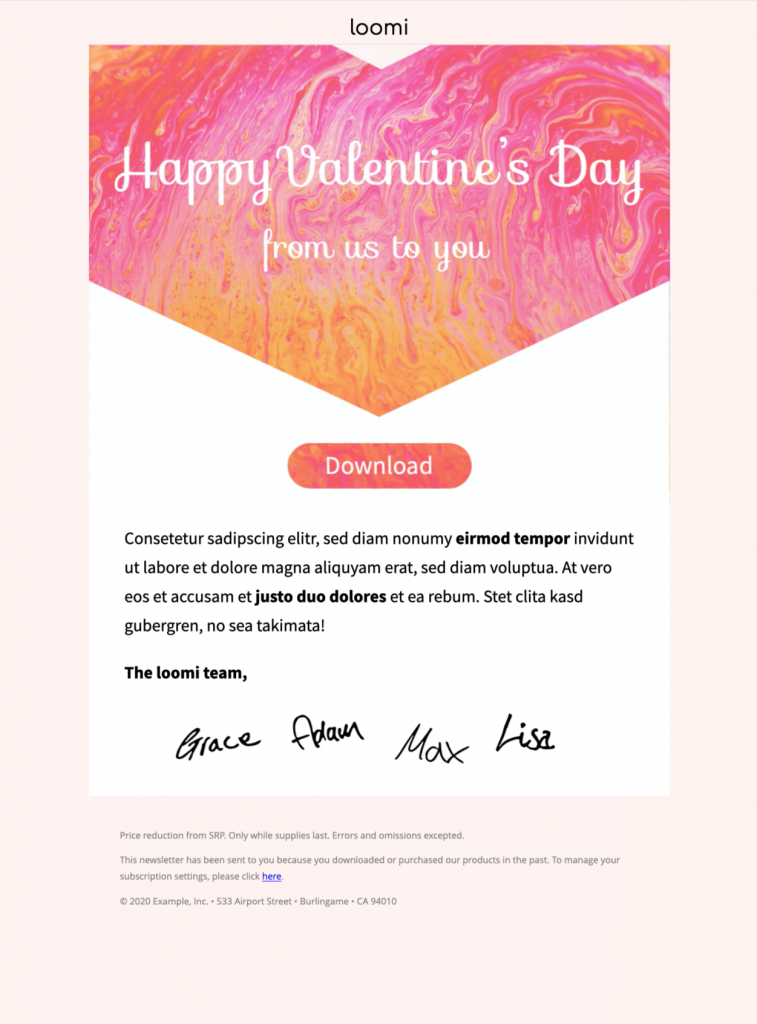
Use this Valentines Day HTML email template to create a greeting for customers, colleagues, members, or friends with a colorful design. Customize the message and sender details in Mail Designer 365.
Key Features:
- Edit on your Mac – from macOS 10.13
- Seasonal sales template
- Customise for your business with drag & drop editor
- Mobile responsive design
- Send to your audience via Mail Designer 365
- Cross platform collaboration with Crew Chat
Valentines Day HTML Email Template for a Warm Greeting
This Valentine's Day email template is designed for a friendly message from a team, organization, or brand. The preview uses a pink-and-orange marbled hero, a handwritten greeting, a central button, a short message area, and team signatures. It works best when appreciation is more important than a sales offer.
Use this Valentines Day HTML email template for a greeting, thank-you, member message, or customer-appreciation note. For a discount, code, or featured-product campaign, use the separate Valentine's Day promotion email template. This keeps the greeting page distinct from the commercial promotion intent.
What to Customize in the Template
Greeting and Audience
Decide whether the message is for customers, employees, members, partners, or a personal list. Replace the sample “from us to you” wording with a greeting that matches that relationship. A customer message can thank readers for their support, while an internal note can recognize collaboration or a shared achievement.
Hero and Brand Style
The supplied design uses a vivid marbled panel in pink and orange with white handwritten text. In Mail Designer 365, adapt the logo, colors, fonts, and hero wording for your organization. Preserve enough contrast for the greeting to remain readable, and review how the pointed lower edge of the hero crops on a narrow mobile layout. Check the final color choices against the WCAG contrast guidance before sending.
Message and Signatures
Replace the placeholder paragraph with a short, specific note. Explain what you appreciate and sign the message with a recognizable team or sender. The example includes handwritten signatures, which can make a group greeting feel personal. Use only approved signatures and do not expose private employee information in the image or alt text.
Button and Destination
The preview contains a central “Download” button. Change both its label and link so they support the real message. Suitable actions might include reading a thank-you note, viewing an event, accessing a member resource, or contacting the team. A pure greeting may not need a button at all; remove it cleanly when there is no useful destination.
Footer and Placeholder Copy
The sample footer contains demonstration text, including promotional and company details. Replace every placeholder with accurate sender information and the required unsubscribe or preference link. Remove discount wording if this Valentine's Day email is not a promotion. Do not leave sample addresses, conditions, or generic legal language in the final design.
Valentine's Day Email Checklist
Before sending this Valentines Day HTML email template, complete these checks:
- Confirm the audience and sender name.
- Replace the logo, hero text, message, signatures, and footer.
- Remove all lorem ipsum and demonstration details.
- Check the button label and destination, or remove the button.
- Use concise alt text for any replacement image.
- Review color contrast and mobile cropping.
- Send a delivered test and click every link.
- Confirm required sender and unsubscribe information.
Prepare the Greeting in Mail Designer 365
Open the Valentines Day HTML email template from this page and edit the greeting, visual style, body copy, button, and footer. Keep the message brief enough to scan on a phone and make sure the sender is identifiable even when images are blocked. If you use the signature image, include the team name in live text as well.
Before scheduling, read the delivered email from the recipient's perspective. A useful Valentine's Day email should feel intentional, inclusive for its selected audience, and free of leftover sample content.