Plan a Fine Dining Restaurant Email Around the Guest Experience
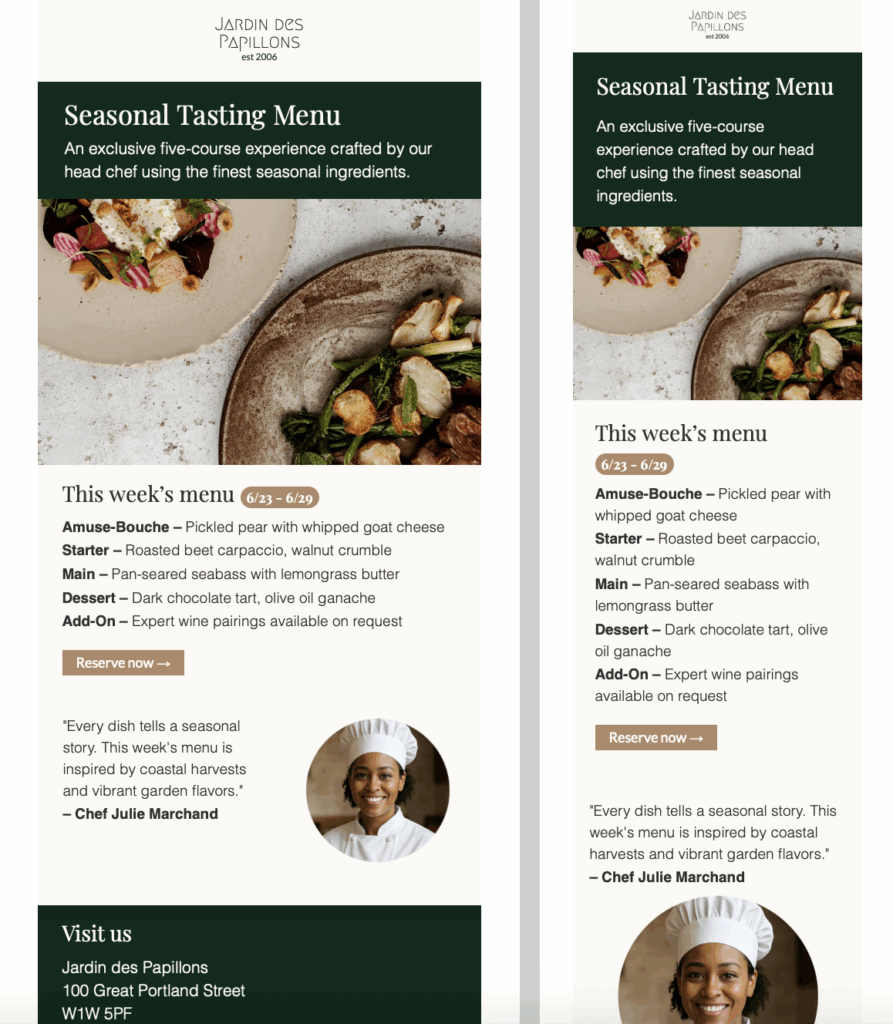
Use this fine dining restaurant email template when you need to introduce a seasonal tasting menu, a prix fixe evening, a chef-led event, or a limited weekend service. Lead with the occasion and the reservation window so guests immediately understand why the message matters. Keep the most important information close to the opening: the menu theme, available dates, service times, price per guest, and the booking deadline.
The preview-led layout gives the food and chef story room to breathe without hiding the practical details. Replace the sample imagery only with photographs that accurately represent the dishes or dining room guests can expect. Update the chef profile, awards, and menu descriptions to match the restaurant’s current offer.
Include the Details Guests Need Before Booking
A polished restaurant email should answer the questions that otherwise delay a reservation. State whether the menu is fixed or offers choices, whether drinks or service are included, and how dietary requirements are handled. Add the restaurant address, arrival time, dress guidance when relevant, cancellation terms, and a clear reservation link or phone number. If capacity is limited, use accurate availability wording rather than artificial urgency.
For tasting menus, check every course name, ingredient, price, and date against the final service plan. If dishes may change with market availability, say so clearly. These details build trust and help the dining team avoid preventable questions after the campaign is sent.
Customize the Design in Mail Designer 365
Adapt the colors, typography, logo, menu sections, and call to action so they fit the restaurant’s visual identity. Keep text blocks concise and use generous spacing around the menu and reservation button. A single primary call to action is usually easiest to scan; secondary links can direct guests to directions, dietary information, or contact details when those resources genuinely help.
Keep the preview image meaningful even when images are blocked. Write concise alternative text that identifies the fine dining restaurant email and its seasonal-menu purpose. The W3C image decision tree can help decide when an image needs descriptive alt text and when it is decorative.
Test Reservations Before Sending
Preview the finished email on desktop and mobile, then send a test to several inboxes. Confirm that dates, prices, phone numbers, map links, and reservation buttons are correct. Test the booking journey from the email through confirmation, including sold-out or unavailable dates. Also review long menu names and smaller screens to ensure the message remains easy to read without relying on the image alone.