
Frequently Asked Questions
How can I uninstall Mail Designer?
If you wish to uninstall Mail Designer from your Mac, you can start by removing any associated files.
To get started, go to Finder. In the menu bar, choose "Go" > "Go to Folder ..."
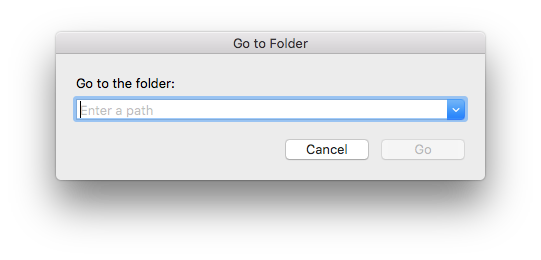 Enter this path into the search box:
to locate and then delete. Following this, enter this path into the search box:
and delete the Mail Designer folder. Finally, to uninstall Mail Designer from your Mac, go to the Applications folder (or wherever you stored the app) and move it to the trash. This will completely remove the app and all files from your Mac. To also remove its settings, open Terminal.app (from Applications > Utilities) and enter the following command:
Enter this path into the search box:
~/Library/Containers/net.tower-one.MailDesigner to locate and then delete. Following this, enter this path into the search box:
~/Library/Group Containers and delete the Mail Designer folder. Finally, to uninstall Mail Designer from your Mac, go to the Applications folder (or wherever you stored the app) and move it to the trash. This will completely remove the app and all files from your Mac. To also remove its settings, open Terminal.app (from Applications > Utilities) and enter the following command:
defaults delete net.tower-one.MailDesigner