
Use E-goi email marketing features with custom, responsive HTML email templates designed in Mail Designer 365.

Mail Designer 365 helps teams use E-goi email marketing features with branded HTML email designs. Build a responsive layout in the drag-and-drop editor, export it for E-goi, and reuse the design for newsletters, transactional messages, automated campaigns, sales, promotions, and more.
HOW IT WORKS
How to Use E-goi Email Marketing Features
- Build your HTML email design in Mail Designer 365 and select "Share” > “Website / HTML…
- Enter the image URL prefix for the online server where you will be hosting your images. You will need this later on so that your images can be located and displayed accurately in your design. (Learn more about this step hosting images for HTML email designs.)
- Following export, select the images in the folder and upload them to the server from the previous step.
- Sign in to your E-goi dashboard and click "Create email", then choose "Import" > "ZIP file".
- Locate the folder you exported from Mail Designer 365, then right-click and select "Compress" to create a ZIP file to upload to E-goi.
- Give your email a subject line and click "Next" to set up your campaign preferences.
- After this, you can click on the drop-down "Testing" menu to preview your design or send a test email.
- You can now use your Mail Designer 365 HTML design with the automation tools provided in the E-goi platform.
Important: Please refrain from making any adjustments to your Mail Designer 365 email template within the E-goi editor. Any changes should be carried out within the Mail Designer 365 app and designs can then be re-exported to E-goi once finished.
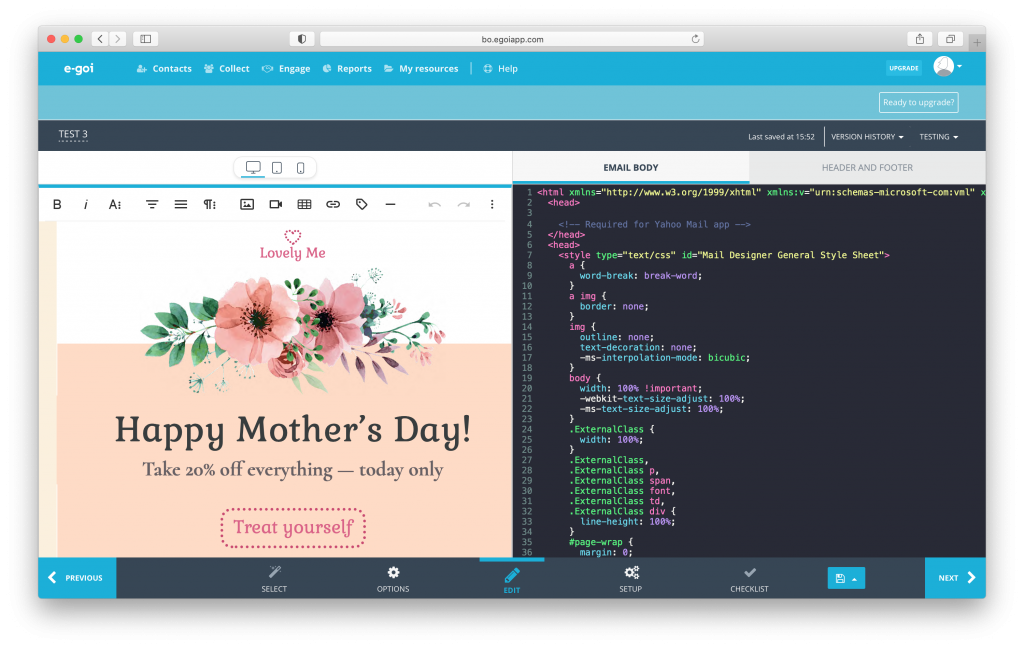
Create custom HTML email templates in Mail Designer 365 to use with the E-goi marketing automation platform
Plan Your E-goi Campaign Workflow
Start with the job each message needs to do. A promotional newsletter may need a bold hero image and one primary call to action, while a transactional email should make account or order information easy to scan. Designing these message types separately helps you use E-goi email marketing features without forcing every campaign into one generic layout.
Prepare a Responsive Email Design
Build the email in Mail Designer 365 with a clear content hierarchy, readable text, and buttons that remain easy to tap on smaller screens. Keep the most important message near the top, use concise sections, and add alternative text to meaningful images. Preview both desktop and mobile variants before export so the design remains useful when recipients open it on different devices.
Export and Import the HTML
When the design is ready, use the HTML export workflow described above and import the package into E-goi. Keep the exported image folder and HTML file together until the import is complete. If you host images independently, confirm that every image URL is public and uses HTTPS. This prevents missing graphics after E-goi sends the finished campaign.
Connect the Design to the Right E-goi Feature
Choose the E-goi workflow that matches the message: a standard campaign for scheduled newsletters, automation for lifecycle sequences, or a transactional workflow for event-driven messages. Mail Designer 365 supplies the visual template; recipient selection, triggers, delivery rules, and reporting remain configured in E-goi. This separation makes it easier to update the design without changing the business logic behind the send.
Test Before Sending
Send a test from E-goi after import. Check the subject line, preheader, sender details, links, personalization placeholders, images, and unsubscribe controls. Review the email in more than one inbox and at both desktop and mobile widths. If you correct the HTML or graphics, import the revised version and complete one final test before scheduling or activating the campaign.
Support
Our team is always on hand ready to give you support. If you have specific questions regarding HTML export to E-goi, or just need some extra help getting set up, get in touch!
Mail Designer 365 works seamlessly with all leading email marketing services. If you’re looking for a different service, check out our full range of integrations and compatible platforms.
Get started with Mail Designer 365 today
Start your 7-day free trial and use your Mac to create stylish email newsletters for your business.
No credit card required
Compatible from Mac OS X 10.11 onwards