Frequently Asked Questions
Do I have to manually create the mobile version for every email design in Mail Designer 365?
Mail Designer 365 automatically generates a mobile version of your Newsletter from your Desktop version. This generated mobile version can then be optimized manually.
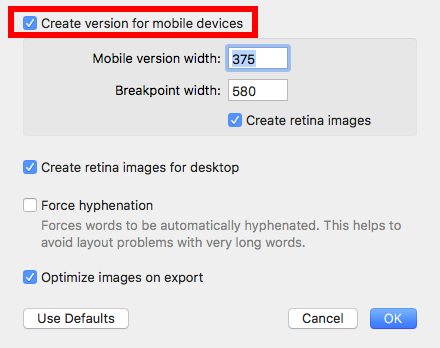
If you are using one of our email designs or one of your previously created templates, it's possible that the mobile version was changed. This means that changes to the desktop version of your newsletter don't automatically get transferred to the mobile version. To generate a new mobile template from your desktop version, please follow these steps:
‣ In the Menu, please select "File" > "Design options."
‣ Remove the checkmark next to "Create version for mobile devices" and press ok.
‣ In the Menu, please go to "File" > "Design options" again.
‣ Activate the checkmark next to "Create version for mobile devices" and press ok
Once you have done this, you should be able to see the mobile modified Desktop version of your newsletter and you will be able to edit the layout blocks of the mobile view.