
Frequently Asked Questions
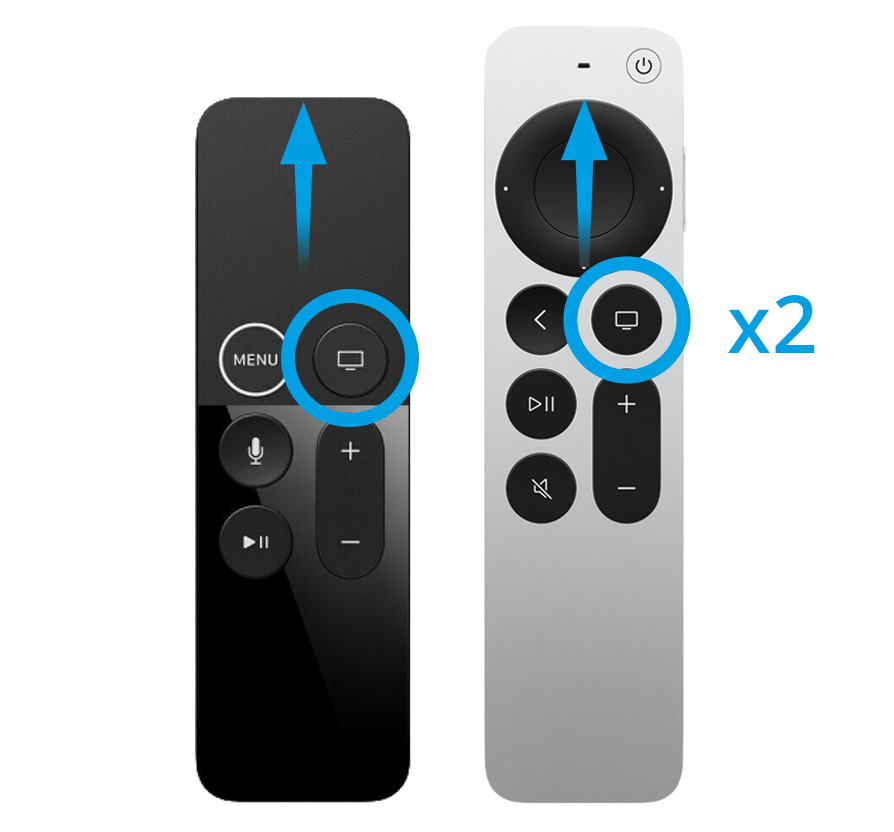
Homescreen> Settings> Remote controls and devices> Home button
There you can assign the Home button again with the old function.
You can expand TV Pro Mediathek with "My Mediathek" subscription packages to access the complete Mediathek library. We offer various Mediathek packages and running times.
Packages:
You want another package or another runtime? No problem - this is all in the: App Store Settings
To cancel:
All these products are handled through your AppStore account. There, you can find all running subscriptions under 'Subscriptions' and you can deactivate the automatic extension: Access it here
Further information on renewal
The processing takes place directly via your iTunes account and extends 24h before expiration automatically by the chosen runtime. You can switch the automatic extension up to 24h before an extension at any time in the AppStore in your account settings, ie. An unsubscription becomes effective at the end of the term.
- 3Sat
- Das Erste (ARD)
- Bayerischer Rundfunk (BR)
- Deutsche Welle (DW)
- Hessischer Rundfunk (HR)
- Kinderkanal (KiKA)
- Mitteldeutscher Rundfunk (MDR)
- Norddeutscher Rundfunk (NDR)
- ORF 1
- ORF 2
- ORF 3
- Phoenix
- Rundfunk Berlin-Brandenburg (RBB)
- Saarländischer Rundfunk (SR)
- Südwestrundfunk (SWR)
- Schweizer Radio und Fernsehen 1 (SRF 1)
- Schweizer Radio und Fernsehen 2 (SRF 2)
- Westdeutscher Rundfunk (WDR)
- Zweite Deutsche Fernsehen (ZDF)
- ZDFinfo
- ZDFneo
1. The film format is not compatible on the end device. The film may be suitable for the Apple TV but not on iPhone / iPad or vice versa.
2. You are abroad. In Germany. the film would be available. Abroad, the film may be blocked. In this case, a VPN service can help such as WorldConnect from VPN Tracker (can be tested for free):https://itunes.apple.com/de/app/vpn-tracker-world-connect/id1117424189?mt=8
3. Mediatheken cleans up the content daily. We check once a day whether the broadcasts are available and automatically clean up broadcasts that are no longer available. If the transmitter is switched off during the day, the exclamation mark can appear. On the following day, the shows are no longer in the catalog.
Here's how you do it:
‣ Go to the AppStore settings: https://apple.co/2Th4vqI
‣ Choose your current TV Pro Media Kit
‣ Select the upgrade to TV Pro GOLD ALL-IN-1
‣ In TV Pro Mediathek, select a TV Pro ID
‣ Then, choose "Restore Purchases"
‣ Log in to your other devices with the same TV Pro ID (for Mac, iPhone / iPad and Apple TV)
Important is that you log in once where you bought the platform subscription - so if you currently have a package for iPhone / iPad, do the upgrade and then sign up on the iPhone with your TV Pro ID.
Note: Apple is in charge of the remaining term of the existing package, the credit will be paid separately about one day after purchase - it will not be charged immediately with the new package price).
The TV broadcasters decide themselves whether their Mediathek content is available abroad. That is why we cannot give a binding statement on whether a specific show can be played outside of Germany. In practice, the only way to know for sure is to try it.
How to recognize blocked content in the app
To help you quickly identify unavailable shows, the app includes a detection feature: if you see a yellow exclamation mark instead of the Play button, the show cannot be retrieved at the moment.
Try with a German internet address using VPN Tracker World Connect
If you are abroad, it can also help to connect with a German internet address. With VPN Tracker World Connect, you can test whether the Mediathek show is available when using a German IP address. VPN Tracker World Connect can be tested for free for 24 hours:
https://itunes.apple.com/de/app/vpn-tracker-world-connect/id1117424189?mt=8
Apps on your Apple TV 4 are automatically updated.
You can check if an update for an app is available or if it hasn't been installed yet via the App Store.
Search for the app in the App Store. If you see an "Update" button instead of "Open," you can then manually start the update process.
This link will directly take you to your profile administration:
https://apple.co/2Th4vqI
You will find all running subscriptions under "Subscriptions." You can also disable the automatic extension of your subscriptions.
1. Check in which app the purchase was made
Please check in the first step in which app and on which platform you purchased the package. You can find the name of the app on the purchase receipt. Alternatively, you can also check in which app you purchased it by looking in the App Store settings under:App Store > Highlights > at the very bottom on "Apple ID: xxx" > Show Apple ID > SubscriptionsA package should be selected and active here.
2. Open app and transfer product status to TV Pro ID
Please open the app in which you purchased the package in the next step.- Please perform the following steps:
- 1. Open app
- 2. Open the store in the menu
- 3. Log in with your TV Pro ID or if you do not have a TV Pro ID yet, create a new TV Pro ID (free)
- 4. Tap "Restore Purchases"
3. Restore package on another device or in another app
To transfer your package to your second device or to another version, please follow these steps:- Open the corresponding app on the target device
- As described above, go to the Store settings and log in here with your TV Pro ID
- Tap "Restore Purchases"
- Now your package should also appear here
‣ Visit TV Pro Login.
‣ Click on "Forgot password" there.
‣ Follow the further steps.
► Watch tutorial
- TV Pro
- Live TV
- TV Pro Mediathek
- Secure purchases
- Transfer purchases
- Use features like Sync etc.
TV Pro
TV Pro for iPhone / iPad Settings > Account ("Not logged in") > Login ► Watch tutorial TV Pro Classic for iPhone / iPad Gear (Settings) > TV Pro Gold > Login TV Pro for Apple TV Menu > Settings > View packages > Log in with TV Pro IDLive TV
Live TV for iPhone / iPad Store > Login or create user account Live TV for Mac Live TV > Log in with TV Pro ID ... Live TV for Apple TV Menu > Store > Log in with TV Pro IDTV Pro Mediathek
TV Pro Mediathek (also for Kids Edition) for iPhone / iPad More > Settings > TV Pro ID > Login TV Pro Mediathek for Mac TV Pro Mediathek > Log in with TV Pro ID ... TV Pro Mediathek for Apple TV Menu > Settings > View packages > Log in with TV Pro IDhttp://livetvhq.livetvgmbh.de.
‣ Create a TV Pro ID in the app and then select "Restore Purchases"
‣ Now open the other apps in the TV Pro GOLD ALL-IN-1 package and enter the same TV Pro ID there.
‣ Logging in with your TV Pro ID will automatically recognize the TV Pro GOLD ALL-IN-1 package.
If you have problems, please delete the app from all devices and start with the device where you initially purchased the TV Pro GOLD ALL-IN-1 package. Then follow the steps above.