
Frequently Asked Questions
You can view a copy of all your invoices in our Online Store:
You will find the invoices for your VPN Tracker 365 purchases in the section "Invoices", here:
http://my.vpntracker.com
You work in accounting and need access to the VPN Tracker invoices for your company? Please ask your VPN Tracker Team manager to invite you to you company's team with the role "Accounting". Afterwards you will receive emails as soon as a new invoice is available and you can dowload this from the web portal
You will find the invoices for your Mail Designer 365 purchases in the section "Orders", here:
https://my.maildesigner365.com
You will find the invoices for your tizi products in the section "Orders", here:
http://my.tizi.tv
Other invoices can be found at http://www.equinux.com/goto/invoice
‣ If you would like to save a PDF copy of your invoice, then do the following:
     Press "Command + P"
     Choose "PDF" > "Save as PDF"
Unfortunately we currently can't purchase orders as your method of payment, sorry!
However, if you would like to pay by check, our online store does have the option of including a purchase order number on your invoice.
Select ‘Check’ as your payment method and then scroll down to the field ‘Purchase Order’. Enter the P.O. number you would like to appear on your invoice and then proceed to payment. You will receive an email containing further information on who to make the check out to. The license will be issued to you once your payment is recieved.
You may have multiple equinux IDs and your licenses are in another account.
‣ Log in to my equinux with your other logins until you find the equinux ID that contains your product licenses.
‣ If you've forgotten your login information, you can retrieve it here.
‣ Check your personal details (e.g. email address, contact information) for the account
‣ Please transfer all of your product licenses to a single equinux ID, for more information on how to transfer licenses, please follow these steps.
Please note that you will find your VPN Tracker 365 Plans under https://my.vpntracker.com. Here you can manage all of your plans and assign them to other users.
Thank you for your interest in equinux Software!
As you may have noticed, most of our consumer software is available to purchase either as a Family Pack or a Single User license.
While the Single User Edition is perfect for those with just one computer, the lucky ones of you with more than one Mac should consider the Family Pack Edition. This allows you to run your equinux software on up to five different computers at once! What's more it costs less than two individual Single User Editions...
Now that's a bargain!
Not to worry. There are a few reasons why this can happen but rest assured we will always get you up and running - sooner, rather than later!
The most common cause behind this is that you have multiple equinux IDs and you have tried to activate the software again using your equinux ID that doesn’t actually have the license registered to it. So when it says: ‘registered to another user’ - it actually means YOU! The software just doesn’t know you’ve got 2 accounts.
So obviously the best way to sort this out is to use your equinux ID that does have the license registered to it and then you’ll be ready to go.
If you have nothing on your other account it would be great if you could send us a quick email explaining that you have 2 IDs and we can delete the one you don’t need.
If you would also like to have everything on one account and have us delete the spare you can transfer your licenses from one account to the other. Just click the link to find out how.
Sure that’s not the reason?
Then all you need to do is drop us an email stating your equinux ID and the Activation Code you were trying to use, along with some proof of purchase. A scanned receipt or confirmation email will do just fine. Then we can have a look at everything and sort your account out so that you can get on with using the software you bought!
After a long run, we retired iSale a while ago.
We made this decision as eBay has shifted its focus to large commercial sellers with thousands of listings. iSale is no longer supported by newer macOS versions and we encourage you to move your existing and future listings directly to eBay's own tools.
eBay now requires all listings to exclusively use HTTPS for content. Auctions using iSale templates do not support HTTPS image links, so it is recommended you re-list your items using eBay's own selling tools.
In March 2018, iSale auction template images from will no longer be available so we encourage all sellers to revise existing listings accordingly.
We'd like to thank you for using iSale.
Kind regards,
Team equinux
If you have a charge from equinux on your credit card that you do not recognize, it may be for one of the following products offered through the equinux Online Store:
- VPN Tracker (VPN software for Mac, iPhone and iPad)
- Mail Designer 365 (email newsletter design software for Macs)
- tizi (iPhone and iPad accessories)
Common scenarios
Auto-renewing products
VPN Tracker and Mail Designer 365 are offered as subscriptions. When a plan has been configured to auto-renew, the associated payment method will automatically be charged.
Additional team-members added
If multiple employees are using one of our products, they may have configured team billing. This means the associated credit card may have been charged, in order to add a new team member to an account.
Invoices and other questions
You can download your invoices from our website:
If you have checked with your team and still have additional questions regarding a charge, please contact our support team. Be sure to include the details from your credit card statement and the last 4 digits of your card.
- Creating a VPN Tracker team
- Inviting team members
- Assigning VPN Tracker plans to team members
- Using the package installer and onboarding tools
- Sharing VPN connections
- Managing billing and invoices for your team
- Log in to you your account at my.vpntracker.com
- Go to "My Plans and Billing" in the sidebar, where you will see your current active plan(s), in case your plan is a team plan, please go to "Team Plans and Billing" in the sidebar
- To deactivate your renewal, flip the switch from blue to grey
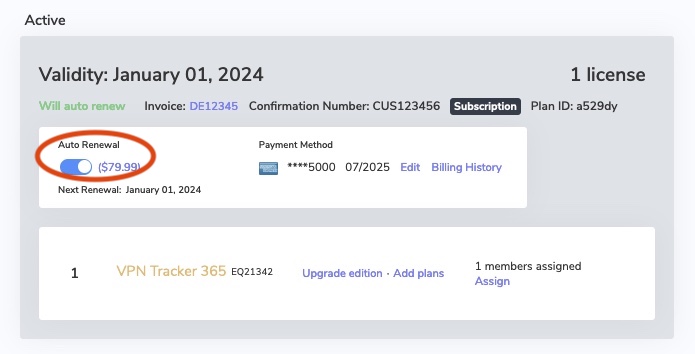
- After deactivating auto renewal, you will receive an email confirming the deactivation.
- Log in to you your account at my.vpntracker.com
- Go to "My Subscriptions" in the sidebar, where you will see your current active plan(s)
- To activate automatic renewal, flip the switch from grey to green
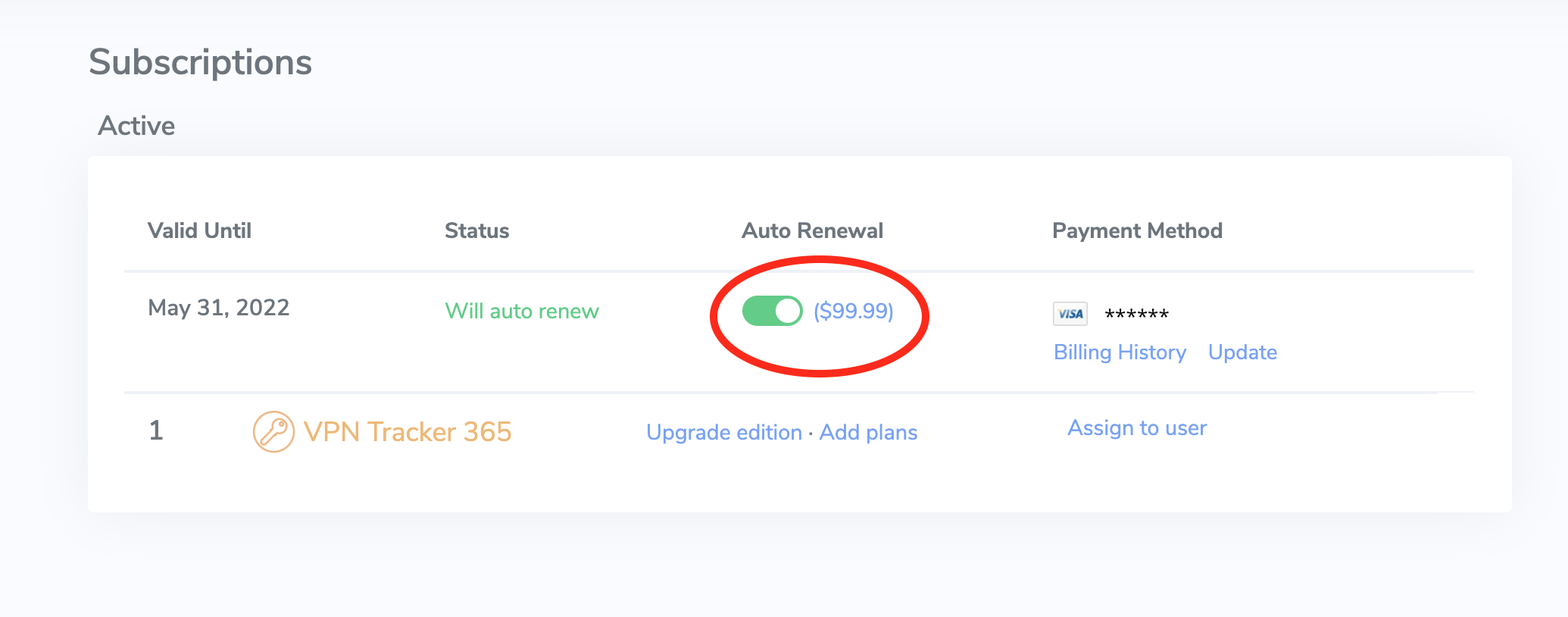
- After activating auto renewal, you will receive an email confirming the activation.
- Log in to your account at my.vpntracker.com
- In the Teams view under "Subscriptions", you will see a list of both your active and your expired plans
- To renew an expired plan, please click on: “Reactivate license
- You will then be shown your available plan options
- Grandfathering pricing is exclusively available for customers using the automatic renewal option. If your plan has expired, you can re-obtain VPN Tracker for the current price tier
- After starting your new plan, you will regain full access to your account including your Personal Safe and Team Management features.
- Log in to your account at my.vpntracker.com
- In the Team overview, go to "Licenses". Here you can see all your existing plans
- Then, click on “Add plans”
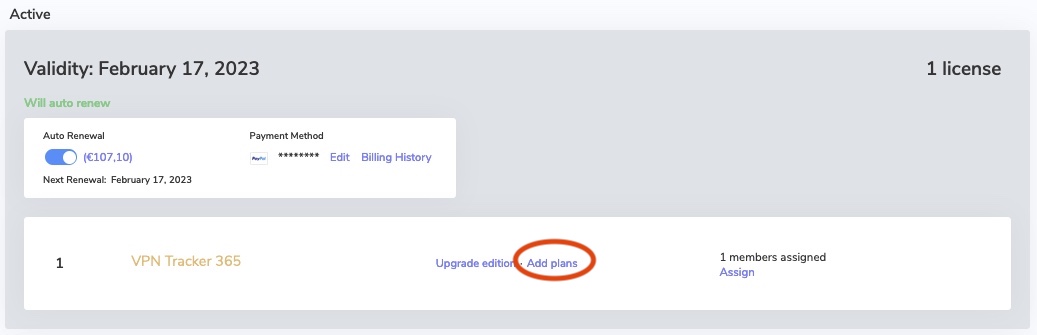
- On the following page enter the number of licenses you would like to add and select the edition. Then click on "Add to plan"
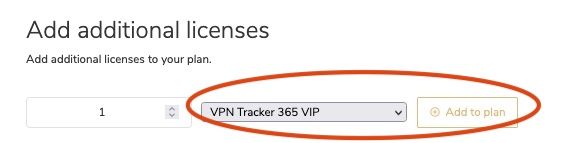
- Under Checkout you will see your new plan. Your new plan will start from today’s date and will run for one year.
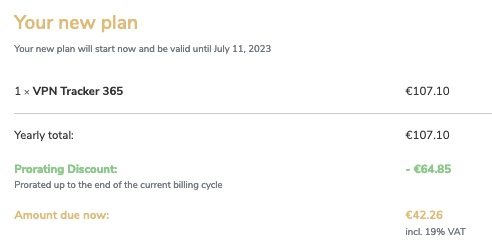
- The "Yearly total" is the total price for one year
- If applicable (i.e. if you have merged your plans), the "Prorating Discount" is the remaining value of your existing licenses which gets deducted from the yearly total to make the "Amount due now".
- Check the Terms and Conditions and click "Pay now"
- You can now assign your licenses to your team members
- Log in to your account at my.vpntracker.com and select your team from the sidebar menu
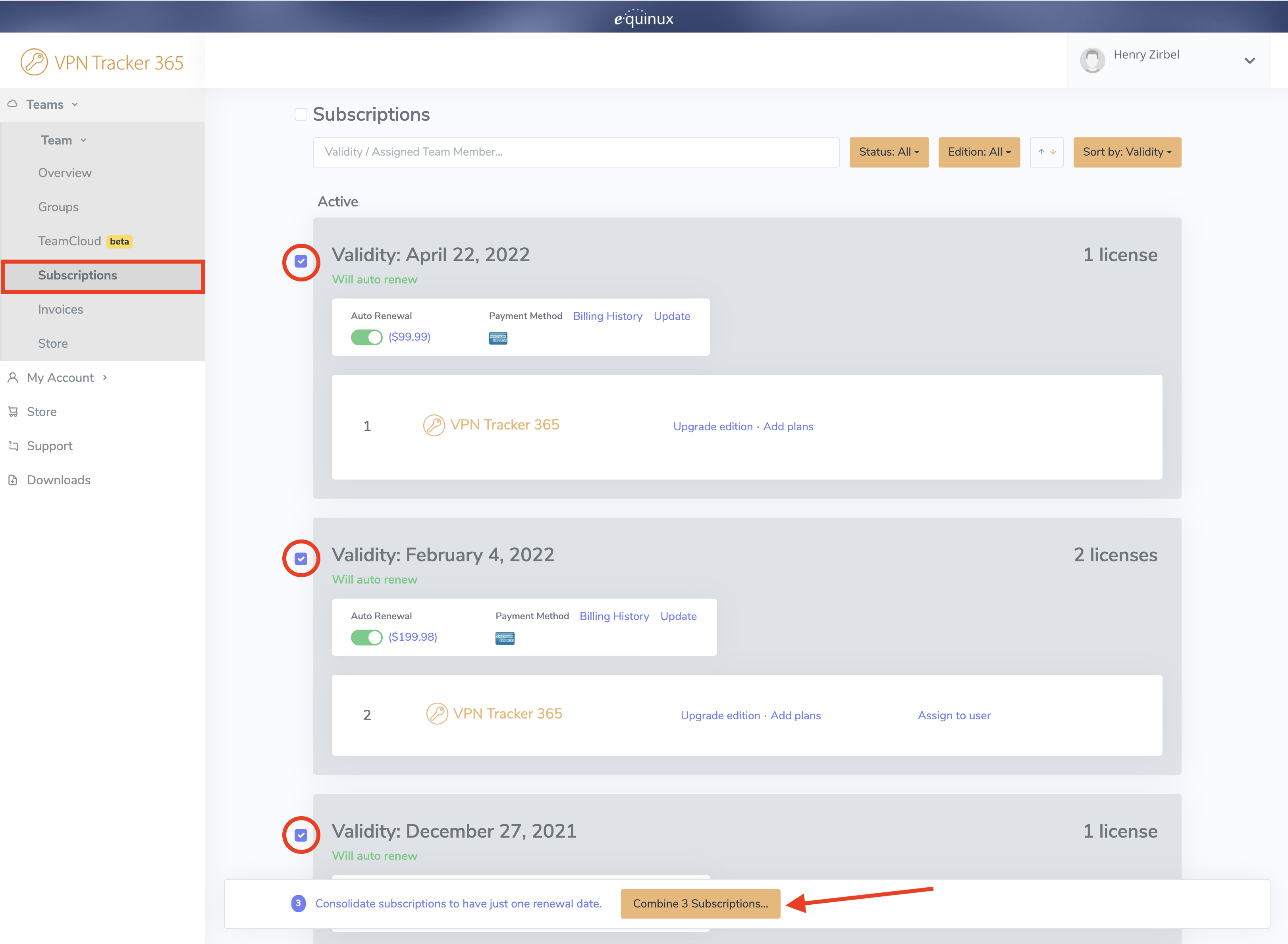
- Under Subscriptions, you can see an overview of your existing plans
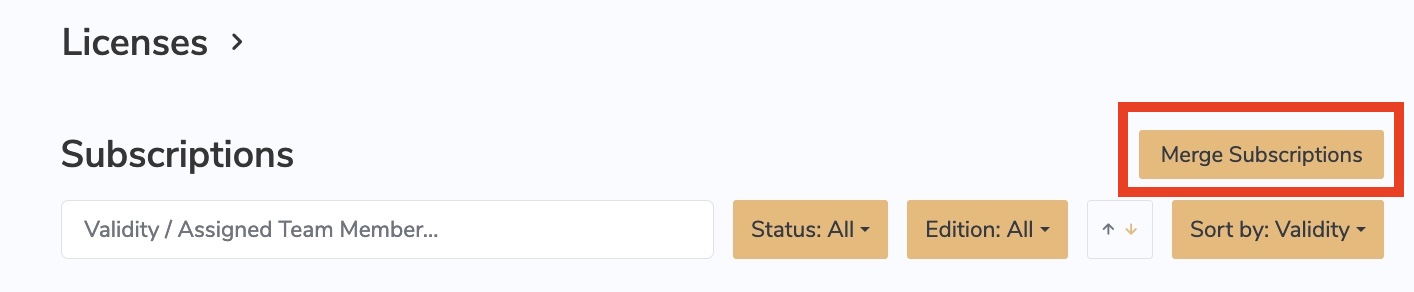
- At the top of the page you will see a "Merge Subscriptions" button. Press this.
- Select the plans you would like to combine by clicking on the checkbox on the left side next to each plan
- Once you have selected all plans, click Combine Subscriptions at the bottom of the window
 On the next page, you can preview the plans which will be merged and also have the option of upgrading to a different license type or adding new licenses, if needed.
On the right, you will see your new plan. Your new plan will start from today’s date and will run for one year. Your existing licenses will also be renewed.
On the next page, you can preview the plans which will be merged and also have the option of upgrading to a different license type or adding new licenses, if needed.
On the right, you will see your new plan. Your new plan will start from today’s date and will run for one year. Your existing licenses will also be renewed.
 The Yearly total is the total price for one year. The Prorating Discount is the remaining value of your existing licenses which gets deducted from the yearly total to make the Amount due now. Check the Terms and Conditions and click Pay now to finalise your changes.
- VPN Tracker: my.vpntracker.com
- Mail Designer 365: my.maildesigner365.com
- TV Pro/Live TV: my.livetvgmbh.de
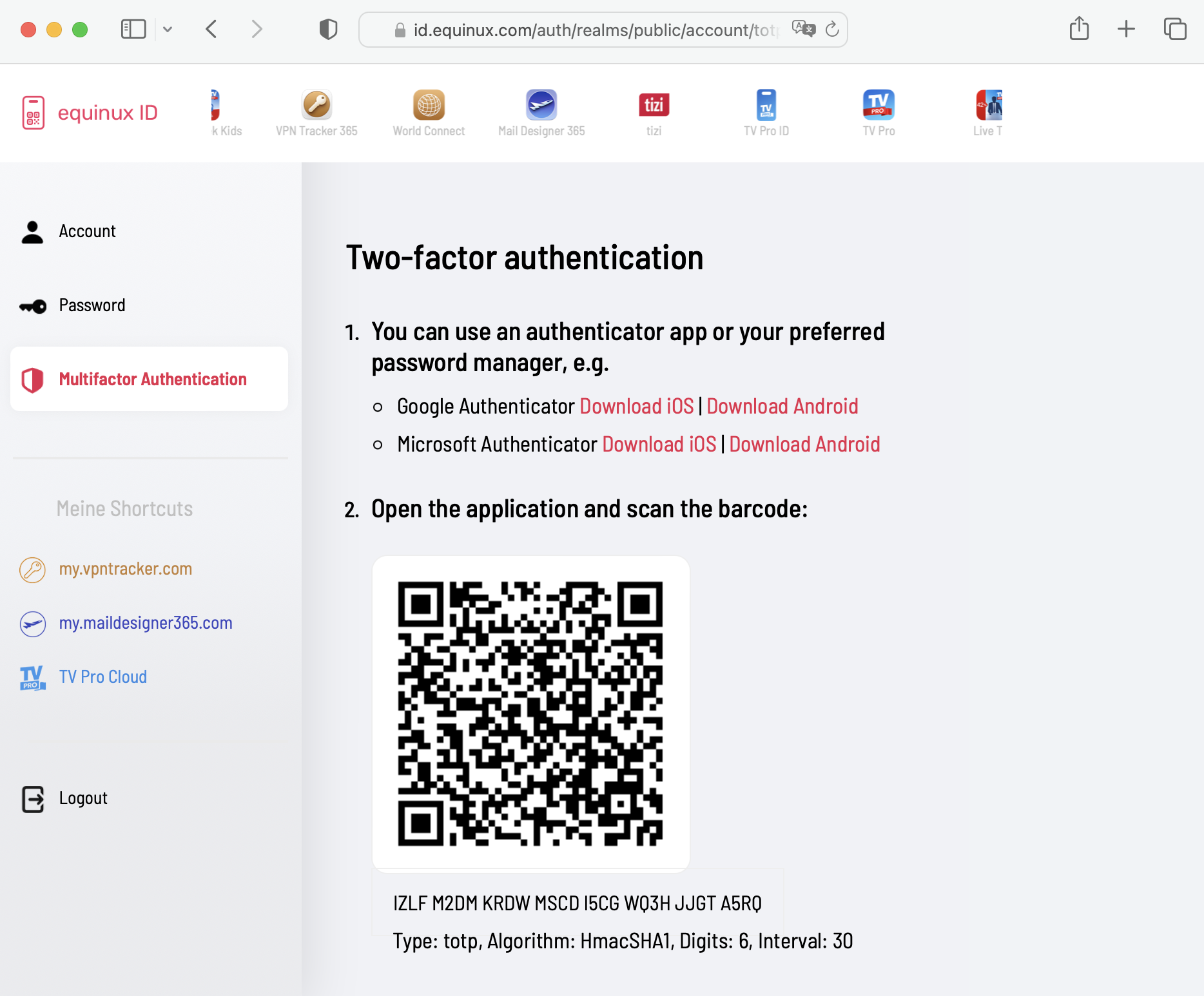
equinux 2FA supports all major authentication and password apps, including:
- Google Authenticator
- Microsoft Authenticator
- Twilio Authy
- 1Password
- FreeOTP
- Bitwarden